
Many Shopify merchants encounter customer confusion when a tiered volume promotion displays differently between the storefront cart drawer and the final checkout. While a theme cart drawer often summarizes savings as an order-level lump sum (e.g., “Volume Savings: -$9.00”), native Shopify checkout itemizes the discount proportionally across each individual qualifying unit (e.g., displaying three shirts at $17.00 each, saving $3.00 per unit). Understanding why Shopify Functions enforce pro-rated line-item discount allocation is essential for compliance, tax accuracy, and accounting integrity. Synchronizing your cart drawer presentation with native checkout logic eliminates cognitive surprise and prevents cart abandonment.
1. Architectural Foundation: Pro-Rated Line-Item Allocation vs. Order Deductions
To understand why volume discounts look different at checkout, merchants must inspect how Shopify’s checkout engine processes promotional reductions:
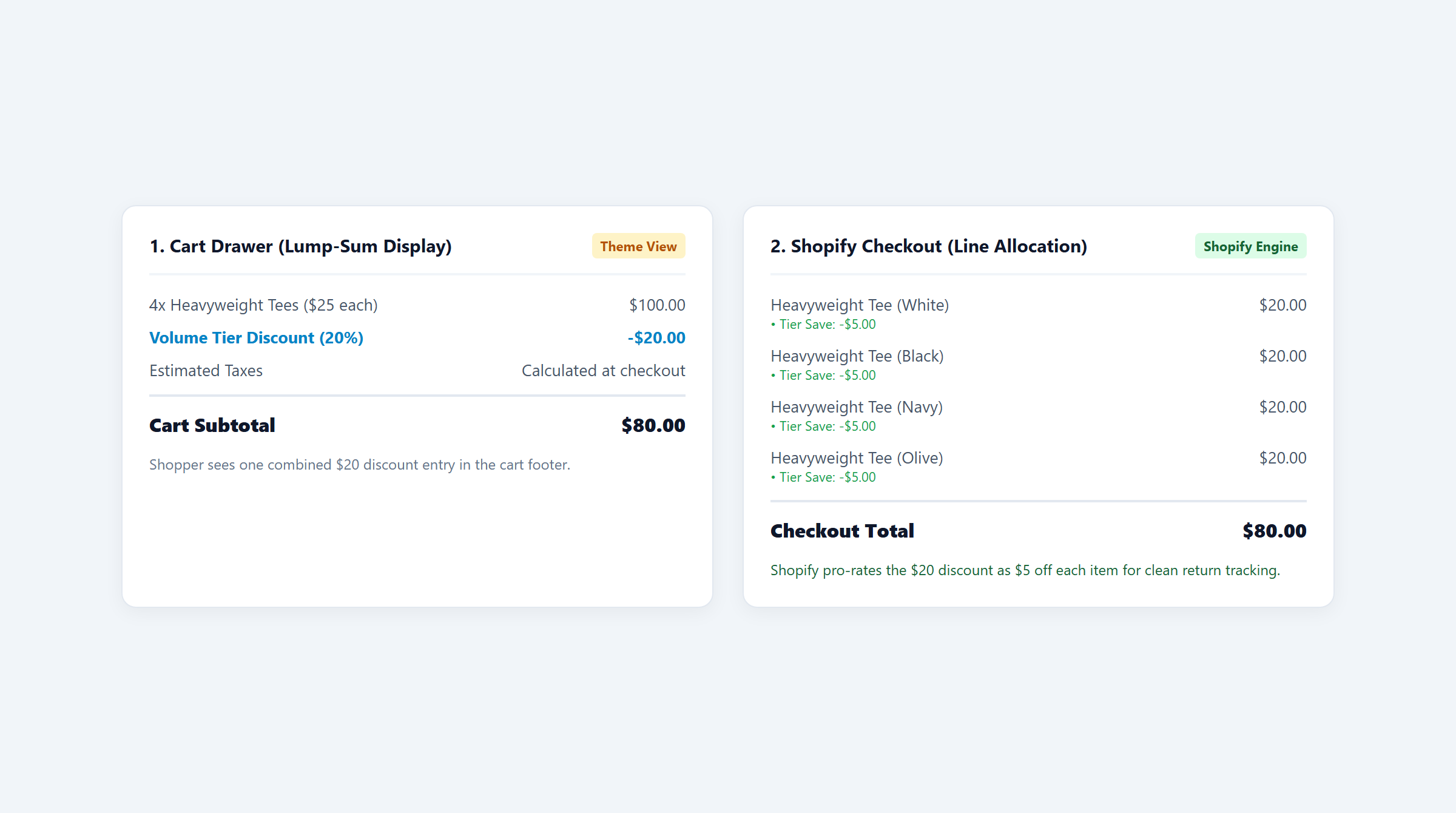
- The Theme Cart Drawer Presentation (Client-Side Display): Most custom Shopify themes and legacy discount scripts calculate volume incentives in JavaScript within the browser DOM. Because themes often sum line item quantities and compare them against tier tables, they display a simple summary badge at the bottom of the cart drawer: “Subtotal: $60.00 − $9.00 Discount = $51.00.” The line items themselves frequently continue displaying their original retail price ($20.00 each).
- The Native Checkout Presentation (Server-Side Shopify Functions): Once the customer clicks “Checkout,” Shopify executes compiled WebAssembly (Wasm) functions on its global edge infrastructure within an 11M instruction / sub-5ms runtime envelope. Rather than applying a single arbitrary deduction to the order total, Shopify Functions generate a structured
DiscountAllocationarray. This array distributes the $9.00 savings evenly across the three qualifying lines ($3.00 or $3 off each unit). Each shirt is explicitly re-priced at $17.00.
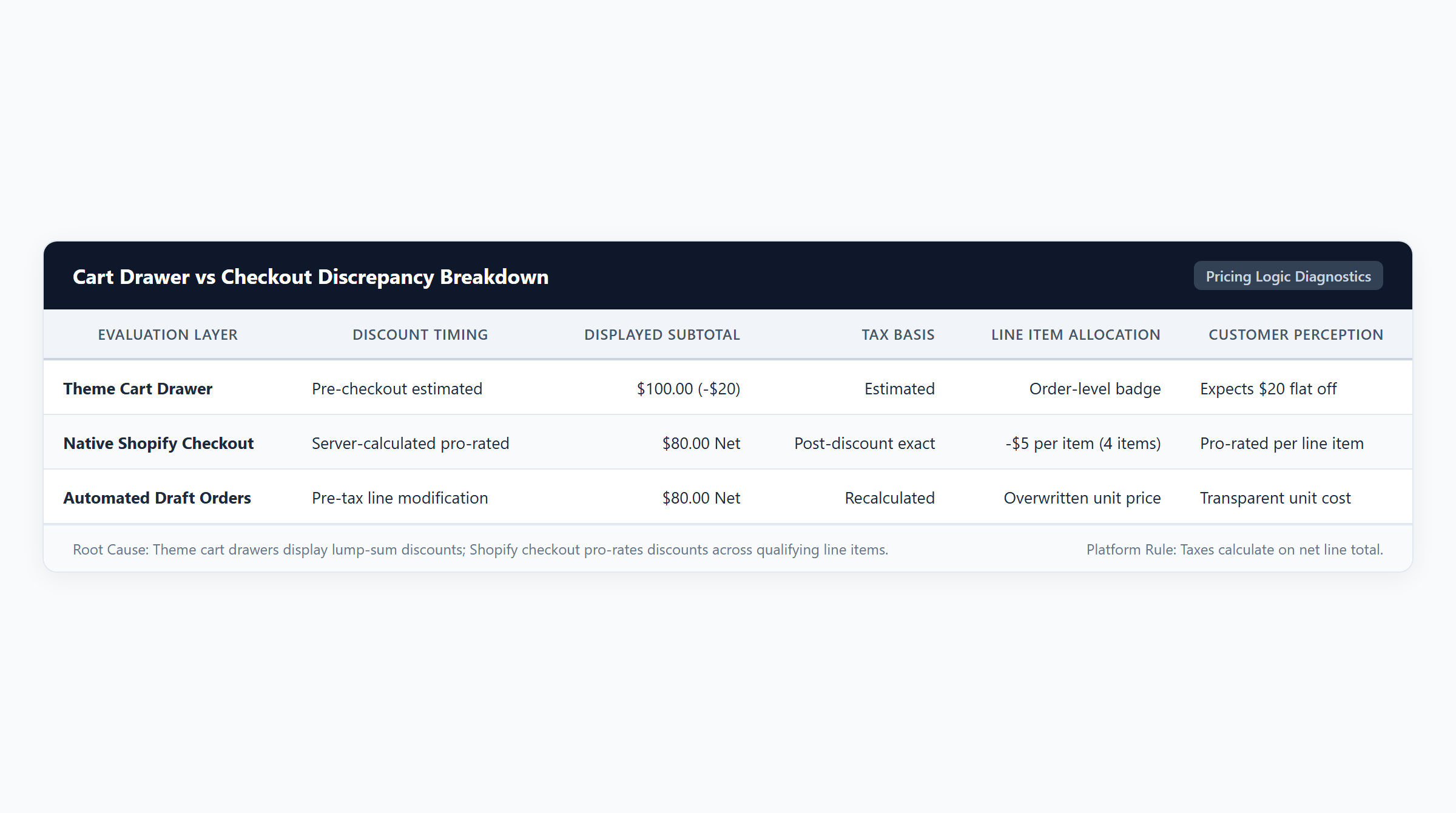
This architectural distribution is not an aesthetic quirk; it is a fundamental platform design required for multi-jurisdictional tax compliance and partial return integrity. For a broader comparison of promotional models, review our guide to volume vs price-based discounts.
2. Tax Basis & Financial Integrity: Why Shopify Pro-Rates Discounts
Shopify enforces line-item allocation because order-level deductions create severe accounting, taxation, and refund vulnerabilities:
1. Multi-Tax Rate Calculations and Jurisdictional Rules
In many states and international tax zones, different product categories carry different sales tax rates (e.g., apparel may be tax-exempt or taxed at 4%, while accessories or home goods are taxed at 8%). If a customer purchases items from multiple tax categories and receives a lump-sum discount, applying that discount to the order subtotal creates legal ambiguity regarding which tax rate applies to the discounted dollars. By pro-rating discounts across each line item based on its pre-discount retail price, Shopify calculates precise tax obligations per line item.
2. Audited Mathematical Models Across Volume Tiers
Consider an apparel merchant selling Everyday Essential Tees ($20.00 retail price, $6.00 unit COGS) and Premium Fleece Hoodies ($50.00 retail, $16.00 COGS) across four audited scenarios:
| Scenario | Cart Line Items | Gross Value | Discount Applied | Net Revenue | Total COGS | Gross Profit | Gross Margin |
|---|---|---|---|---|---|---|---|
| 1. Volume Tier 1 (3 Units) | 3 Tees ($20.00 each) | $60.00 | $9.00 (15% Pro-Rated) | $51.00 ($17/unit) | $18.00 | $33.00 | 64.7% |
| 2. Unqualified Cart (2 Units) | 2 Tees ($20.00 each) | $40.00 | $0.00 (Full Price) | $40.00 ($20/unit) | $12.00 | $28.00 | 70.0% |
| 3. Volume Tier 2 (5 Units) | 5 Tees ($20.00 each) | $100.00 | $20.00 (20% Pro-Rated) | $80.00 ($16/unit) | $30.00 | $50.00 | 62.5% |
| 4. Mixed Cart (3 Tees + 1 Hoodie) | 3 Tees ($60) + 1 Hoodie ($50) | $110.00 | $11.00 (10% Mixed Break) | $99.00 | $34.00 | $65.00 | 65.7% |
Mathematical Audit of Scenarios
- Scenario 1: Volume Tier 1 (3 Units at $20.00 with 15% Pro-Rated Discount): Gross value is $60.00. The 15% discount deducts $9.00, distributed evenly as $3.00 off per shirt ($3 deduction). Net price per unit is $17.00, totaling $51.00 net customer payment (or $57.00 with shipping fees). At $18.00 total COGS ($6.00 × 3), gross profit reaches $33.00 (64.7% margin). Crucially, each unit is officially itemized on the receipt at $17.00.
- Scenario 2: Unqualified Cart (2 Units at $20.00): The customer places only 2 units in their basket. The volume rule requires 3 units, so the discount evaluates to $0.00. The customer pays full price of $40.00 ($20.00 per unit). Total COGS is $12.00, yielding $28.00 gross profit (70.0% margin).
- Scenario 3: Volume Tier 2 (5 Units at $20.00 with 20% Pro-Rated Discount): The shopper steps up to the 5-unit tier. Gross value is $100.00. The 20% discount deducts $20.00, allocated as $4.00 off per shirt ($4 deduction). Net unit price drops to $16.00, producing $80.00 net revenue. At $30.00 total COGS ($6.00 × 5), gross profit expands to $50.00 (62.5% margin), delivering 51% more gross profit dollars than Scenario 1.
- Scenario 4: Multi-Item Mixed Cart (3 Tees + 1 Hoodie): The cart contains 3 Tees ($60.00 gross) and 1 Hoodie ($50.00 gross), reaching $110.00 gross subtotal. A 10% mixed-basket discount deducts $11.00, reducing net payment to $99.00. The $11.00 discount pro-rates proportionally: $6.00 across the tees ($2.00 per tee, net $18.00 each) and $5.00 on the hoodie (net $45.00). At $34.00 total COGS ($18.00 + $16.00), gross profit reaches $65.00 (65.7% margin).
3. Cart Drawer Parity & UX Alignment
Discrepancies between expected item pricing in theme shopping bags and final checkout line itemizations trigger sharp abandonment spikes (Journal of Interactive Marketing). When customers see $20.00 per unit in the drawer with a -$9.00 badge at the bottom, and then arrive at checkout to see three shirts priced at $17.00 with no separate “Volume Discount” line at the bottom, they fear their promotion was lost.
To establish perfect visual parity and eliminate cognitive friction, apply these three UX standards:
- Display Pro-Rated Net Prices Directly in the Cart Drawer: Update your cart drawer Liquid templates or theme app block to display the discounted unit price ($17.00) alongside the strikethrough original price ($20.00) on each line item. When the customer transitions from drawer to checkout, the itemized numbers match perfectly.
- Include Explicit Allocation Badges: Under each qualifying cart line item, render a subtle pill badge: “Buy 3+ Tier Applied: $17.00/ea”. Reinforcing the volume rule directly on the product card confirms qualification.
- The Rule of 100 in Volume Messaging: For products priced under $100, frame volume tiers as percentage reductions (e.g., “Buy 3 Save 15%”) rather than dollar savings to maximize click-through velocity (Journal of Consumer Psychology).
4. Return & Partial Refund Protection
The greatest commercial benefit of Shopify’s pro-rated discount allocation is automatic protection against partial return arbitrage:
Under legacy discount apps that applied lump-sum deductions to the cart subtotal, a customer who purchased 3 items for $60.00 minus a $9.00 volume discount ($51.00 net paid) could return a single shirt and demand a refund based on the item’s unallocated retail price ($20.00). If granted, the customer received a $20.00 refund while retaining 2 shirts for only $31.00 ($15.50 per unit)—effectively capturing an unauthorized 22.5% discount and destroying merchant margin.
Because Shopify Functions allocate discounts pro-rata across line items, each shirt’s net transaction value is permanently recorded at $17.00. When the merchant processes a single-unit return in Shopify Admin, the refund automatically defaults to the net paid amount ($17.00), preventing customer exploitation. For complex stacking rules across categories, review our guide to Shopify discount combinations.
5. Technical Architecture & App Solution Comparison
Executing accurate volume discounting with seamless cart drawer parity requires modern Shopify Functions architecture:
| Platform / Application | Primary Focus | BOGO Support | Volume Support | Free Gift Support | Spend Goals | Technical Architecture | Pricing |
|---|---|---|---|---|---|---|---|
| Easy Deals (EasyAppsLab) | Dynamic volume tiered ladders, cart drawer parity scripts, and sub-5ms Functions logic | Yes (Native Functions BOGO & bundle logic) | Yes (Tiered breaks & collection bundles) | Yes (Auto-add & customer-selected gift modals) | Yes (Multi-tier cart milestone progress bars) | Shopify Functions (WebAssembly sub-5ms runtime) | $9.99/mo (7-day free trial) |
| Shopify Native Discounts | Basic coupon codes and single-tier automatic discounts without tiered quantity breaks | Limited (Fixed ratio Buy X Get Y only) | No (Requires individual coupon workarounds) | Limited (Manual customer add-to-cart required) | No (Requires theme Liquid modifications or app) | Shopify Core Admin Engine | Free (Included with all Shopify plans) |
| Automated Discounts & Gifts | Cart-level rule automation, gift triggers, and multi-condition checkout promotions | Yes (Functions & API automation) | Yes (Tiered cart rules) | Yes (Automated gift injection) | Yes (Cart value milestones) | Shopify Functions & Storefront API | $29.99/mo |
| Volume & Tiered Discounts | Grid-based wholesale quantity tiers and volume discount tables | No (Volume tables focus only) | Yes (Product & collection quantity breaks) | No (Not supported in core tiers) | No (Not supported in core tiers) | Theme App Extension & Functions | $19.99/mo |
Deploying Easy Deals equips your Shopify store with automated volume tiered tables and cart parity scripts starting at $9.99/mo with a 7-day free trial. Built entirely on Shopify Functions WebAssembly, Easy Deals executes discount allocation logic server-side in sub-5ms without external webhook latency. For troubleshooting missing discounts, review our diagnosis guide on why Shopify discounts fail to apply.
6. Volume Pricing QA Checklist & Merchant FAQ
Before launching a tiered volume promotion, verify your store against this 6-point QA checklist:
- Cart Drawer vs Checkout Parity: Add 3 volume tier items to your cart; verify that net unit prices ($17.00) display consistently in both the theme drawer and native checkout.
- Line-Item Allocation Audit: Inspect the checkout summary to confirm the discount is pro-rated across eligible lines rather than displayed as an ambiguous order deduction.
- Partial Return Verification: Complete a test order and process a partial return on 1 unit in Shopify Admin. Verify the system defaults to the net paid amount ($17.00).
- Tax Calculation Review: Check the tax line item on your test order to verify that sales tax calculates on net discounted prices ($51.00) rather than full retail value.
- Threshold Boundary Test: Add 2 units (unmet tier) to confirm the cart charges full price ($40.00) and displays clear progress messaging to add the 3rd unit.
- Discount Stacking Check: Test applying a shipping discount code alongside the volume tier to ensure combination settings function properly without error.
Frequently Asked Questions
Why doesn’t my volume discount appear as a single discount line at checkout?
Shopify’s checkout engine is designed to distribute discounts proportionally across individual line items. This pro-rated distribution is legally required so that sales taxes, customs duties, and itemized returns reflect the exact net price paid per unit.
Does pro-rating a volume discount affect my Shopify sales reports?
Yes, positively. In Shopify Finance Reports, each item records its proportional share of gross sales and discount deductions. This provides clean product-level contribution margin data without skewing individual product performance.
Can I make my cart drawer look identical to the native checkout?
Yes. By using a Shopify Functions discount app with Theme App Extensions like Easy Deals, your cart drawer Liquid templates can fetch pro-rated line item prices directly from the cart object, ensuring customers see the exact same unit pricing in the drawer as they see at checkout.
What happens if a customer returns one item from a volume discount tier?
Because Shopify records the net pro-rated price on each line item, processing a return in Shopify Admin automatically refunds only the net amount paid ($17.00 for a $20.00 item with a $3.00 allocation), completely eliminating return arbitrage.