To automatically discount the cheapest item in a Shopify cart, merchants can configure a native Buy X Get Y automatic discount targeted at a specific collection, or deploy a serverless application built on Shopify Functions. In a native Buy X Get Y setup, when the “Customer buys” and “Customer gets” rules reference the same collection with specified quantity parameters (for example, Buy 2 items, Get 1 item at 100% off), Shopify’s checkout engine automatically sorts eligible cart line items by unit price and applies the discount to the lowest-priced qualifying unit. However, because native settings require customers to manually add all qualifying items to the cart and apply deductions only during final checkout steps, modern brands deploy Shopify Functions to dynamically display cart drawer strikethroughs and pro-rate deductions across line items to prevent return abuse.
While discounting the cheapest item represents one of ecommerce’s most effective conversion levers, poor execution creates severe margin leakage. When price variance across catalog items is wide, shoppers frequently pair high-ticket garments with low-cost accessories, creating customer confusion or margin collapse. Furthermore, if a free item is discounted to $0.00 on a single invoice line, opportunistic buyers can return full-price items while keeping the free gift. This technical guide examines the algorithmic mechanics of price-ranking discounts, details mathematical safeguards for pro-rated return accounting, and outlines a verified 7-point QA acceptance testing matrix for Shopify stores.
1. Core Mechanics: How Discounting the Cheapest Item Functions
When a customer adds multiple eligible items to a cart, the ecommerce promotion engine must execute an algorithmic price-sorting sequence. In Shopify, this evaluation occurs via one of two architectural pathways:
- Native Buy X Get Y Collection Logic: In the Shopify Admin, a merchant creates a Buy X Get Y automatic discount where “Customer buys” 2 items from Collection A, and “Customer gets” 1 item from Collection A at 100% off. When a customer adds 3 qualifying items from Collection A, the checkout engine queries the line items, sorts them in descending order of unit price (e.g., $40.00, $25.00, $12.00), and targets the lowest unit price ($12.00) for the 100% discount.
- Shopify Functions WebAssembly Execution: Modern applications—such as Easy Deals—evaluate price-ranked promotions using custom WebAssembly (Wasm) functions executing directly on Shopify’s global checkout infrastructure under a strict 5ms runtime budget. Functions allow merchants to rank items across multiple disparate collections, enforce maximum price floors, or pro-rate the cheapest item’s monetary value across all items in the cart.
Unlike simple percentage discounts that apply uniformly across catalog items, cheapest-item promotions require dynamic cart evaluation. Every time a customer adds, removes, or modifies the quantity of an item, the sorting algorithm must re-evaluate the cart hierarchy to ensure the discount shifts dynamically to whichever unit currently holds the lowest retail value.
2. Cart Economics, Price Disparity & Line-Item Allocation
To understand the financial implications of price-ranked discounting, merchants must examine how discount values are distributed across invoice line items. In Shopify, discounts can be allocated in two distinct ways: single line-item reduction or pro-rated distribution.
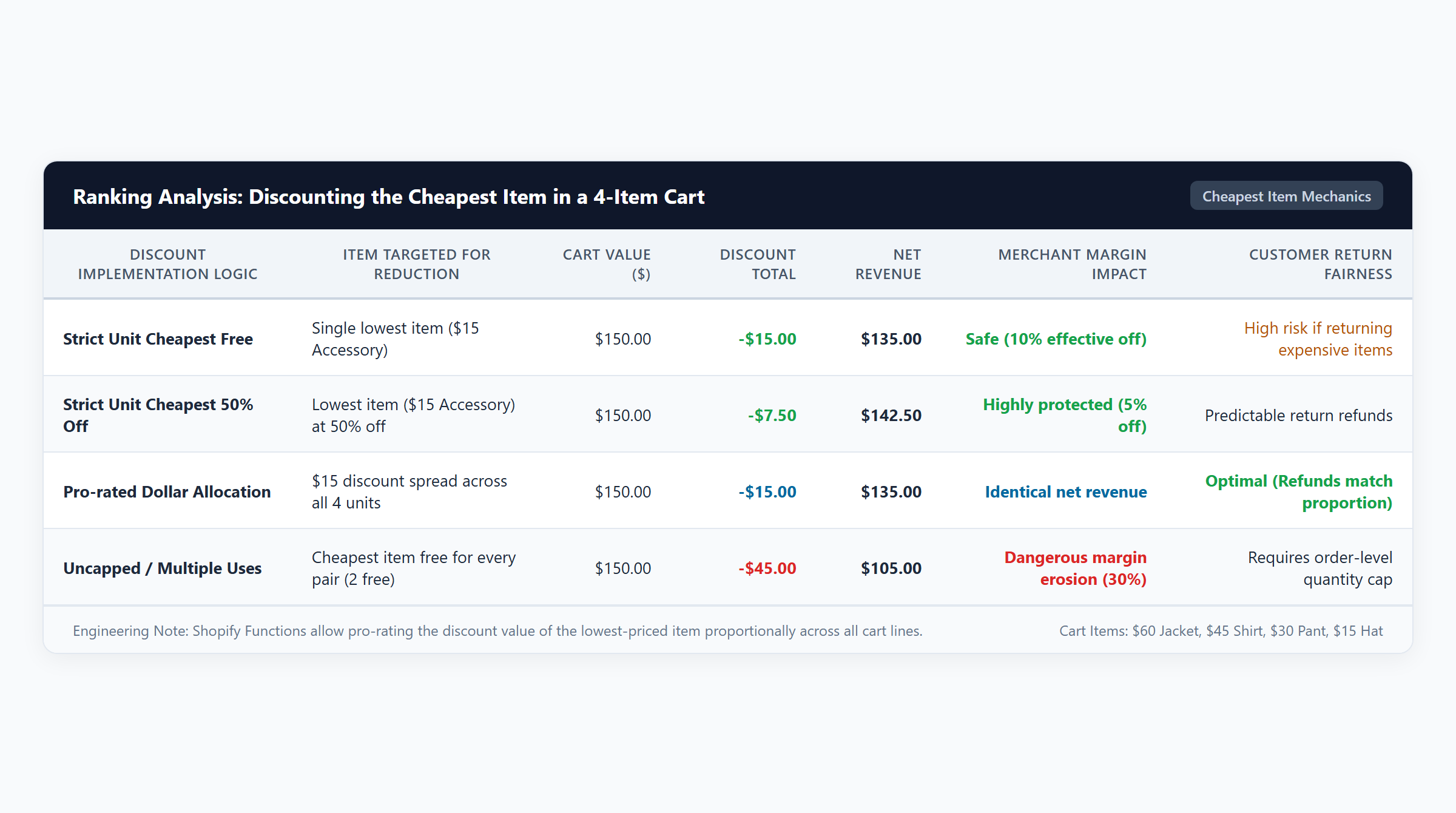
Single Line-Item Reduction vs. Pro-Rated Allocation
Consider our verified financial audit scenario where a customer purchases three leather accessories: a Leather Crossbody Strap ($40.00, $14.00 COGS), a Canvas Pouch ($25.00, $9.00 COGS), and a Brass Keyring ($12.00, $4.00 COGS). Total gross cart value is $77.00, with total product COGS of $27.00. The cheapest item is the Brass Keyring ($12.00):
| Cart Line Item | Catalog Retail Price | Unit COGS | Single-Line Allocation | Pro-Rated Allocation | Effective Discount Allocation |
|---|---|---|---|---|---|
| Leather Crossbody Strap | $40.00 | $14.00 | $40.00 (Net Paid) | $33.77 (Net Paid) | $6.23 Deduction (51.9% of discount) |
| Canvas Pouch | $25.00 | $9.00 | $25.00 (Net Paid) | $21.10 (Net Paid) | $3.90 Deduction (32.5% of discount) |
| Brass Keyring (Cheapest) | $12.00 | $4.00 | $0.00 (100% Free) | $10.13 (Net Paid) | $1.87 Deduction (15.6% of discount) |
| Total Cart Performance | $77.00 | $27.00 | $65.00 Net ($38 Profit) | $65.00 Net ($38 Profit) | $12.00 Total Discount (58.5% Margin) |
While both allocation methods collect the exact same net revenue ($65.00) and generate identical gross profit ($38.00 / 58.5% margin), their operational consequences for returns and accounting are vastly different.
The Return Loophole in Single-Line Discounting
Under single-line discounting, the Brass Keyring appears on the customer’s receipt with a net price of $0.00, while the Strap ($40.00) and Pouch ($25.00) remain at full retail price. If an opportunistic customer subsequently returns the Leather Strap, Shopify’s standard refund engine evaluates the Strap at its invoice price ($40.00), issuing a full $40.00 refund. The customer successfully retains the $12.00 Keyring for $0.00, while paying only $25.00 for the Pouch. The merchant suffers severe margin leakage.
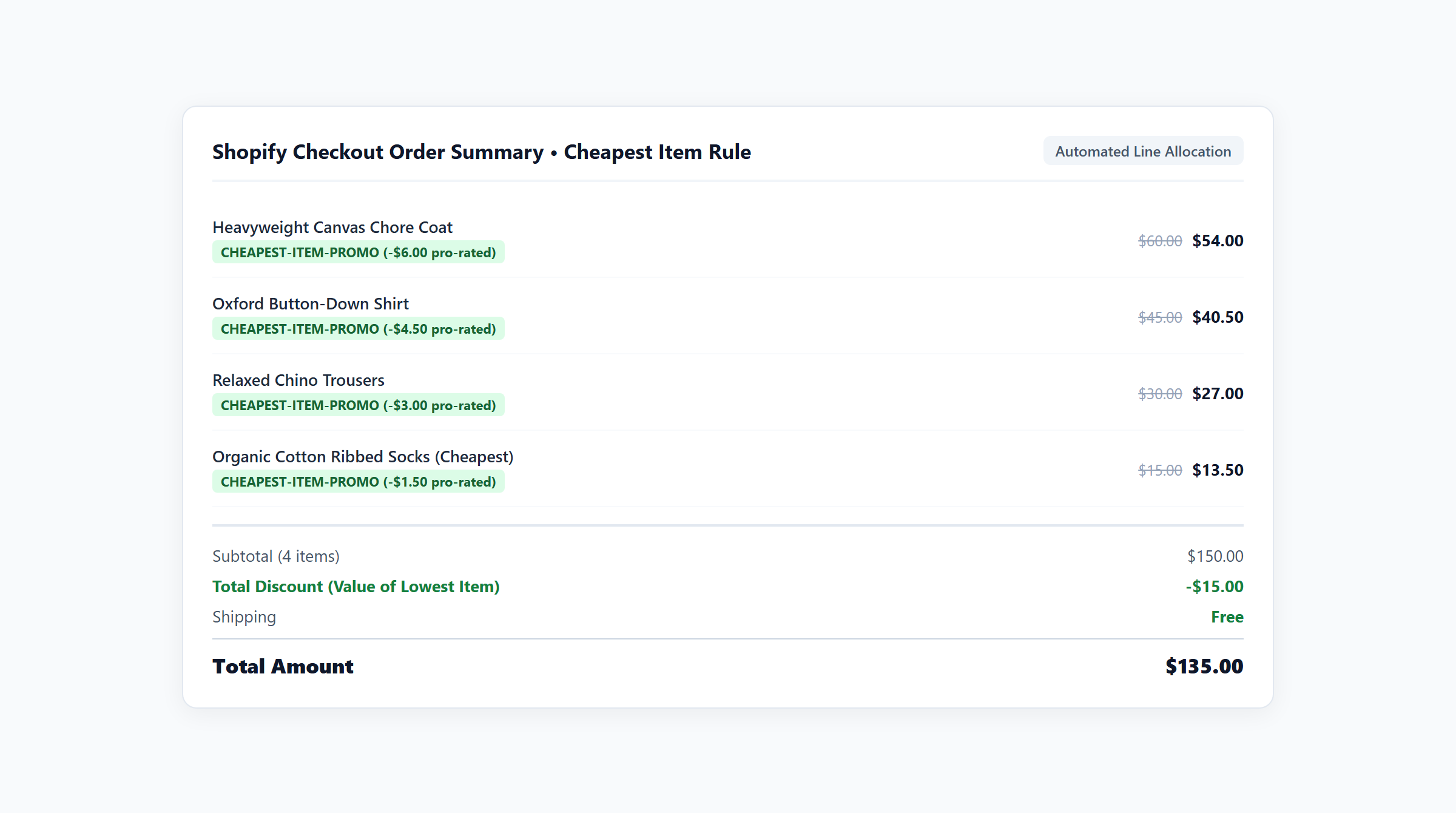
Under pro-rated allocation (governed by Shopify order-level rules and advanced Functions apps), the $12.00 discount is divided proportionally based on item value:
Discount_item = Discount_total * (Price_item / Cart_gross)
The Strap’s refund basis drops to $33.77 ($40.00 – $6.23), the Pouch drops to $21.10 ($25.00 – $3.90), and the Keyring drops to $10.13 ($12.00 – $1.87). If the customer returns the Strap, they receive only $33.77. The promotional savings remain distributed across the items the customer keeps, safeguarding merchant economics.
Price Disparity in Heterogeneous Baskets
Price disparity volatility represents another commercial hazard. Consider Scenario 3 from our financial model: a customer purchases a Waterproof Shell Jacket ($80.00, $28.00 COGS), a Cotton Graphic Tee ($15.00, $5.00 COGS), and a Ribbed Beanie ($10.00, $3.00 COGS). Gross cart value is $105.00, with $36.00 total COGS:
- The cheapest item is the $10.00 Beanie.
- The customer receives a $10.00 discount, paying $95.00 net.
- The merchant earns $59.00 in gross profit, maintaining a strong 62.1% profit margin.
While the merchant’s margin is protected, the customer’s effective discount is less than 10% ($10.00 on a $105.00 cart). When shoppers expect a massive “Buy 2 Get 1 Free” benefit, discovering that the free item is an insignificant $10 beanie often causes cart abandonment. To mitigate this friction, stores should either group products into tight, homogeneous price bands or deploy percentage tiers (e.g., Buy 2, Get the 3rd at 50% Off as modeled in Scenario 4 on $110 carts).
3. Storefront UX: Cart Drawer Clarity & Strikethrough Pricing
One of the most persistent technical challenges in native Shopify promotional setups is the disconnect between the storefront cart drawer and the native checkout page.
The Ajax API Disconnect
Most modern Shopify themes utilize asynchronous slide-out cart drawers powered by the Shopify Ajax API (/cart.js). However, native automatic discounts—including Buy X Get Y price-ranking logic—are evaluated exclusively on the server side during checkout compilation. As a result:
- A customer adds 3 qualifying items to their cart.
- The cart drawer queries
/cart.js, which returns all 3 items at full catalog price. - The customer sees no indication of a discount, assuming the promotion has failed.
- Only after clicking “Checkout” does the Shopify checkout page sort the items and display the strikethrough price on the cheapest item.
This lack of cart drawer visibility causes severe drop-offs. Merchants must utilize Shopify Functions apps that feature embedded theme app blocks or deploy Shopify’s Cart Transform API to reflect strikethrough pricing and promotional badges directly inside the sliding cart drawer prior to checkout initiation.
4. Native Buy X Get Y Boundaries vs App Capabilities
While native Shopify discounts provide a zero-cost entry point, operational constraints quickly become apparent for growing stores:

The “Manual Add” Friction
Under native Shopify Buy X Get Y rules, the checkout engine cannot automatically inject the cheapest item into the cart. If a promotion states “Buy 2 Shirts, Get 1 Free,” the shopper must know to physically add all 3 shirts to their cart. If they add only 2 shirts expecting the store to supply the free item, Shopify charges full price for both shirts without applying any discount.
Omnichannel Retail POS Parity
For brands operating physical retail storefronts, promotional rules must sync seamlessly with Shopify POS hardware terminals. Native automatic discounts automatically evaluate on Shopify POS registers when items are scanned. However, complex multi-tier rules or pro-rated line allocations require apps built natively on Shopify Functions to ensure identical price ranking across online and in-person checkout lanes.
5. Stacking Rules & Combination Constraints
When running cheapest-item promotions, merchants must configure promotional stacking permissions carefully to prevent compounding margin losses.
Reciprocal Combinations
Shopify classifies discounts into Product, Order, and Shipping tiers. A cheapest-item discount is classified as a Product Discount. If a customer also possesses a free shipping code or a 10% order discount coupon, both discounts must have reciprocal combination permissions enabled in Shopify Admin. Otherwise, Shopify will evaluate which promotion yields greater savings and apply only that single discount, discarding the other.
Platform Concurrency Caps
Shopify enforces a hard platform limit of 25 concurrent active automatic discounts per store. Large stores running multiple regional BOGO offers or category-specific price-ranking rules quickly hit this limit. Apps powered by Shopify Functions consolidate unlimited promotion rules within a single active app function, avoiding platform blocks.
6. Comprehensive Comparison Matrix: Native vs Functions Architecture
Compare the operational capabilities of native Shopify settings against Shopify Functions applications when discounting the cheapest item:
| Operational Dimension | Native Shopify Buy X Get Y | Shopify Functions (Easy Deals) | Merchant Impact |
|---|---|---|---|
| Cheapest Item Identification | Applies to lowest unit price within designated collection. | Dynamic server-side price ranking across single or multiple collections. | Enables cross-category promotions (e.g., Buy from Shoes, Get cheapest Socks free). |
| Cart Drawer Visibility | No native strikethrough in cart; discount calculates only at checkout. | Embedded cart drawer widgets display real-time strikethrough pricing and badges. | Confirms promotional savings upfront, reducing cart abandonment. |
| Return Allocation Method | Single line reduction to $0.00 (creates return loophole). | Pro-rated distribution across all participating items. | Safeguards merchant profits against partial return exploitation. |
| Free Item Addition | Manual: Customer must physically add all qualifying items. | Customer-selected modal or automated item injection. | Eliminates missed promotion complaints and support tickets. |
| Execution Speed & Reliability | Native backend checkout execution (< 5ms). | Sandboxed WebAssembly at checkout edge nodes (< 5ms ceiling). | Zero checkout latency, zero script bloat, full BFCM resilience. |
| Active Discount Concurrency | Capped at 25 active concurrent automatic discounts. | Consolidates unlimited campaign rules inside 1 active app discount. | Bypasses Shopify’s 25 automatic discount ceiling. |
7. Implementation Blueprint with Easy Deals
For Shopify merchants seeking to deploy sophisticated price-ranked promotions with pro-rated refund protections and seamless cart drawer parity, Easy Deals provides an enterprise-grade solution built directly on Shopify Functions. Available on the Shopify App Store for $9.99/month following a 7-day free trial, setup is accomplished in minutes:
- Install Easy Deals from the Shopify App Store: Connect the app to your Shopify admin.
- Select Cheapest Item / BOGO Campaign: Choose the pre-configured “Lowest-Priced Item Discount” promotional template.
- Define Collection Scope & Ratios: Set your promotional ratios (e.g., Buy 2, Get 1 at 100% off or 50% off) and select qualifying product collections.
- Activate Pro-Rated Allocation: Toggle on pro-rated line item distribution to ensure discount deductions are shared across qualifying items for return protection.
- Enable Cart Drawer Badges: Activate the theme app block to display real-time strikethrough pricing and celebratory promo badges inside your theme’s slide-out cart.
- Publish via Shopify Functions: Save your campaign to deploy the compiled WebAssembly logic directly into Shopify’s global checkout infrastructure.
8. Pre-Launch Acceptance Testing Matrix: 7-Point QA Checklist
Before publicizing any cheapest-item promotional campaign, execute this rigorous 7-point QA acceptance checklist across your storefront:
| Test Item | Testing Objective | Verification Methodology | Expected System Behavior |
|---|---|---|---|
| QA-01: Dynamic Price Sorting Test | Verify system identifies and targets the lowest unit price. | Add items priced at $40, $25, and $12; observe targeted item; add a $10 item. | Discount dynamically transfers from the $12 item to the new $10 item. |
| QA-02: Quantity Threshold Trigger | Ensure discount triggers only upon reaching required item count. | Add 2 items in a Buy 2 Get 1 campaign; verify price; add 3rd item. | No discount applies on 2 items; discount applies instantly upon adding 3rd unit. |
| QA-03: Cart Drawer vs Checkout Parity | Prevent visual discrepancies between cart drawer and checkout. | Inspect strikethrough pricing and subtotal in slide-out cart; proceed to checkout. | Cart drawer line deductions match checkout totals exactly to the penny. |
| QA-04: Partial Return Pro-Rata Audit | Verify refund protections on discounted multi-item orders. | Complete a test order with 3 items; initiate simulated partial refund in Admin. | Refund basis reflects pro-rated net price, preventing return arbitrage. |
| QA-05: Reciprocal Combination Stacking | Confirm compatibility with free shipping or order promo codes. | Apply cheapest-item discount and enter manual promo code in checkout. | Both promotions execute simultaneously without collision error notices. |
| QA-06: Sales Tax Base Verification | Ensure tax calculations reflect net paid amounts. | Inspect calculated sales tax or VAT on the discounted line item in checkout. | Tax is assessed strictly on the net discounted subtotal, not pre-discount retail. |
| QA-07: Mobile Responsiveness Test | Verify user interface on mobile viewports. | Test promotional flow on iOS Safari and Android Chrome devices. | Promo badges, cart drawer strikethroughs, and checkout accordions render cleanly. |
9. Frequently Asked Questions (FAQ)
How does Shopify know which item is the cheapest in a cart?
When an automatic discount or Shopify Function evaluates an order, it inspects all line items matching the promotional criteria and sorts them in descending order based on unit selling price. The item holding the lowest monetary value is designated as the target for the discount.
Can I discount the cheapest item across multiple different collections?
Native Shopify Buy X Get Y discounts allow you to designate one collection for “buys” and another collection for “gets”. However, to automatically find and discount the cheapest item across any combination of items from multiple collections, you need an app built on Shopify Functions such as Easy Deals.
What happens if a customer returns the full-price item from a BOGO order?
If the promotion was configured with single line reduction, the customer can return the full-price item for a full refund while keeping the free item. To prevent this, merchants should deploy pro-rated discount allocation, which distributes the discount across all items and lowers the refund basis for every unit.
Does Shopify automatically add the free cheapest item to the cart?
No. Native Shopify discount rules require the customer to manually add all eligible items (both the items they buy and the item they get) to their cart before the discount applies. Apps like Easy Deals provide customer-facing selection modals to eliminate this friction.
Can cheapest-item discounts combine with free shipping?
Yes, provided that reciprocal combination permissions are enabled in Shopify Admin. In the discount configuration, check the “Shipping discounts” box under Combinations, and ensure your free shipping discount rule allows combinations with product discounts.