
Shopify allows merchants to combine product, order, and shipping discounts simultaneously at checkout, provided that explicit reciprocal combination permissions are enabled within the Shopify Admin. Rather than summing percentage discounts additively, Shopify executes discounts in a strict sequential calculation hierarchy: product-level discounts apply first to reduce eligible line items, order-level discounts calculate next against the newly reduced merchandise subtotal, and shipping discounts evaluate last against carrier shipping rates. Stacking multiple promotions within the exact same tier—such as two simultaneous product discounts on a single line item—is restricted by Shopify’s native engine and requires serverless Shopify Functions to arbitrate.
For high-volume merchants, mastering discount combinations is essential for driving Average Order Value (AOV) and conversion rates without accidentally collapsing gross margins. When discounts compound unexpectedly or shipping subsidies stack onto heavy product markdowns, profits erode rapidly. This technical guide examines the architectural hierarchy of Shopify discount combinations, provides mathematical proofs of sequential compounding, analyzes refund allocation economics, and provides a verified 7-point acceptance testing checklist for seamless promotional deployment.

1. Discount Classification: The Three Native Shopify Tiers
To configure promotions effectively, merchants must first understand how Shopify categorizes discounts. The Shopify platform segregates all promotions into three distinct native classes, each governing a specific layer of the checkout payload:
- Product Discounts: Apply directly to specific line items, variants, or collections. Examples include percentage markdowns (e.g., 20% off denim), fixed amount reductions ($10 off jackets), and Buy X Get Y (BOGO) mechanisms. Product discounts alter the net selling price of the individual SKU.
- Order Discounts: Apply globally across the entire cart subtotal after product-level discounts have been applied. Examples include threshold-based cart incentives (e.g., $15 off orders over $100) or storewide promotional codes (e.g., 10% off entire order).
- Shipping Discounts: Target shipping rates generated by carrier calculations or flat-rate profiles. These discounts can reduce shipping rates by a fixed monetary amount, discount rates by a percentage, or waive shipping costs entirely for qualifying orders.
Each native discount created in Shopify Admin—whether established as an automatic discount or a discount code—contains a dedicated “Combinations” configuration panel. By default, new discounts are configured to operate in isolation. Unless a merchant explicitly grants permission for a discount to combine with other classes, the checkout engine will reject stacking attempts, applying only the single discount offering the greatest financial benefit to the customer.
2. Calculation Order: Sequential Compounding vs Baseline Application
A widespread misconception among ecommerce merchants is that percentage discounts combine additively. For example, if a store offers a 15% collection discount on trousers and an influencer provides a 10% storewide order discount code, merchants frequently assume the customer receives a 25% total markdown. In the Shopify checkout engine, this assumption is mathematically incorrect.
Shopify enforces a strict sequential compounding order. Discounts do not calculate simultaneously against the original retail price (MSRP). Instead, they calculate in stages:
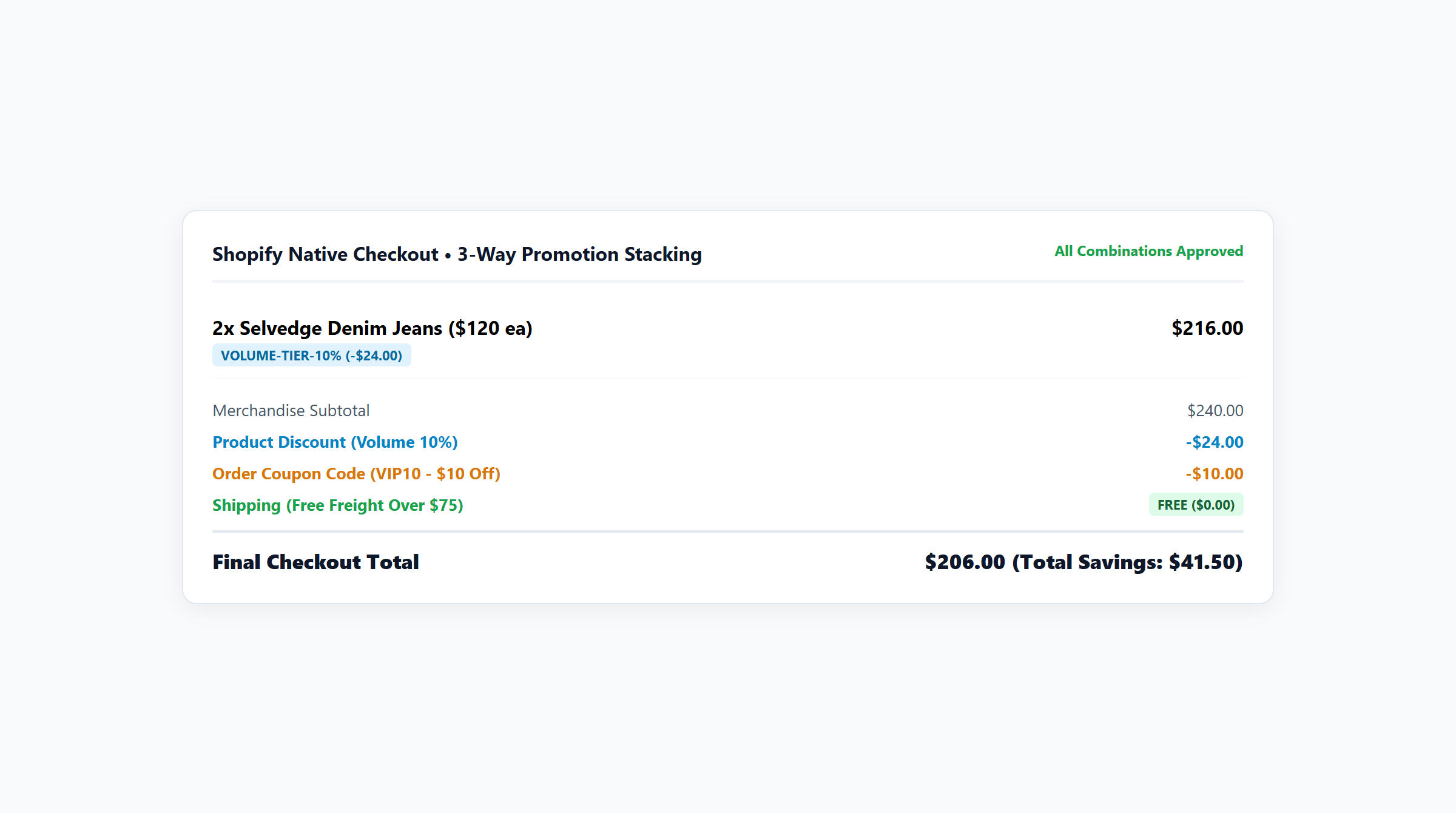
Mathematical Proof of Sequential Discount Compounding
When a product discount combines with an order discount, the effective discount percentage is governed by the following mathematical formula:
Effective Combined Discount Rate:
D_effective = 1 - ((1 - d_product) * (1 - d_order))
Where d_product represents the product discount percentage and d_order represents the order discount percentage. Let us examine the actual transaction figures for an order containing 2 units of Tailored Chino Trousers priced at $50.00 each ($100.00 gross cart value) with unit Cost of Goods Sold (COGS) of $15.00 ($30.00 total COGS):
| Calculation Step | Mathematical Execution | Running Subtotal | Cumulative Discount |
|---|---|---|---|
| 1. Initial Gross Subtotal | 2 units @ $50.00 | $100.00 | $0.00 (0.0%) |
| 2. Product Discount (15%) | $100.00 * 0.15 = $15.00 | $85.00 | $15.00 (15.0%) |
| 3. Order Discount (10%) | $85.00 * 0.10 = $8.50 | $76.50 | $23.50 (23.5%) |
| 4. Net Amount Paid | $100.00 – $23.50 | $76.50 | $23.50 (23.5%) |
Under additive calculation, a 25% discount on $100.00 would yield $25.00 in deductions, leaving a net paid subtotal of $75.00. Under Shopify’s sequential compounding architecture, the 10% order discount operates strictly against the $85.00 post-product-discount baseline, deducting $8.50 instead of $10.00. The merchant collects $76.50—saving $1.50 in margin leakage per transaction. With total product COGS of $30.00, the merchant retains $46.50 in gross profit, maintaining a healthy 60.8% gross margin.
The Free Shipping Threshold Disqualification Trap
A critical point of friction occurs when free shipping thresholds interact with product-level discounts. Under Shopify’s platform rules, when a shipping discount requires a minimum order value (e.g., “Free Shipping on orders over $100”), the qualification logic evaluates the post-discount subtotal, not the pre-discount catalog value.
Consider a customer who adds exactly $100.00 of merchandise to their cart to reach a $100 free shipping milestone. If they apply a 20% product discount code, their subtotal drops to $80.00. Because $80.00 is below the required $100.00 threshold, the checkout engine automatically revokes free shipping eligibility, re-imposing carrier freight charges. Unless the merchant employs an intelligent cart drawer that calculates thresholds dynamically or deploys automated milestone progress bars, customers will experience checkout shock and abandon their carts.
3. Configuring Reciprocal Permissions in Shopify Admin
For two discounts to combine successfully at checkout, Shopify enforces a strict reciprocal permission rule. It is insufficient to enable combination permissions on only one of the promotions; both participating discounts must explicitly allow stacking with the other’s tier.
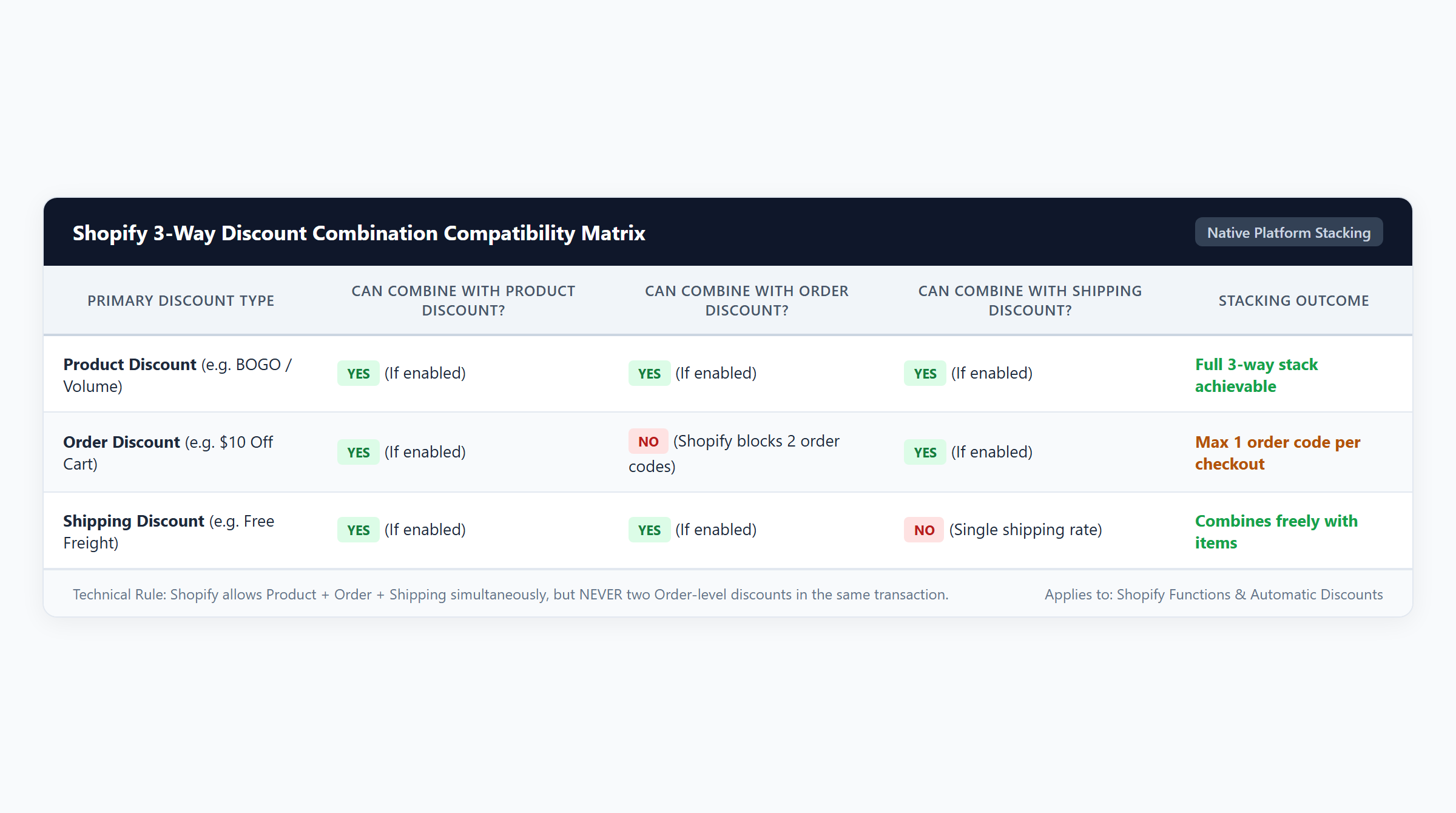
The Reciprocal Rule Explained
Suppose you configure an automatic 20% product discount on summer apparel and wish to allow customers to apply a “FREESHIP” promotional code at checkout. You must configure the settings as follows:
- Navigate to Shopify Admin > Discounts and open the automatic product discount.
- Scroll down to the Combinations section and check the box for Shipping discounts. Save changes.
- Open the “FREESHIP” shipping discount code.
- Scroll down to its Combinations section and check the box for Product discounts. Save changes.
If either discount lacks this permission, the checkout engine treats them as mutually exclusive. If the customer enters the code, Shopify will evaluate which promotion yields the higher monetary discount, applying only that single promotion and displaying an error message for the other.
Automatic vs Code Combination Allowances
Shopify permits customers to combine an automatic discount with manual discount codes, provided combination permissions are enabled. Specifically:
- Automatic Discounts: A cart can qualify for one automatic product discount and one automatic order discount simultaneously, provided their categories combine.
- Discount Codes: Customers can apply up to 5 individual discount codes to a single order at checkout, subject to category compatibility and reciprocal permissions.
- Automatic + Codes: An automatic discount will combine with manual discount codes as long as the codes belong to compatible, permitted tiers.
4. Native Engine Boundaries vs Shopify Functions Capabilities
While Shopify’s native discount settings provide basic stacking across different classes (Product + Order + Shipping), significant operational limitations emerge when merchants attempt more sophisticated promotional strategies.
The Same-Category Native Restriction
The native Shopify engine does not allow two discounts within the exact same category to apply to the same item. If a customer is eligible for a 15% collection discount on hoodies and also enters a 20% VIP customer product code, Shopify does not combine them to give 32% or 35% off. Instead, Shopify automatically applies only the single discount that gives the customer the largest reduction (in this case, the 20% VIP discount), completely discarding the 15% promotion.
Similarly, native Shopify cannot execute tiered quantity breaks (e.g., Buy 2 get 10% off, Buy 3 get 15% off) while simultaneously awarding a Buy X Get Y free gift on the same product line. The native engine lacks the logic to segment line item quantities into distinct promotional buckets.
Platform Concurrency Ceilings
Shopify enforces a hard platform limit of 25 concurrent active automatic discounts per store. For merchants operating extensive product catalogs, running localized campaigns across multiple collections, or deploying multi-tier wholesale pricing, this 25-discount ceiling is quickly exhausted. Attempting to create a 26th automatic discount results in an immediate administrative block.
The Modern Solution: Shopify Functions
To overcome these architectural limitations, Shopify introduced Shopify Functions, replacing legacy Ruby scripts with high-performance WebAssembly (Wasm) modules running at checkout. Apps built natively on Shopify Functions—such as Easy Deals—execute custom discount logic directly within Shopify’s global checkout infrastructure under a strict 5ms runtime ceiling.
By delegating discount arbitration to a Shopify Function, a merchant can consolidate hundreds of promotion rules, volume tiers, and free gift milestones into a single active app discount. This completely bypasses the 25-discount platform limit while enabling sophisticated multi-promotional coordination that native settings cannot support.
5. Margin Safeguards: Preventing Stacking Collapses
Careless combination configurations can lead to rapid profit erosion. The most hazardous scenario occurs when merchants combine high percentage product markdowns with order discounts and unconstrained free shipping subsidies.
Shipping Subsidy Margin Erosion Model
When an order qualifies for free shipping, the carrier shipping fee is not eliminated; rather, the merchant absorbs the out-of-pocket freight expense. The true combined profit margin must account for both the merchandise markdown and the absorbed shipping cost:
Combined Profit Margin Formula:
Margin_combined = ((P_gross - Discount_total) - COGS_product - Freight_carrier) / (P_gross - Discount_total)
Let us analyze the financial impact across four distinct promotional scenarios using audited cost structures from our financial model:
| Promotional Structure | Gross Value | Discounts Applied | Net Paid | Total COGS + Freight | Gross Profit | Profit Margin |
|---|---|---|---|---|---|---|
| Scenario 1: Product Discount + Free Shipping 2x French Terry Hoodies ($50 ea) with 20% off + $5 carrier shipping subsidy |
$100.00 | $20.00 | $80.00 | $35.00 ($30 product + $5 freight) |
$45.00 | 56.3% |
| Scenario 2: Sequential Product + Order 2x Chino Trousers ($50 ea) with 15% product + 10% order discount |
$100.00 | $23.50 | $76.50 | $30.00 ($30 product COGS) |
$46.50 | 60.8% |
| Scenario 3: Compounding Triple Stacking 2x Puffer Vests ($75 ea) with 20% product + 15% order + $8 carrier freight |
$150.00 | $48.00 | $102.00 | $58.00 ($50 product + $8 freight) |
$44.00 | 43.1% |
| Scenario 4: Easy Deals Rule Coordination 3x Cotton Overshirts ($50 ea) + Volume Tier (10%) + Milestone Gift ($15 retail, $3 COGS) + $5 freight |
$165.00 | $30.00 | $135.00 | $56.00 ($48 product + $3 gift + $5 freight) |
$79.00 | 58.5% |
The danger of unconstrained stacking is vividly demonstrated in Scenario 3. On a $150.00 retail cart, the customer receives a 20% product discount ($30.00 off, reducing the subtotal to $120.00), a 15% order discount ($18.00 off, reducing subtotal to $102.00), and free shipping (absorbing $8.00 in carrier freight). The total discount deduction reaches $48.00. While the merchant collects $102.00, total costs amount to $58.00 ($50.00 product COGS + $8.00 shipping freight). Gross profit collapses from an unpromoted $100.00 to just $44.00, reducing profit margin to 43.1%.
Conversely, Scenario 4 illustrates how structured promotion coordination using Easy Deals protects profitability. By replacing compounding monetary discounts with a modest 10% volume discount ($15.00 off) paired with an attractive complimentary gift ($15.00 retail value, but only $3.00 wholesale COGS), the merchant achieves an impressive $135.00 net paid basket, generating $79.00 in gross profit and maintaining a superior 58.5% margin.
6. Comprehensive Comparison Matrix: Native vs Functions Architecture
To determine whether your store can rely on native Shopify combination settings or requires a dedicated Shopify Functions application, evaluate the architectural differences outlined below:
| Capability Dimension | Native Shopify Combinations | Shopify Functions (Easy Deals) | Commercial / Operational Impact |
|---|---|---|---|
| Same-Tier Discount Stacking | Disallowed. Only 1 product discount applies per line item; highest value wins. | Fully supported. Can coordinate tiered volume breaks, catalog sales, and BOGO rules on the same cart item. | Enables multi-tier promotional stacking without code conflict errors. |
| Sequential Calculation Control | Rigid platform sequence: Product first, Order second (compounding), Shipping third. | Configurable allocation algorithms with customizable evaluation order. | Allows merchants to prevent margin dilution by locking calculation baselines. |
| Free Shipping Threshold Basis | Evaluates strictly against post-discount subtotal. Markdowns can disqualify shipping. | Dynamic cart drawer progress bars indicate real-time gap and recommend smart upsells. | Eliminates unexpected shipping charges at checkout and curbs cart abandonment. |
| Execution Speed & Stability | Native backend checkout execution (< 5ms). | Sandboxed WebAssembly (Wasm) at checkout edge nodes (< 5ms ceiling). | Zero checkout latency, zero draft order bloat, and total resilience during BFCM traffic surges. |
| Cart Drawer Visual Parity | Discounts display primarily at checkout; cart drawers require custom theme scripts. | Automated cart drawer banner, tier progress bar, and real-time discount line item previews. | Confirms promotional savings before checkout, boosting conversion confidence. |
| Active Discount Concurrency | Strict ceiling of 25 active concurrent automatic discounts. | Consolidates hundreds of promotion rules into a single active app function. | Overcomes the 25-discount limit for stores with extensive promotional calendars. |
7. Accounting, Tax and Refund Implications of Combined Discounts
Combining discounts impacts more than front-end conversion rates; it fundamentally alters line-item financial accounting, sales tax collection, and customer refund processing.
Pro-Rated Line Item Allocation
When an order-level discount is applied to a cart containing multiple line items, Shopify does not assign the discount to a generic “cart deduction” line item on the invoice. Instead, Shopify automatically pro-rates the order discount proportionally across all eligible line items based on their post-product-discount value.
For example, in Scenario 2, the customer purchased 2 pairs of trousers at $50.00 each ($100.00 total). The 15% product discount reduced each pair to $42.50 ($85.00 subtotal). The 10% order discount ($8.50 total) is pro-rated evenly, deducting exactly $4.25 from each pair. The final net recognized revenue for each pair of trousers in Shopify financial reports is exactly $38.25 ($42.50 – $4.25).
Partial Return and Refund Safeguards
Pro-rated line allocation is critical for protecting merchant profitability when customers initiate partial returns. If the customer in Scenario 2 returns one pair of trousers, Shopify calculates the maximum refund basis as $38.25—not the original $50.00 retail price or the $42.50 product-discounted price. This prevents opportunistic customers from exploiting stacked promotions by returning a portion of their order while pocketing the order-level discount on the items they keep.
Sales Tax and Value-Added Tax (VAT) Calculation
In most tax jurisdictions (including the United States, European Union, and United Kingdom), sales tax and VAT are calculated strictly on the net paid amount after all combined discounts have been deducted. In Scenario 1 ($100.00 gross, $20.00 discount, $80.00 net paid), state and local sales taxes are levied exclusively on the $80.00 taxable base. If shipping is taxable in the destination jurisdiction and the customer receives free shipping via a discount code, the taxable shipping base becomes $0.00.
8. Implementation Blueprint with Easy Deals
For merchants seeking to orchestrate advanced multi-tier promotions without encountering native combination roadblocks, Easy Deals provides an enterprise-grade solution built directly on Shopify Functions. Available on the Shopify App Store for $9.99/month following a 7-day free trial, Easy Deals simplifies promotional governance:
- Install Easy Deals from the Shopify App Store: Add the app to your store and complete the streamlined onboarding process.
- Select Your Campaign Architecture: Choose from pre-configured promotional templates, including Tiered Volume Discounts, Buy X Get Y (BOGO), Free Gift with Purchase, or Cart Spend Goals.
- Configure Multi-Promotion Rules: Establish clear promotional hierarchies. For example, set a tiered quantity break (10% off 2 items, 15% off 3 items) that automatically coordinates with a free shipping progress bar.
- Enable Cart Drawer Parity: Activate the embedded theme app block to display real-time promotional badges, tier milestone progress bars, and accurate subtotal discounts directly inside your theme’s slide-out cart.
- Set Margin Safety Guardrails: Define minimum cart thresholds and exclusion lists (e.g., clearance items or low-margin collections) to ensure promotions never stack into negative margins.
- Activate via Shopify Functions: Save your campaign. Easy Deals deploys the logic as an optimized WebAssembly module directly into Shopify’s native checkout pipeline.
9. Pre-Launch Acceptance Testing: 7-Point QA Checklist
Before publicizing any combined promotional campaign, conduct rigorous end-to-end testing across all stages of the purchase funnel. Use this verified 7-point QA acceptance matrix:
| Test Item | Testing Objective | Verification Methodology | Expected System Behavior |
|---|---|---|---|
| QA-01: Reciprocal Permission Verification | Confirm discounts stack without conflict errors. | Apply target product discount and enter shipping/order code in checkout. | Both discounts appear as active line items; total deductions match sequential formula. |
| QA-02: Threshold Boundary Test | Verify minimum spend behavior around discount boundary. | Build a cart valued at exactly $100.00; apply 20% product discount; check free shipping bar. | Subtotal drops to $80.00; system correctly flags that $20.00 is needed to regain free shipping. |
| QA-03: Cart Drawer vs Checkout Parity | Prevent visual discrepancies between cart and checkout. | Inspect line items, subtotal, and discount badges in the cart drawer; proceed to checkout. | Total savings, line item deductions, and final subtotal in checkout match cart drawer exactly. |
| QA-04: Partial Return Pro-Rata Check | Ensure refund integrity on multi-item orders. | Complete a test order with combined discounts; initiate a simulated refund for 1 item in Admin. | Shopify calculates refund amount based on pro-rated net paid price, preserving merchant margin. |
| QA-05: Platform Limit Concurrency | Verify active discount budget in Shopify Admin. | Review total active automatic discounts under Admin > Discounts. | Total active automatic discounts count remains comfortably below the 25-discount ceiling. |
| QA-06: Code Stacking Maximums | Validate multi-code customer entry limits. | Attempt to apply more than 5 discount codes sequentially at checkout. | System enforces Shopify’s 5-code limit gracefully with a clear customer notification. |
| QA-07: Mobile Checkout Responsiveness | Ensure usability on mobile viewports. | Test combined checkout flow on iOS Safari and Android Chrome devices. | Discount tags, promo code entry fields, and order summary accordions expand and render cleanly. |
10. Frequently Asked Questions (FAQ)
Can you combine two discount codes on Shopify?
Yes. Shopify allows customers to enter up to 5 discount codes on a single order, provided that each discount code belongs to a compatible class (e.g., one product code and one shipping code) and has reciprocal combination permissions enabled in the Shopify Admin. However, you cannot combine two native discount codes for the same product line item.
Why did my customer’s free shipping discount disappear after applying a discount code?
This occurs when the free shipping discount requires a minimum purchase amount (e.g., $100). Shopify evaluates shipping thresholds against the net subtotal after product discounts have been deducted. If a 20% discount code reduces a $100 cart to $80, the cart no longer satisfies the $100 requirement, causing the checkout engine to revoke free shipping.
How do I combine an automatic discount with a discount code?
To allow an automatic discount to combine with a discount code, navigate to Discounts in your Shopify Admin, open the automatic discount, scroll to Combinations, and check the boxes for the discount categories you wish to permit. Then, open the discount code and check the corresponding category box to establish reciprocal permissions.
What is the maximum number of automatic discounts I can run on Shopify?
Shopify enforces a hard platform limit of 25 active concurrent automatic discounts per store. To run more complex promotional schedules without hitting this limit, merchants can use Shopify Functions apps like Easy Deals, which consolidate numerous campaign rules into a single active app function.
Does Shopify calculate order discounts before or after product discounts?
Shopify always calculates product discounts first. Order discounts calculate second, applying strictly against the reduced subtotal. This sequential compounding model ensures that discounts do not add together additively, protecting merchant margins.