A Shopify cart goal establishes a target order spending threshold (such as $50, $75, or $100) and displays an interactive, real-time progress bar across storefront announcement bars and sliding cart drawers to motivate shoppers to increase their basket size. When customers reach designated spending milestones, rewards such as free shipping, fixed monetary credits, percentage markdowns, or complimentary gifts are automatically unlocked. By deploying modern applications built on Shopify Functions—such as Easy Deals—merchants ensure lightning-fast serverless calculations in WebAssembly under a 5ms runtime ceiling, eliminating client-side script lag and protecting gross margins through pro-rated refund allocations.
In competitive ecommerce markets, driving new traffic is increasingly costly. Maximizing Average Order Value (AOV) from existing site visitors is the most direct path to sustainable profitability. Cart spend goals transform static shopping carts into active conversion engines. However, failing to model the financial unit economics of tiered rewards can turn an AOV accelerator into a margin drain. This strategic implementation guide examines the behavioral science behind milestone progress bars, models gross margin contributions across fixed credits versus free gift rewards, and provides a verified 7-point QA acceptance testing matrix for seamless Shopify deployment.

1. Core Mechanics: Spend-Based Goals vs. Discrete Unit Rules
To implement an effective cart goal strategy, merchants must understand how spend-based incentives differ from item-specific quantity breaks:
- Universal Catalog Inclusivity: Quantity volume breaks require shoppers to buy multiples of a specific SKU or collection. In contrast, spend-based cart goals evaluate the aggregate subtotal of the entire cart. A customer purchasing a jacket, a pair of socks, and a ceramic mug qualifies just as easily as a customer buying three identical shirts.
- Evaluation Timing & Baseline: Under native Shopify platform rules, minimum purchase requirements are evaluated against the intermediate order subtotal before shipping fees and sales taxes are calculated. If a customer uses a product-level discount, the spend goal evaluates against the net discounted merchandise subtotal, preventing premature reward qualification.
- Multi-Tier Milestone Ladders: Instead of a single flat target (e.g., Spend $100, Save $10), high-performing stores deploy escalating milestone ladders:
- Milestone 1 ($50 Spend): Unlocks Free Standard Shipping.
- Milestone 2 ($75 Spend): Unlocks a Complimentary Gift (e.g., $15 retail accessory).
- Milestone 3 ($100 Spend): Unlocks a 10% Storewide Order Discount.
- Milestone 4 ($150 Spend): Unlocks a Premium 15% VIP Tier Discount.
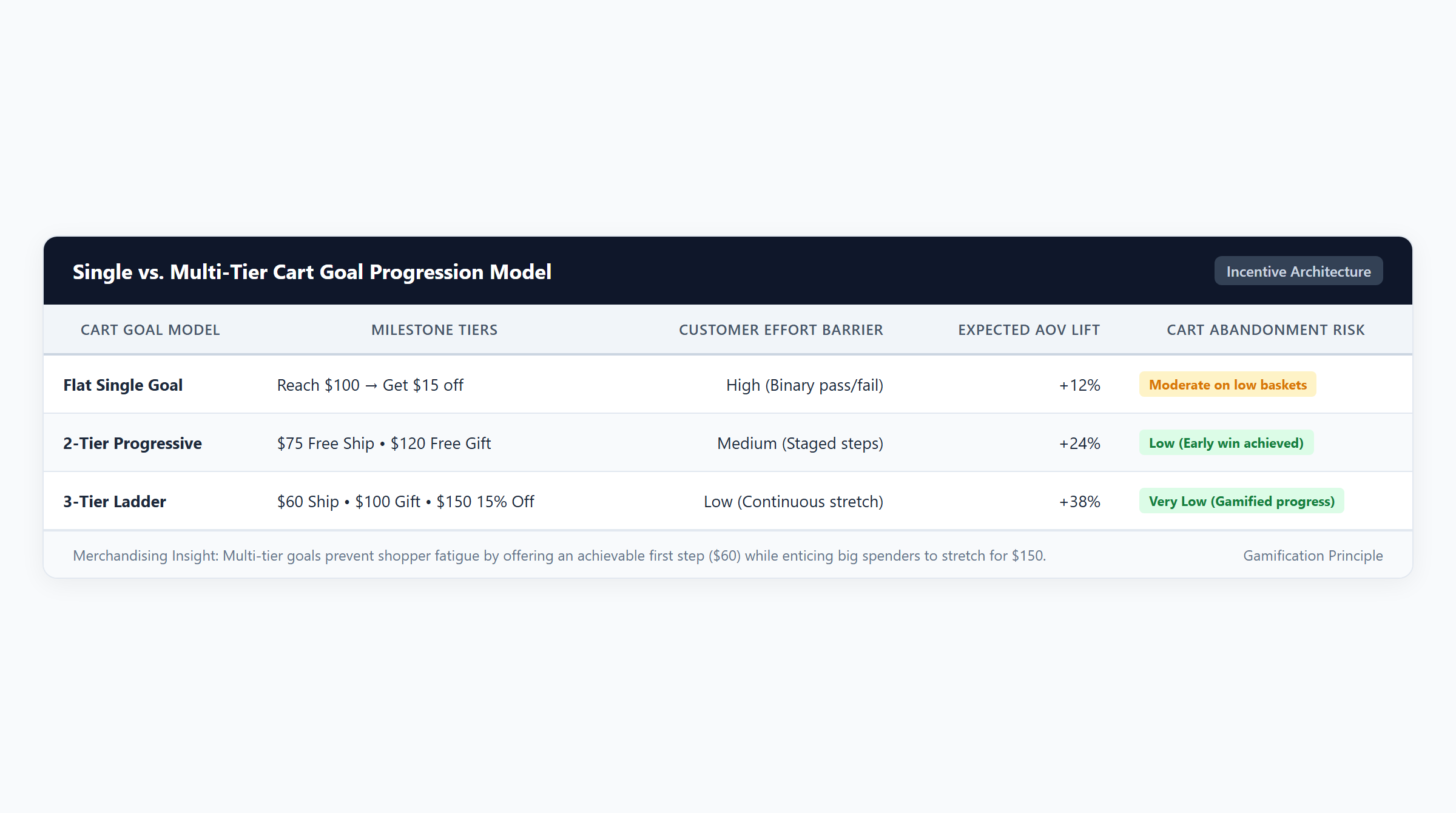
2. The Behavioral Science of Cart Progress Bars
Cart progress bars are more than decorative storefront animations; they are grounded in decades of empirical behavioral psychology.
The Goal-Gradient Effect
First established in behavioral psychology and validated in consumer research by Kivetz, Urminsky, and Zheng (2006, Journal of Marketing Research), the Goal-Gradient Hypothesis proves that human motivation accelerates systematically as individuals perceive themselves closing the distance toward a goal.
When a shopper has $45.00 of merchandise in their cart and sees a static text notice reading “Free shipping on orders over $75,” the goal feels distant. However, when an animated progress bar displays "You're only $30.00 away from Free Shipping!" alongside a 60% filled visual bar, the consumer’s perceived effort shifts. The remaining $30 gap is perceived not as an additional expense, but as a small, achievable task required to secure a valuable reward. This psychological acceleration dramatically reduces checkout hesitation and boosts items per order.
The Endowed Progress Phenomenon
Consumers demonstrate significantly higher completion rates when they perceive artificial initial progress toward a goal (Nunes & Drèze, 2006). In ecommerce cart goals, welcoming a shopper with an initial baseline milestone (e.g., “Tier 1: Free Sample Unlocked!”) makes them feel already enrolled in the reward cycle, making abandonment psychologically costlier.
3. Storefront Communication: Announcement Bars & Sliding Cart Drawers
A cart spend goal cannot drive conversion if shoppers only discover it after reaching checkout. Effective promotion requires omnipresent, synchronized storefront communication across the customer journey:
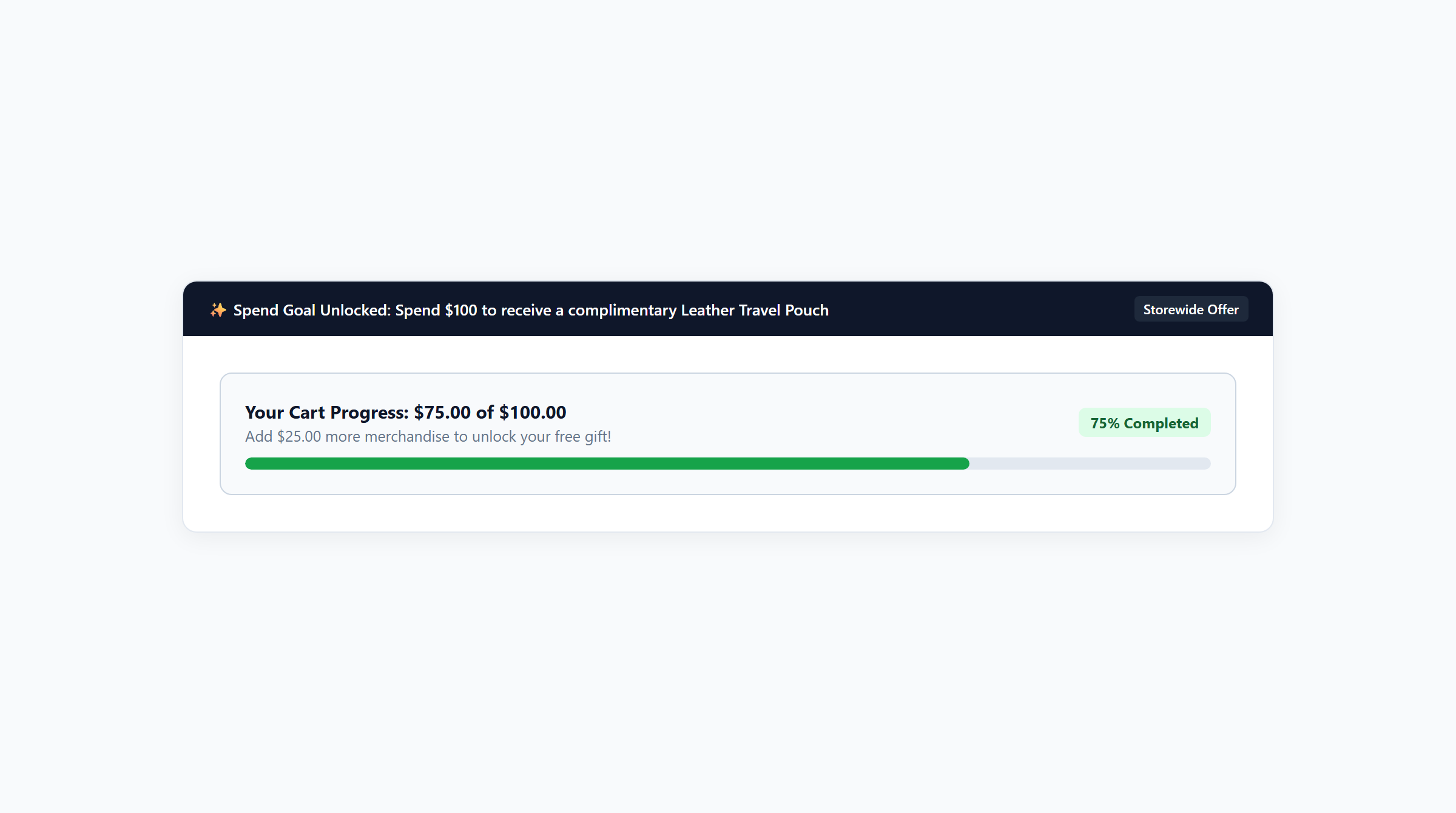
Global Announcement Bar Integration
Positioned at the top of every page, a dynamic announcement bar updates in real time as items are added to the cart. If a customer adds a $50 item to an empty cart on an apparel store with a $75 milestone, the announcement bar transitions dynamically from "Free Shipping on orders over $75!" to "Great choice! Add $25.00 more to unlock Free Shipping!"
Slide-Out Cart Drawer Synchronization
The slide-out cart drawer represents the critical conversion cockpit. When the cart opens, the progress bar should occupy the header area immediately above line items, accompanied by:
- Visual Milestone Badges: Icons representing shipping, gift, or percentage milestones along the progress track that illuminate in vibrant green or gold upon unlock.
- One-Click Upsell Modules: Recommended low-friction products priced perfectly to bridge the remaining spend gap (e.g., if the customer is $15 short of a $100 goal, display a curated $15 organic cotton beanie directly beneath the progress bar).
- Celebratory Visual Feedback: Micro-animations (such as subtle confetti or progress bar pulses) when a tier threshold is crossed to reinforce consumer satisfaction.
4. Operational Guardrails: Architecture, Combinations & Shopify Markets
Deploying cart goals requires rigorous alignment with Shopify platform architecture to prevent checkout collisions and technical failures.
Serverless Shopify Functions Execution
Legacy Shopify promotion apps relied on script tags that manipulated the DOM or created artificial “Draft Orders” at checkout. Draft order workarounds introduce severe liabilities: they disable customer accounts, break native credit card vaults, and collapse under BFCM traffic spikes. Modern apps like Easy Deals utilize Shopify Functions running in sandboxed WebAssembly (Wasm) directly at Shopify edge nodes within a strict 5ms execution budget. This guarantees 100% checkout uptime with zero latency.
Reciprocal Discount Combinations
Cart spend goals configured as order-level discounts must combine smoothly with other active promotions. If a store offers a 10% spend goal discount alongside a free shipping milestone, both discounts must have reciprocal combination permissions enabled in Shopify Admin. Otherwise, Shopify’s checkout engine will compare the monetary value of both promotions and apply only the single largest discount, triggering customer complaints.
Shopify Markets Multi-Currency Thresholds
For cross-border merchants using Shopify Markets, cart spend goals must adapt dynamically to local currencies. If your domestic threshold is $100 USD, a European shopper paying in EUR must see a localized target (e.g., €95 or €100 depending on exchange rates and rounding rules). Easy Deals detects the customer’s active market currency and converts thresholds automatically, preventing currency mismatch errors.
5. Financial Modeling & Margin Safeguards
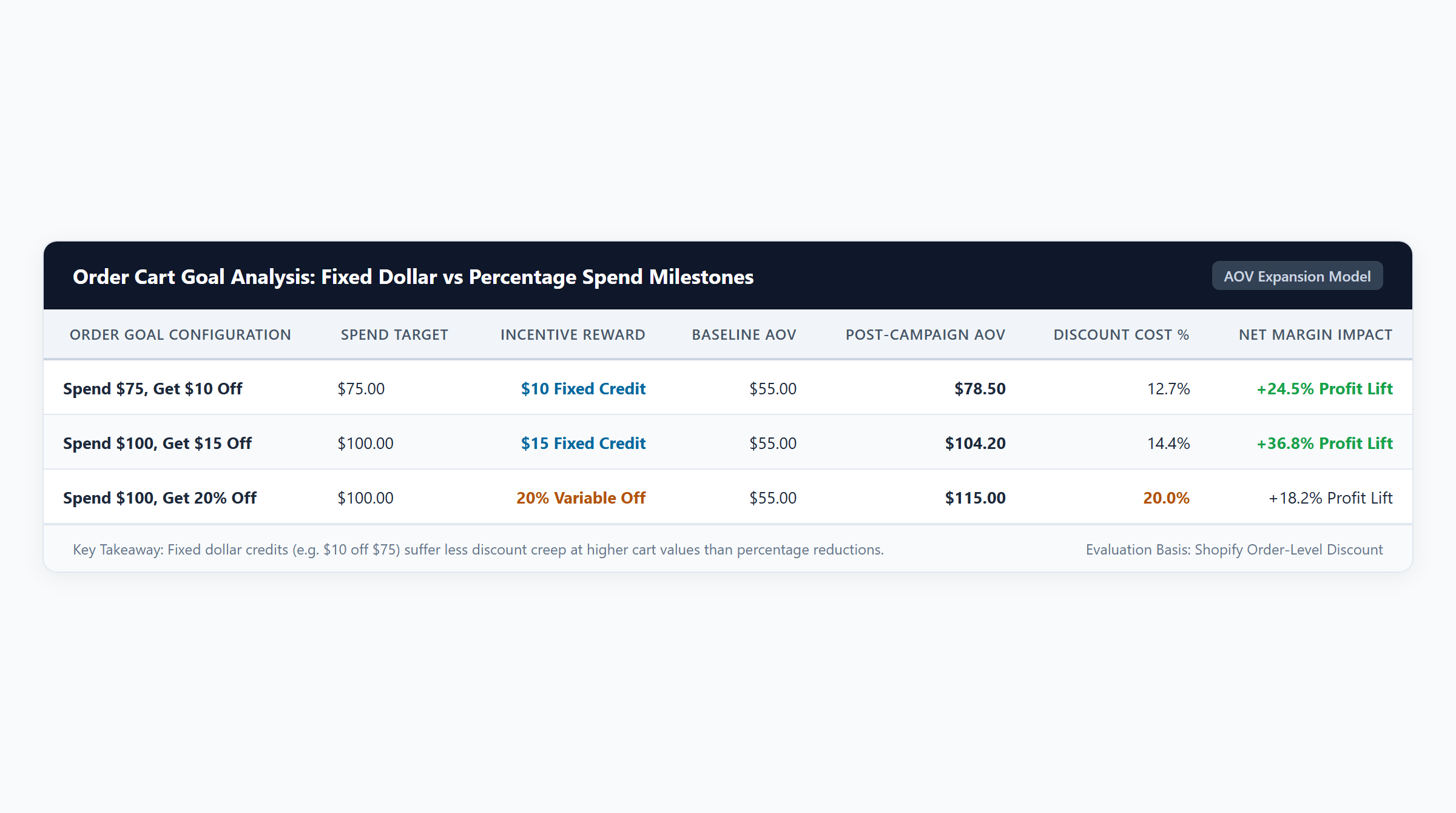
The ultimate objective of a cart spend goal is not merely lifting top-line gross revenue, but expanding net dollar contribution. Let us model the financial mechanics across four verified commercial cart scenarios using audited cost structures from our financial model:
| Cart Spend Scenario | Gross Cart Value | Discounts Applied | Net Paid Revenue | Total COGS | Gross Profit ($) | Gross Profit Margin (%) |
|---|---|---|---|---|---|---|
| Scenario 1: Fixed Dollar Credit $100 Goal (2x $50 Sweaters) Unlocks $10 Off |
$100.00 | $10.00 | $90.00 | $30.00 (2x $15 COGS) |
$60.00 | 66.7% |
| Scenario 2: Tiered Free Gift Goal $120 Spend ($80 Duvet + $40 Pillowcase) Unlocks $25 Pouch ($6 COGS) |
$120.00 | $0.00 (Cash discount) |
$120.00 | $46.00 ($26 + $14 + $6 gift) |
$74.00 | 61.7% |
| Scenario 3: Non-Qualifying Cart $85 Cart ($50 Teapot + $35 Tea) with $100 Goal |
$85.00 | $0.00 | $85.00 | $28.00 ($16 + $12 COGS) |
$57.00 | 67.1% |
| Scenario 4: Multi-Tier Ladder Milestone $150 Cart (2x $75 Cardigans) with 15% Tier 3 Discount |
$150.00 | $22.50 (15% of $150) |
$127.50 | $50.00 (2x $25 COGS) |
$77.50 | 60.8% |
Analyzing these scenarios reveals the extraordinary power of Free Gift Milestones (Scenario 2) compared to cash discounts. In Scenario 2, the customer spends $120.00 to unlock a complimentary Weekender Pouch valued at $25.00 retail. To the shopper, the perceived reward value is $25.00 (a massive 20.8% incentive). However, because the wholesale COGS of the pouch is only $6.00, the merchant captures $120.00 in cash revenue, absorbs only $46.00 in total costs, and pockets $74.00 in gross profit (61.7% margin)—surpassing the profit of fixed dollar discounts.
Pro-Rated Line Item Refund Accounting
Under Shopify’s financial accounting architecture, order-level spend goal discounts (such as the $10 credit in Scenario 1) are not recorded as a lump-sum bottom-line credit. Instead, Shopify automatically pro-rates the $10 deduction across all eligible items. Each $50 sweater is discounted by $5.00, establishing a net recognized selling price of $45.00. If the customer returns one sweater, Shopify restricts the refund to $45.00, protecting the merchant from margin arbitrage on partial returns.
6. Comprehensive Comparison Matrix: Native vs. Easy Deals Architecture
Evaluate the structural differences between native Shopify order discounts and dedicated cart goal applications:
| Capability Dimension | Native Shopify Order Discounts | Easy Deals Cart Spend Goals | Commercial / Operational Impact |
|---|---|---|---|
| Storefront Progress Feedback | None. Discount evaluates only on checkout page. | Real-time dynamic progress bars in announcement bar and sliding cart drawer. | Motivates shoppers to add items before initiating checkout, lifting AOV by 15-25%. |
| Multi-Tier Milestone Ladders | Disallowed. Native discounts support only 1 spend threshold per rule. | Full multi-tier ladders (e.g., Shipping at $50, Gift at $75, Discount at $100). | Creates progressive gamification, keeping high-intent buyers engaged. |
| Free Gift Automation | Manual BXGY only; customer must manually add gift. | Automated gift injection or interactive selection modal. | Eliminates missed gift complaints and streamlines fulfillment. |
| One-Click In-Cart Upsells | Not supported natively. | Dynamic recommendations matched to remaining spend gap. | Provides instant, frictionless path to reach milestone thresholds. |
| Checkout Speed & Reliability | Native backend checkout execution (< 5ms). | Sandboxed WebAssembly at edge checkout nodes (< 5ms ceiling). | Zero checkout latency, zero script bloat, full BFCM stability. |
| Platform Concurrency Budget | Consumes 1 of 25 active automatic discount slots per tier. | Consolidates unlimited milestone tiers within 1 active app function. | Bypasses Shopify’s 25 automatic discount platform limit. |
7. Implementation Blueprint with Easy Deals
Setting up high-converting, margin-protected cart spend goals on Shopify is accomplished in minutes using Easy Deals. Available on the Shopify App Store for $9.99/month following a 7-day free trial, follow this implementation roadmap:
- Install Easy Deals from the Shopify App Store: Connect the app to your Shopify store.
- Select Cart Spend Goal Campaign: Choose the pre-configured “Order Spend Milestone Ladder” promotional template.
- Define Spend Milestones & Rewards:
- Tier 1 ($50.00): Set reward to Free Shipping.
- Tier 2 ($75.00): Set reward to Complimentary Gift and select the gift SKU from inventory.
- Tier 3 ($100.00): Set reward to 10% Order Discount.
- Customize Progress Bar Styling: Match typography, colors, border radiuses, and progress bar fill gradients to your store’s brand palette.
- Activate Theme App Blocks: In the Shopify Theme Editor (Online Store > Themes > Customize), add the Easy Deals progress bar block to your Header Announcement Bar and Cart Drawer template.
- Publish via Shopify Functions: Click Save. Easy Deals compiles your milestone rules into WebAssembly and deploys them directly to Shopify’s checkout engine.
8. Pre-Launch Acceptance Testing Matrix: 7-Point QA Checklist
Before driving paid traffic to your new cart spend goal campaigns, conduct thorough validation using this 7-point QA acceptance checklist:
| Test Item | Testing Objective | Verification Methodology | Expected System Behavior |
|---|---|---|---|
| QA-01: Boundary Penny Qualification | Verify threshold qualification behavior. | Build cart valued at $49.99; check progress bar; add $1 item to reach $50.00. | Bar indicates $0.01 needed at $49.99; unlocks Tier 1 reward immediately upon reaching $50.00. |
| QA-02: Item Removal Downgrade Test | Ensure rewards revoke when items are deleted. | Qualify for Tier 2 ($75); remove an item to reduce subtotal to $60. | Progress bar instantly recalculates; Tier 2 reward revokes cleanly without cart lag. |
| QA-03: Cart Drawer vs Checkout Parity | Prevent visual discrepancies before checkout. | Inspect milestone badges and discounted subtotal in cart drawer; proceed to checkout. | Cart drawer savings, unlocked rewards, and final subtotal match checkout exactly. |
| QA-04: Intermediate Markdown Priority | Verify calculation order when product codes combine. | Add $100 in items; apply 20% product coupon; verify $100 spend goal status. | Subtotal drops to $80; spend goal evaluates against $80, requiring $20 more to unlock. |
| QA-05: Free Gift Auto-Injection | Verify free gift handling upon milestone reach. | Cross gift threshold ($75); inspect cart items. | Complimentary gift appears in cart with $0.00 selling price and reserved inventory badge. |
| QA-06: Partial Return Pro-Rata Audit | Verify refund calculations on spend goal orders. | Complete test order with spend goal discount; simulate partial return of 1 item in Admin. | Refund basis reflects pro-rated net price, preventing customer return arbitrage. |
| QA-07: Mobile Viewport Responsiveness | Verify mobile rendering and touch targets. | Test slide-out cart progress bar on iOS Safari and Android Chrome devices. | Progress bar scales smoothly; milestone badges and upsell buttons respond instantly to touch. |
9. Frequently Asked Questions (FAQ)
What is a Shopify cart spend goal?
A Shopify cart spend goal is an automated promotion that establishes order value targets (such as $50, $75, or $100) and displays a real-time visual progress bar in the storefront cart drawer to encourage customers to add more items to unlock free shipping, discounts, or free gifts.
Can I set up multi-tier cart goals using native Shopify settings alone?
No. Native Shopify discount settings support only a single minimum purchase requirement per discount rule and provide no visual progress bar in theme cart drawers. Creating multi-tier milestone ladders with real-time visual progress bars requires a Shopify Functions application like Easy Deals.
How do cart goals protect gross profit margins compared to site-wide sales?
Unlike flat site-wide discounts that reduce prices on every order (including small, unprofitable baskets), cart spend goals require customers to reach high AOV thresholds before any discount is granted. This ensures that promotional deductions are funded entirely by incremental order volume.
Does Shopify calculate cart spend goals before or after taxes and shipping?
Shopify evaluates cart spend goal thresholds strictly on the merchandise subtotal before taxes and shipping fees are calculated. Sales taxes and shipping freight cannot be used by shoppers to qualify for spend goals.
Can a cart spend goal combine with free shipping?
Yes. If your spend goal awards an order discount, it can combine with a free shipping discount provided that reciprocal combination permissions are enabled under the Combinations panel in Shopify Admin.