Looking for the best discount apps for Shopify to scale your sales without eroding your margins? The right choice depends on your specific promotional strategy: for on-page volume breaks on single product pages, Kaching Bundles offers clean, conversion-focused widget styling; for gift-with-purchase (GWP) and Buy X Get Y campaigns, BOGOS is the established market benchmark; for catalog-wide flash sales and scheduled price edits, Discounty and Bold Discounts provide reliable bulk scheduling; and for merchants seeking an all-in-one promotion suite that combines tiered cart spend goals, BOGO, volume tiers, and free shipping via modern Shopify Functions, Easy Deals and AIOD provide flexible multi-campaign rule builders.
While Shopify’s native discount settings have expanded significantly, growing stores frequently encounter limitations when trying to display visual tier tables on product pages, automatically inject free gifts into carts, or coordinate multi-tier spend milestones. This guide provides an independent, side-by-side comparison of 10 leading Shopify discount applications based on verified features, current pricing structures, technical architecture, and merchant suitability as of October 2026.
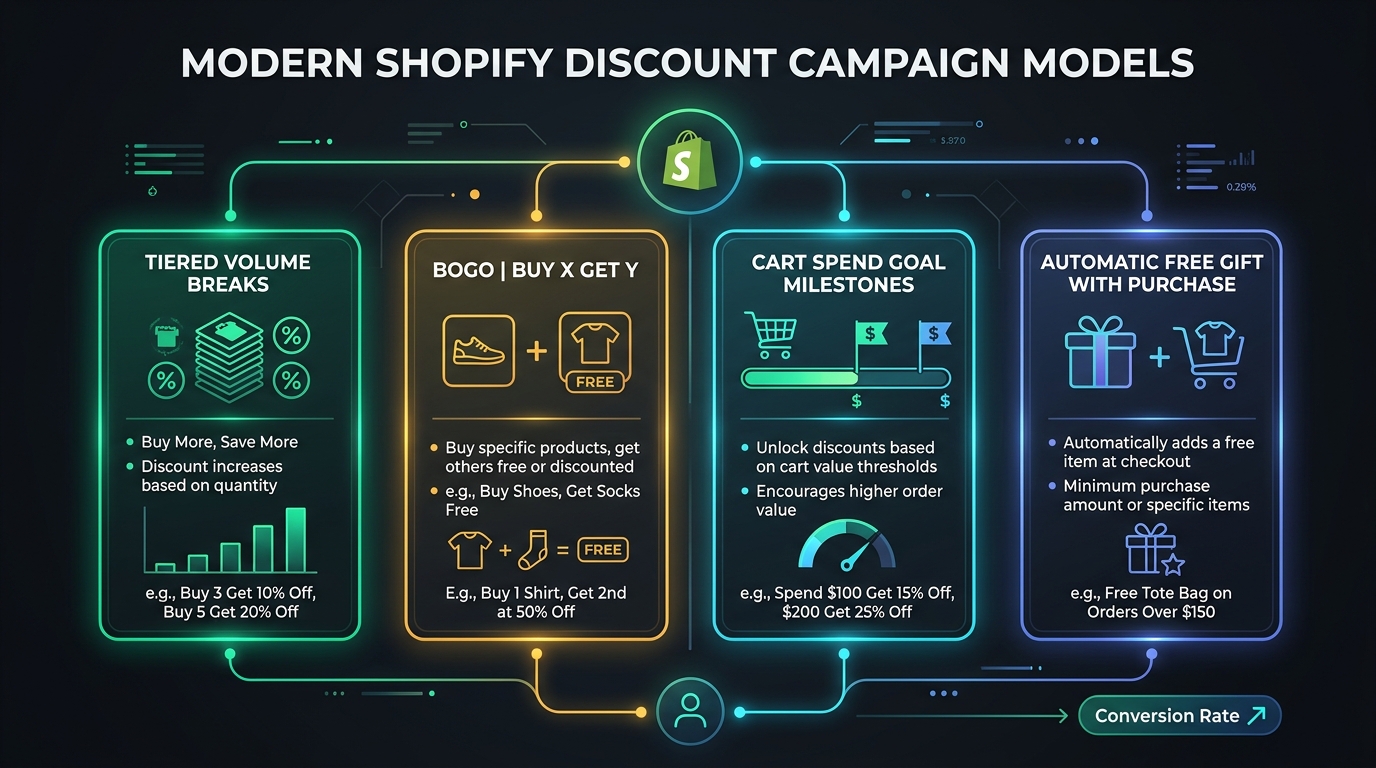
Methodology: How We Evaluated & Compared These Discount Apps
To avoid superficial listicles that merely rewrite marketing copy, our editorial team applied a consistent evaluation rubric across all reviewed applications. Every app was assessed against five core criteria:
- 1. Promotional Flexibility & Campaign Depth: We verified support for primary promotional formats: Buy X Get Y (BOGO), tiered quantity breaks, free gifts with purchase, cart spend goals, and rule stacking/combinations.
- 2. Technical Architecture & Checkout Integrity: We verified whether apps operate via native Shopify Functions (server-side discount execution in WebAssembly) or rely on legacy workarounds (such as draft orders, custom checkout redirects, or “ghost variants” that can disrupt Shop Pay, Apple Pay, and multi-currency conversions).
- 3. Storefront Performance & Theme Integration: We evaluated whether storefront components load cleanly via Shopify Online Store 2.0 Theme App Blocks or require manual edits to theme Liquid files that leave orphaned code upon removal.
- 4. Pricing Transparency & Total Cost of Ownership (TCO): We checked current subscription tiers, development store access, trial periods, and whether apps impose additional percentage-based commission fees on discounted revenue.
- 5. Merchant Reputation & Ecosystem Track Record: We analyzed verified merchant review volume, average ratings on the Shopify App Store, developer maintenance frequency, and customer service responsiveness.
Testing Context: Functional checks were conducted in standard Shopify Online Store 2.0 environments using the official Dawn reference theme across desktop and mobile viewports, observing cart calculations, coupon interactions, and drawer updates.
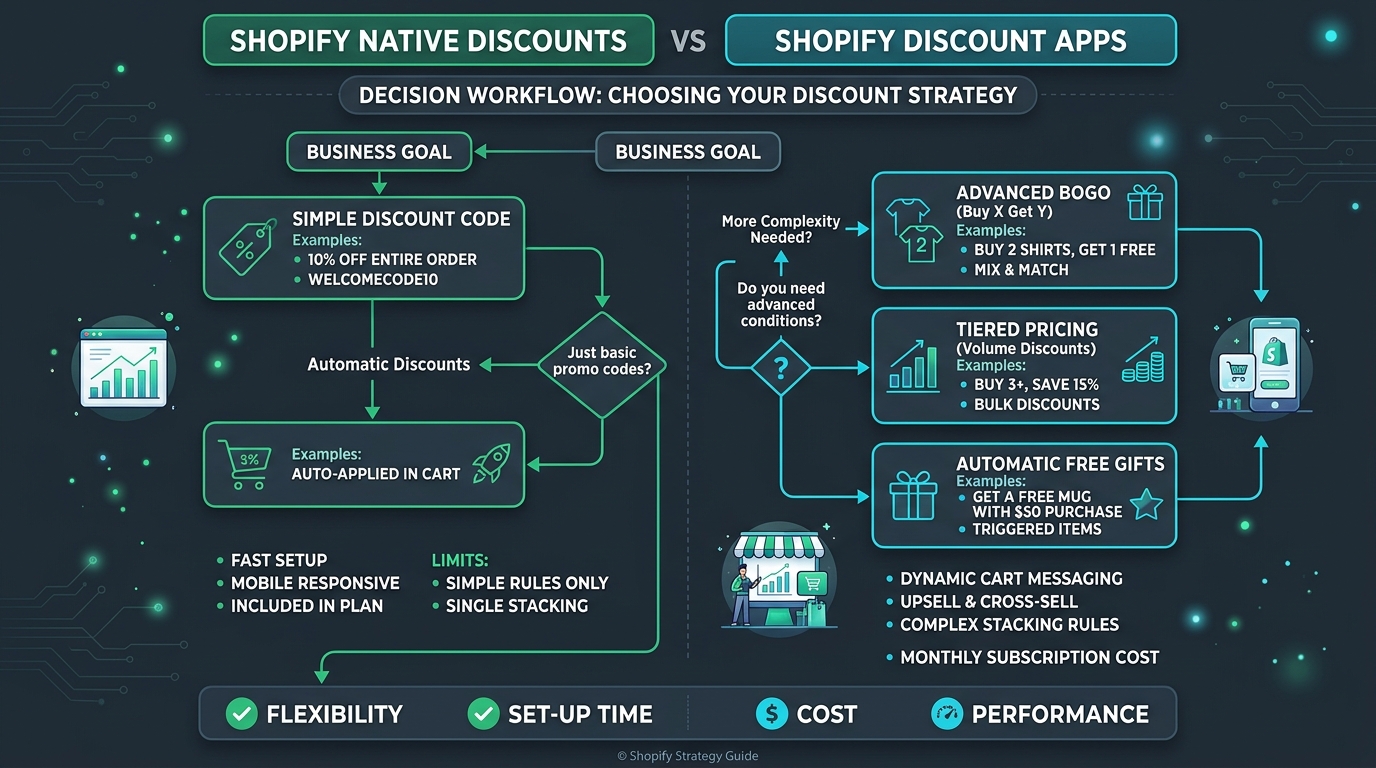
Shopify Native Discounts vs. Third-Party Apps: When Do You Actually Need an App?
Before committing to a monthly app subscription, merchants should determine whether Shopify’s built-in discount engine already meets their operational requirements. Utilizing native functionality keeps overhead low and minimizes third-party dependencies.
What Shopify Native Discounts Handle Well
- Standard Promo Codes & Automatic Discounts: Setting percentage discounts (e.g., 15% off) or fixed amount discounts (e.g., $10 off) across entire orders, specific collections, or specific product lines based on minimum spend or quantity thresholds.
- Basic Buy X Get Y (BXGY): Configuring straightforward offers such as “Buy 2 T-shirts from Collection A, get 1 hat from Collection B at 50% off.”
- Native Discount Combinations: Permitting product discounts to combine with order discounts or shipping discounts when explicitly enabled in the Shopify admin. For an in-depth breakdown of native rules, review our guide on combining product, order, and shipping discounts.
- Zero Storefront Code Overhead: Native discounts execute directly within Shopify’s core platform without injecting JavaScript or CSS into your theme.
Key Functional Gaps in Native Shopify Discounts
- Absence of On-Page Tier Tables: Native volume discounts calculate at checkout. Shoppers browsing a product detail page cannot see an interactive quantity break grid (e.g., “Buy 2 for $35, Buy 3 for $45”) that visually highlights per-unit savings.
- No Automatic Free Gift Addition: In native BXGY promotions, the customer must manually locate the qualifying gift item in your catalog and add it to their cart before the 100% discount applies at checkout. If the shopper forgets to add the item, they receive no gift, leading to customer support inquiries.
- No Progressive Spend Milestone Bars: Native settings cannot render a single interactive progress bar displaying progressive rewards (e.g., “Spend $50 for Free Shipping, $80 for a Free Gift, $100 for 15% Off”).
- Lack of Real-Time Cart Drawer Feedback: Native discounts do not provide dynamic notifications inside AJAX cart drawers explaining why an offer did not trigger or how much more spending is needed.
The Architectural Standard: Shopify Functions vs. Legacy Scripts
When selecting a discount app, technical architecture directly affects conversion stability. Historically, advanced promotions relied on Shopify Scripts (limited to Shopify Plus) or Draft Order APIs. Draft order approaches intercept the checkout button, create temporary backend orders, and frequently break accelerated payment options like Shop Pay and Apple Pay while introducing multi-currency tax errors.
Modern applications run on Shopify Functions. Built on WebAssembly, Shopify Functions execute custom discounting logic directly on Shopify’s servers during checkout calculations. This architecture preserves standard checkout flow, maintains compatibility with accelerated payment wallets, and supports Shopify Markets international currency conversions. Before installing any tool, confirm that it utilizes modern Shopify Functions rather than checkout redirects.
For an operational comparison checklist, consult our article on Shopify native discounts vs. discount apps.
The 10 Best Shopify Discount Apps in 2026 (In-Depth Reviews)
Below is our detailed assessment of the top 10 discount applications available on the Shopify App Store, verified as of October 2026.
1. AIOD – All Automatic Discount (by Cirkle Studio LLC)
Shopify App Store Listing: AIOD on Shopify App Store
Overall Rating: 4.9 / 5 (360+ reviews)
Verified Pricing (October 2026): Free plan for development stores and stores generating under $500/mo in app-assisted revenue. Paid plans: Basic ($14.99/mo), Pro ($24.99/mo), and Plus/Advanced ($39.99/mo).
- Best For: Multi-offer promotional management under a single administrative dashboard.
- Key Capabilities: Tiered volume breaks, BOGO offers, mix-and-match bundles, automated free gifts, customer-tag wholesale pricing, and priority-based discount stacking.
- Strengths: Wide feature variety; enables merchants to run diverse promotional models simultaneously; includes rule priority controls to avoid unintended discount overlap.
- Limitations: The administrative interface contains dense configuration menus with a noticeable learning curve; entry-level tiers include monthly app-assisted sales thresholds.
- Ideal Merchant Profile: Growing catalog stores and multi-category retailers running concurrent seasonal discounts who prefer a single tool over multiple point solutions.
- Verification Notes: Listing details, pricing, and feature availability verified directly via Cirkle Studio LLC’s Shopify App Store listing.
2. BOGOS: Free Gift Bundle Upsell (by Secomapp)
Shopify App Store Listing: BOGOS on Shopify App Store
Overall Rating: 4.9 / 5 (4,400+ reviews)
Verified Pricing (October 2026): 7-day free trial. Paid tiers scale by monthly order volume: Starter ($29.99/mo), Plus ($49.99/mo), Pro ($79.99/mo), and Enterprise ($99.99/mo).
- Best For: Free Gift with Purchase (GWP) promotions and customer-selected gift popups.
- Key Capabilities: Automatic gift insertion into cart, customer-facing gift selection sliders, multi-tier gift rewards (e.g., Spend $60 get Gift A, Spend $120 get Gift B), and URL-based gift activation.
- Strengths: Longstanding ecosystem track record; refined gift-selection drawer modals; dependable handling of gift variant choices (size/color).
- Limitations: Starting price of $29.99/mo is higher for early-stage stores; focused primarily on gifting and BOGO rather than dedicated wholesale quantity tables.
- Ideal Merchant Profile: Beauty, cosmetics, skincare, and apparel brands whose primary merchandising strategy relies on gift incentives to protect brand value. For tactical offer planning, see our Shopify BOGO App Guide.
- Verification Notes: Verified via Secomapp’s official Shopify App Store listing (`freegifts`) and merchant documentation.
3. Discounty: Bulk Discount Sales (by Discounty)
Shopify App Store Listing: Discounty on Shopify App Store
Overall Rating: 4.9 / 5 (1,200+ reviews)
Verified Pricing (October 2026): Free plan available for basic testing. Paid plans: Starter ($9.90/mo), Pro ($19.90/mo), and Ultimate ($39.90/mo).
- Best For: Automated flash sale scheduling, countdown urgency, and bulk catalog price adjustments.
- Key Capabilities: Scheduled sale launches and automatic price rollbacks, bulk percentage markdowns across collections, basic quantity breaks, countdown timer bars, and product badges.
- Strengths: Straightforward campaign wizard; schedule holiday promotional markdowns in advance; competitive entry-level pricing.
- Limitations: Limited advanced logic for conditional gift unlocks or complex multi-tiered cart goals.
- Ideal Merchant Profile: Small to mid-sized retailers who run regular weekend flash sales, holiday clearances, or seasonal catalog markdowns.
- Verification Notes: Developer details, current pricing tiers, and capabilities verified via Discounty’s official App Store listing.
4. Kaching Bundles: Quantity Breaks (by Kaching Appz)
Shopify App Store Listing: Kaching Bundles on Shopify App Store
Overall Rating: 5.0 / 5 (1,000+ reviews)
Verified Pricing (October 2026): Free for development stores. Live store plans: Basic ($14.99/mo), Scale ($29.99/mo), and Pro ($59.99/mo).
- Best For: High-converting on-page quantity break selectors on product detail pages.
- Key Capabilities: Embedded product-page volume break boxes (“Buy 2 Save 10%, Buy 3 Save 15%”), customizable badge callouts (“Most Popular”), variant selection within tier boxes, and native Functions checkout processing.
- Strengths: Exceptionally clean widget design; integrates seamlessly as an Online Store 2.0 app block without theme template disruption; smooth mobile responsiveness.
- Limitations: Specialized exclusively for product-page volume tiers; does not provide sitewide cart goal bars, customer gift modals, or collection-level BOGO rules.
- Ideal Merchant Profile: Direct-to-Consumer (DTC) brands selling consumable goods, basics, or hero SKUs where encouraging multi-unit purchases is the primary objective.
- Verification Notes: Verified via Kaching Appz’s official Shopify App Store listing and documentation.
5. Regios Automatic Discounts (by Regios)
Shopify App Store Listing: Regios on Shopify App Store
Overall Rating: 4.9 / 5 (200+ reviews)
Verified Pricing (October 2026): 7-day free trial. Standard plan starts at $29.99/mo; Plus and Enterprise tiers scale to $49.99–$99.99/mo.
- Best For: Custom conditional logic, B2B wholesale tag discounting, and multi-market discount rules.
- Key Capabilities: Pure Shopify Functions execution; customer tag targeting (wholesale/VIP); market and currency-specific discount rules; flexible volume break logic.
- Strengths: High logic flexibility for technical operators; isolates complex rules without frontend performance drag; robust handling of international market edge cases.
- Limitations: Does not include pre-designed visual frontend widgets (e.g., banners, popups, progress bars); merchants must build storefront messaging via theme blocks or custom code.
- Ideal Merchant Profile: Shopify Plus brands, B2B/retail hybrid merchants, and development agencies seeking backend discount precision without bundled marketing widgets.
- Verification Notes: Verified via Regios’s Shopify App Store profile and developer documentation.
6. Hulk Bundles Quantity Breaks (by HulkApps)
Shopify App Store Listing: Hulk Bundles on Shopify App Store
Overall Rating: 4.6 / 5 (1,100+ reviews)
Verified Pricing (October 2026): 7-day free trial. Basic Plan ($12.00/mo), Pro Plan ($19.90/mo), and Advanced Plan ($29.90/mo).
- Best For: Standard, grid-based volume discount tables across large collections.
- Key Capabilities: Grid and table-style tiered pricing displays, collection-wide quantity tiers, customer-tag restrictions, and basic cart notification messages.
- Strengths: Part of the established HulkApps product suite; accessible entry pricing; customizable table layouts.
- Limitations: Older theme integrations may require manual CSS adjustments for modern custom themes; styling options feel more traditional compared to dedicated modern bundle widgets.
- Ideal Merchant Profile: Merchants already utilizing other HulkApps utilities who need a functional, cost-effective quantity pricing table.
- Verification Notes: Verified via HulkApps official listing URL (`volume-discounts`) and feature notes.
7. Bold Discounts ‑ Flash Sales (by Bold Commerce)
Shopify App Store Listing: Bold Discounts on Shopify App Store
Overall Rating: 4.4 / 5 (1,200+ reviews)
Verified Pricing (October 2026): $19.99/mo flat rate; free for Shopify development stores.
- Best For: Storewide sales that require automated compare-at price updates for external product feed synchronization.
- Key Capabilities: Bulk compare-at price editing, scheduled sale starts and stops, countdown timers, and automated collection sales badges.
- Strengths: Modifies actual variant prices so discounted amounts sync to external channels (Google Shopping, Meta Catalog feeds) without coupon codes; predictable flat monthly pricing.
- Limitations: Updating large catalogs (thousands of SKUs) requires batch API processing time; editing variant compare-at prices can conflict with external ERP or inventory sync tools.
- Ideal Merchant Profile: High-SKU retail merchants heavily reliant on Google Shopping or marketplace feeds where discounts must appear before reaching the checkout.
- Verification Notes: Verified via Bold Commerce documentation and active App Store listing.
8. Wide Bundles ‑ Quantity Breaks (by Mat De Sousa)
Shopify App Store Listing: Wide Bundles on Shopify App Store
Overall Rating: 4.9 / 5 (300+ reviews)
Verified Pricing (October 2026): 14-day free trial. Basic Plan ($18.00/mo) up to Advanced ($36.00/mo) based on store scale.
- Best For: Direct-to-Consumer stores wanting to replace standard variant dropdowns with interactive bundle cards.
- Key Capabilities: Replaces standard Shopify variant dropdowns with selectable bundle offers (“1 Bottle for $30, 2 Bottles + Free Shipping for $50”); customizable promotional badges; mobile-optimized selection buttons.
- Strengths: Built specifically for mobile conversion on paid social traffic (Meta/TikTok); clean, intuitive visual configuration; rapid customer interaction.
- Limitations: Replacing the native variant selector can conflict with specialized third-party color swatch apps or complex multi-option variant architectures.
- Ideal Merchant Profile: Single-product DTC brands, impulse physical products, and stores driving significant mobile advertising traffic.
- Verification Notes: Verified via Mat De Sousa’s official Shopify App Store listing.
9. Unlimited Bundles & Discounts (by Revy Apps)
Shopify App Store Listing: Unlimited Bundles on Shopify App Store
Overall Rating: 4.8 / 5 (720+ reviews)
Verified Pricing (October 2026): Free tier available (up to 1 bundle). Paid tiers: Starter ($9.99/mo), Basic ($19.99/mo), and Professional ($38.99/mo).
- Best For: Value-oriented product bundle packages and basic volume break incentives.
- Key Capabilities: Fixed bundles, mix-and-match bundle collections, tiered volume discounts, and automatic checkout discount application.
- Strengths: Low starting cost ($9.99/mo); dependable customer service; simple setup for straightforward product kits.
- Limitations: Frontend styling controls are basic compared to specialized modern apps like Kaching or Wide Bundles; can require theme tweaks on customized cart drawers.
- Ideal Merchant Profile: Early-stage stores seeking functional product bundling on a modest monthly software budget.
- Verification Notes: Verified via Revy Apps official Shopify listing (`unlimited-bundles-discounts`).
10. Easy Deals (by EasyAppsLab)
Editorial Disclosure: Easy Deals is developed by EasyAppsLab, the publisher of this guide. In accordance with our editorial standards, it is evaluated strictly under the same criteria, limitations, and operational requirements as all competing applications.
Developer: EasyAppsLab
Technical Architecture: Native Shopify Functions (Shopify 2026 API) + Online Store 2.0 Theme App Blocks
Pricing Structure: Free plan available for staging and testing; predictable flat monthly tiers for production stores without percentage-based sales commissions.
- Best For: Stores looking to unify Order Spend Goals (milestone progress bars), BOGO offers, Collection Discounts, and Free Shipping into a single promotional stack.
- Key Capabilities:
- Tiered Order Cart Goals (e.g., $50 → Free Shipping, $100 → Free Gift, $150 → 15% Off) with real-time cart progress bars.
- Automated BOGO and multi-collection Buy X Get Y offers with modal gift selectors.
- Deterministic Campaign Compatibility Engine: evaluates product, order, and shipping discounts together to prevent conflicting rule errors at checkout.
- Native storefront components: sticky promotion bars, drawer progress widgets, and gift modals rendered via Theme App Blocks.
- Strengths: Replaces multiple overlapping apps (shipping bar + spend goal app + BOGO app) with a unified engine; executes server-side on Shopify Functions, preserving standard accelerated checkouts (Shop Pay, Apple Pay).
- Limitations: As a modern solution, it lacks the multi-year public review history of 10-year market incumbents like Bold or Secomapp; optimized strictly for Shopify Online Store 2.0 themes (not suited for legacy non-OS 2.0 architectures).
- Ideal Merchant Profile: Small to mid-sized merchants seeking to simplify their tech stack by managing spend goals, BOGO, and volume discounts within a single system.
- Verification Notes: Architectural implementation and compatibility validated on Shopify Online Store 2.0 reference stores. Merchants are encouraged to test campaign logic on staging stores prior to live campaigns.
Comprehensive Comparison Table (Verified Features & Pricing)
The matrix below summarizes all 10 applications across core promotional capabilities, checkout architecture, and current monthly pricing as verified in October 2026. Only verified capabilities are marked as supported.
| App Name | Primary Focus | BOGO / BXGY | Volume / Tiered Breaks | Free Gift (GWP) | Cart Spend Goals | Shopify Functions | Starting Price | Verification Date |
|---|---|---|---|---|---|---|---|---|
| AIOD | All-in-One Engine | Yes | Yes | Yes | Partial | Yes | Free / $14.99 | Oct 2026 |
| BOGOS | Free Gift with Purchase | Yes | Limited | Yes (Leader) | Yes | Yes | $29.99 | Oct 2026 |
| Discounty | Bulk & Scheduled Sales | Yes | Yes | No | No | Yes | Free / $9.90 | Oct 2026 |
| Kaching Bundles | Product Page Quantity Breaks | No | Yes (Leader) | No | No | Yes | $14.99 | Oct 2026 |
| Regios Discounts | Custom Logic / B2B / Tags | Yes | Yes | Partial | No | Yes (Pure) | $29.99 | Oct 2026 |
| Hulk Bundles | Standard Volume Tables | No | Yes | No | No | Yes | $12.00 | Oct 2026 |
| Bold Discounts | Catalog Flash Sales / Feeds | No | No | No | No | Hybrid | $19.99 | Oct 2026 |
| Wide Bundles | Variant Replacement Bundles | No | Yes | No | No | Yes | $18.00 | Oct 2026 |
| Unlimited Bundles | Budget Bundle Kits | Yes | Yes | No | No | Hybrid | Free / $9.99 | Oct 2026 |
| Easy Deals | Unified Promo Suite & Goals | Yes | Yes | Yes | Yes (Leader) | Yes | Free / Flat Tier | Oct 2026 |
Practical Decision Framework: How to Choose the Right Discount App
Rather than seeking an app with the highest number of features, merchants should align software selection with their primary merchandising mechanism and catalog type. Use the following five operational scenarios:
Scenario 1: DTC Hero-Product & Consumable Brands
- Primary Objective: Increase units purchased per transaction directly on the Product Detail Page (PDP).
- Recommended Apps: Kaching Bundles or Wide Bundles.
- Rationale: These tools embed high-converting visual selectors right next to the “Add to Cart” button, allowing shoppers to upgrade quantities without navigating secondary popups.
Scenario 2: Fashion, Apparel & Multi-Category Retailers
- Primary Objective: Move seasonal inventory using collection-wide BOGO offers and automated weekend flash sales.
- Recommended Apps: Discounty or AIOD.
- Rationale: Large catalogs require bulk scheduling across collections and automated compare-at pricing updates rather than manual per-product tier creation.
Scenario 3: Skincare, Cosmetics & Premium Brands
- Primary Objective: Increase cart size while protecting brand equity from constant percentage markdowns.
- Recommended Apps: BOGOS or Easy Deals.
- Rationale: Free Gift with Purchase (GWP) and Tiered Cart Spend Milestones maintain premium pricing perception while incentivizing shoppers to add high-margin items to reach rewards.
Scenario 4: Technical Stores, B2B & Multi-Market Retailers
- Primary Objective: Implement complex conditional pricing based on customer tags (wholesale vs. retail) and international currency requirements.
- Recommended Apps: Regios Automatic Discounts.
- Rationale: Regios offers deep control over Shopify Functions logic trees without forcing pre-packaged visual templates into custom themes.
Scenario 5: Merchants Seeking App Consolidation
- Primary Objective: Replace multiple overlapping apps (free shipping bar, BOGO app, volume tier app) with a single unified solution.
- Recommended Apps: Easy Deals or AIOD.
- Rationale: Consolidating into one engine avoids rule collisions at checkout and eliminates duplicate monthly software fees.
Margin Caution: Be Aware of Revenue-Share Pricing Models
When reviewing app costs, verify whether the app assesses usage-based commission fees. Certain discounting apps charge a nominal base subscription ($9–$15/mo) but add a 1.5% to 3.0% fee on all sales generated through their widgets. For an e-commerce store generating $40,000 in monthly campaign sales, a 2% commission adds $800/month in software overhead. Always calculate your Total Cost of Ownership based on your projected order volume.
For an analysis of the structural differences between item-level volume tiers and cart-wide rules, see our guide on volume discounts vs. price-based discounts.
Worked Example: Promotion Math and Checkout Margin Reality
To demonstrate how different promotional mechanisms affect gross profit contribution, let us examine an apparel retailer evaluating three promotional structures. The calculation includes full transparent Cost of Goods Sold (COGS) assumptions across all purchased and gifted items.
Baseline Financial Assumptions:
- Core Shirt: Retail Price = $30.00 | COGS = $10.00 (66.7% base margin)
- Accessory Item: Retail Price = $40.00 | COGS = $16.00 (60.0% base margin)
- Free Gift Item: Retail Value = $15.00 | COGS = $5.00 (sourcing cost absorbed by merchant)
| Metric | Strategy A: Product Volume Break (Kaching/Wide) | Strategy B: Tiered Cart Goal (Easy Deals/BOGOS) | Strategy C: Flat 20% Off Coupon (Native) |
|---|---|---|---|
| Customer Action | Buys 3 Shirts ($30 each) | Buys 2 Shirts ($60) + adds $40 Accessory to reach $100 Cart Goal | Buys 1 Shirt ($30) with promo code |
| Gross Retail Value | $90.00 | $100.00 (+$15 Gift = $115 total value received) | $30.00 |
| Discount Applied | Buy 3 Save 15% (-$13.50) | $100 Goal unlocks Free Gift ($15 retail, $0 at checkout) | 20% Off Code (-$6.00) |
| Amount Paid by Customer | $76.50 | $100.00 | $24.00 |
| Itemized Cost of Goods Sold (COGS) | $30.00 (3 × $10.00 shirts) | $41.00 (2 × $10 shirts + $16 accessory + $5 gift cost) | $10.00 (1 × $10.00 shirt) |
| Gross Profit ($) | $46.50 | $59.00 | $14.00 |
| Gross Margin (%) | 60.8% | 59.0% | 58.3% |
Key Strategic Insight: Notice the relationship between gross margin percentage and gross profit dollars. In Strategy B (the Tiered Cart Goal), the merchant’s gross margin percentage is 59.0%—slightly lower than Strategy A’s 60.8% due to absorbing the $5.00 gift cost. However, because the customer added the $40 accessory to qualify for the gift, Strategy B generated $59.00 in net gross profit dollars—yielding +$12.50 (+26.9%) more cash contribution than Strategy A ($46.50) and +$45.00 (+321%) more cash than the flat 20% coupon ($14.00). In retail ecommerce, bank accounts balance on gross profit dollars, not gross margin percentages.
Frequently Asked Questions: Technical & Operational Guide
Before deploying or upgrading promotional tools across your store, review these direct answers to the most critical technical, operational, and architectural questions merchants encounter when evaluating Shopify discount applications.
1. Can I stack multiple discount codes in Shopify without a third-party app?
- Direct Answer: You can combine native discount codes across different discount classes (e.g., Product + Order + Shipping), but you cannot combine multiple automatic product discounts on the same line item using Shopify’s built-in tools alone.
- Platform Mechanics: Shopify’s native discount combination engine requires merchants to explicitly check the “Combines with” boxes in the admin. However, if two separate automatic product promotions apply to the same SKU (such as a 15% collection sale and a “Buy 2 Get 10%” break), Shopify defaults to the single highest saving rule and ignores the other.
- When You Need an App: To implement deterministic priority stacking—such as layering a volume discount with a VIP customer code and an unlocked free gift—you need an app built on Shopify Functions that evaluates combinations server-side. For detailed configuration steps, read our guide on combining product, order, and shipping discounts.
2. Do modern Shopify discount apps work reliably with Shop Pay and Apple Pay?
- Direct Answer: Yes—provided the application is built natively on Shopify Functions. Apps relying on legacy draft order redirects frequently fail or strip discounts during accelerated checkout.
- Platform Mechanics: Shopify Functions execute within Shopify’s core checkout infrastructure in WebAssembly (WASM). Because the discount is calculated server-side before the checkout payload is dispatched to payment processors, accelerated checkout wallets (Shop Pay, Apple Pay, Google Pay, and PayPal Express) receive the exact discounted order total.
- Verification Tip: In your testing environment, always perform an end-to-end checkout using Shop Pay. If the app redirects you to an external domain or shows the full price before jumping to a secondary page, the app is not using modern Shopify Functions architecture.
3. Will installing a discount app slow down my storefront or hurt Core Web Vitals?
- Direct Answer: Apps built with Online Store 2.0 Theme App Blocks and server-side Shopify Functions have minimal impact on your storefront’s Core Web Vitals (LCP, FID, CLS) compared to legacy script-injection apps.
- Platform Mechanics: Legacy discount apps injected large external JavaScript bundles into `theme.liquid` to monitor cart changes and recalculate prices in the browser DOM. Modern apps host their discount execution on Shopify’s servers during checkout calculations, limiting frontend requirements to lightweight, asynchronous theme blocks.
- Best Practice: Avoid apps that require editing your theme’s Liquid template files directly. Verify in Shopify Theme Editor that the app installs strictly as an App Block or App Embed that can be toggled on or off without leaving orphaned code.
4. What is the essential pre-launch testing checklist before running a live promotion?
- Direct Answer: Never launch a discount campaign without validating four high-impact edge cases in a private/incognito browser session:
- Test 1 — Sub-Threshold Cart: Add fewer items or less spend than required. Confirm that no premature discount triggers and progress indicators clearly display the remaining gap.
- Test 2 — Qualification & Reward: Add qualifying items. Verify that the correct discount percentage or free gift automatically appears in the cart drawer and transfers into checkout.
- Test 3 — Qualification Revocation: Remove qualifying items from the cart. Confirm that the reward or free gift is cleanly removed and not retained at checkout.
- Test 4 — Multi-Currency / International Markets: If you use Shopify Markets, test the promotion in your top foreign currencies to confirm that exchange rounding does not prevent customers from hitting threshold requirements. If discounts fail to trigger, consult our guide on troubleshooting Shopify discounts not applying.
5. What happens when I uninstall a discount app, and how do I prevent storefront errors?
- Direct Answer: If you delete an app from the Shopify Admin while campaigns or theme embeds are still active, you risk leaving orphaned theme code, broken cart drawers, or active discount functions that continue applying in checkout.
- The Clean Offboarding Protocol: Always follow this 3-step sequence: (1) de-activate all running campaigns within the app’s dashboard; (2) open the Shopify Theme Editor and disable all app blocks and app embeds; (3) test adding items to your cart to verify native theme functionality before clicking “Uninstall” in your Shopify Admin.
- Merchant Resource: For a comprehensive safety checklist before changing your promotional software, see our detailed guide on what to check before uninstalling a Shopify discount app.
Summary & Next Steps
There is no universal “best” discount app for every Shopify store—only the software that aligns with your specific promotional strategy. If your priority is driving multi-unit purchases on single product pages, deploy Kaching Bundles or Wide Bundles. If your growth model relies on gift incentives that protect brand equity, BOGOS is the proven market benchmark. For storewide holiday flash sales, Discounty and Bold Discounts deliver dependable bulk scheduling. And if you wish to consolidate cart spend goals, BOGO offers, volume discounts, and shipping tiers into a single deterministic Shopify Functions engine, Easy Deals provides a modern, high-performance foundation.
Before launching your next major campaign, calculate your itemized COGS across every qualifying product and bonus gift, verify that your chosen application runs on native Shopify Functions, and validate your checkout flow across mobile wallets.