
Merchants should rely on native Shopify discounts if their promotional needs are limited to standard coupon codes, fixed or percentage order discounts, and basic manual Buy X Get Y offers evaluated strictly at checkout. However, store owners must deploy a dedicated discount app when their merchandising strategy requires interactive storefront widgets (such as slide-out cart drawer progress bars and product page quantity break tables), automated free gift injection without forcing customers to search for reward SKUs, dynamic cheapest-item price targeting across broad collections, or complex multi-tiered spend goals. Modern discount apps powered by Shopify Functions execute server-side in WebAssembly under an enforced 5 millisecond runtime budget, guaranteeing sub-second checkout speed and complete compatibility with Shop Pay and accelerated wallets.
Choosing between native tools and third-party software is not merely a question of app subscription pricing—it is an architectural and financial evaluation. An unoptimized discount app using legacy code can slow storefront performance, cause checkout drop-off, and erode margins through uncontrolled discount stacking. Conversely, relying strictly on native settings when launching complex promotions introduces customer friction that depresses Average Order Value (AOV). This comprehensive decision guide compares native capabilities against specialized discount apps across 10 functional criteria, details the technical evolution of Shopify Functions, and delivers a deterministic break-even Return on Investment (ROI) mathematical model.

1. Native Shopify Discount Capabilities & Built-in Strengths
Shopify’s core platform includes a robust, built-in discount engine available across all subscription tiers (Basic, Shopify, Advanced, and Plus). For many emerging DTC brands, these built-in tools deliver exceptional operational efficiency without adding monthly software overhead.
What Native Shopify Discounts Do Exceptionally Well
- Zero Incremental Software Cost: Native discounts are included natively within your Shopify subscription, eliminating monthly SaaS app fees and third-party contract management.
- Direct Checkout Core Integration: Native discounts evaluate directly within Shopify’s primary checkout engine, guaranteeing zero API downtime, zero theme script conflicts, and instant compatibility with accelerated wallets (Shop Pay, Apple Pay, Google Pay, PayPal).
- Comprehensive Three-Class Architecture: Supports discounts across all three platform classes: Product Discounts (line-item percentage or dollar savings), Order Discounts (cart-level deductions), and Shipping Discounts (free or discounted shipping rates).
- Granular Customer Eligibility & Usage Limits: Easily restrict coupon codes to specific customer segments, first-time buyers, minimum subtotal thresholds, or maximum usage caps per customer.
- Up to 25 Active Automatic Discounts: Modern Shopify stores can run up to 25 active automatic discounts concurrently without requiring manual coupon entry.
Ideal Merchant Profile for 100% Native Discounts: A store selling an edited catalog (under 50 SKUs) running occasional holiday sales (e.g., “Use code BFCM20 for 20% off sitewide”) or simple volume thresholds that do not require on-page quantity tables or free gift injection.
2. When Native Falls Short: The 5 Merchandising Triggers for a Dedicated App
As an ecommerce brand scales beyond single-product marketing into structured merchandising campaigns, native Shopify settings encounter five rigid functional ceilings.
Trigger 1: The Native Buy X Get Y Manual-Add Limitation
Under native Shopify automatic discounts, Buy X Get Y offers operate strictly as post-selection pricing rules. According to official Shopify documentation, customers must manually locate and add all qualifying buy items and discounted reward items into their cart before the discount evaluates. If you promote “Buy a jacket, get a free beanie,” and a customer adds only the jacket, native checkout does not auto-insert the beanie. Dedicated promotion apps eliminate this friction by listening to storefront AJAX cart events and automatically injecting qualifying gift SKUs into the cart drawer. Learn more in our Shopify BOGO app guide.
Trigger 2: Total Absence of Storefront Visual Feedback & Steppers
Native Shopify discounts evaluate only at checkout. They cannot render interactive quantity-break tables on product pages (e.g., “Buy 2 for $50, Buy 3 for $65”) or visual progress bars inside sliding cart drawers. According to the Goal Gradient Effect (Kivetz, Urminsky & Zheng, 2006), consumer motivation accelerates as shoppers perceive proximity to a reward milestone. An interactive cart progress bar displaying “Add $15 more to unlock Free Shipping & a Free Gift” creates compelling psychological urgency that native checkout cannot provide.
Trigger 3: Inability to Discount the Cheapest Item Across Unequal Collections
In native Shopify BXGY discounts across multi-product collections, if a customer selects three items of differing prices ($50, $40, and $20), native rules lack granular controls to guarantee the lowest-priced item is discounted. If an unmanaged promotion discounts the $50 jacket instead of the $20 tote bag, gross profit collapses by more than 50%! Dedicated apps provide automated cheapest-item sorting logic that protects gross margin dollars. Review our cheapest item discount tutorial.
Trigger 4: Complex Multi-Tiered Spend Ladders
Native automatic discounts cannot easily configure cascading spend tiers (e.g., Spend $50 get 10% off; Spend $100 get 15% off + Free Shipping; Spend $150 get 20% off + Deluxe Gift) within a single unified rule. Dedicated apps manage complex multi-tier ladders seamlessly, providing clear visual milestones that lift Average Order Value (AOV). Explore our cart goal strategy guide.
Trigger 5: Advanced Collection Sets (ALL vs. ANY Logic)
Native discounts default to ANY (union) logic across collections. Dedicated apps support ALL (intersection) logic, allowing merchants to require shoppers to purchase from multiple distinct categories (e.g., 1 Top AND 1 Bottom) before unlocking a promotion, preventing discount gaming. Master collection rules in our Shopify collection discount rules guide.
3. Technical Evolution: Why Shopify Functions Replaced Legacy Draft Hacks
The historical hesitation many merchants felt toward third-party discount apps was well-founded: legacy apps used fragile workarounds that damaged conversion rates. Understanding the three generations of discount architecture is essential for technical evaluation.
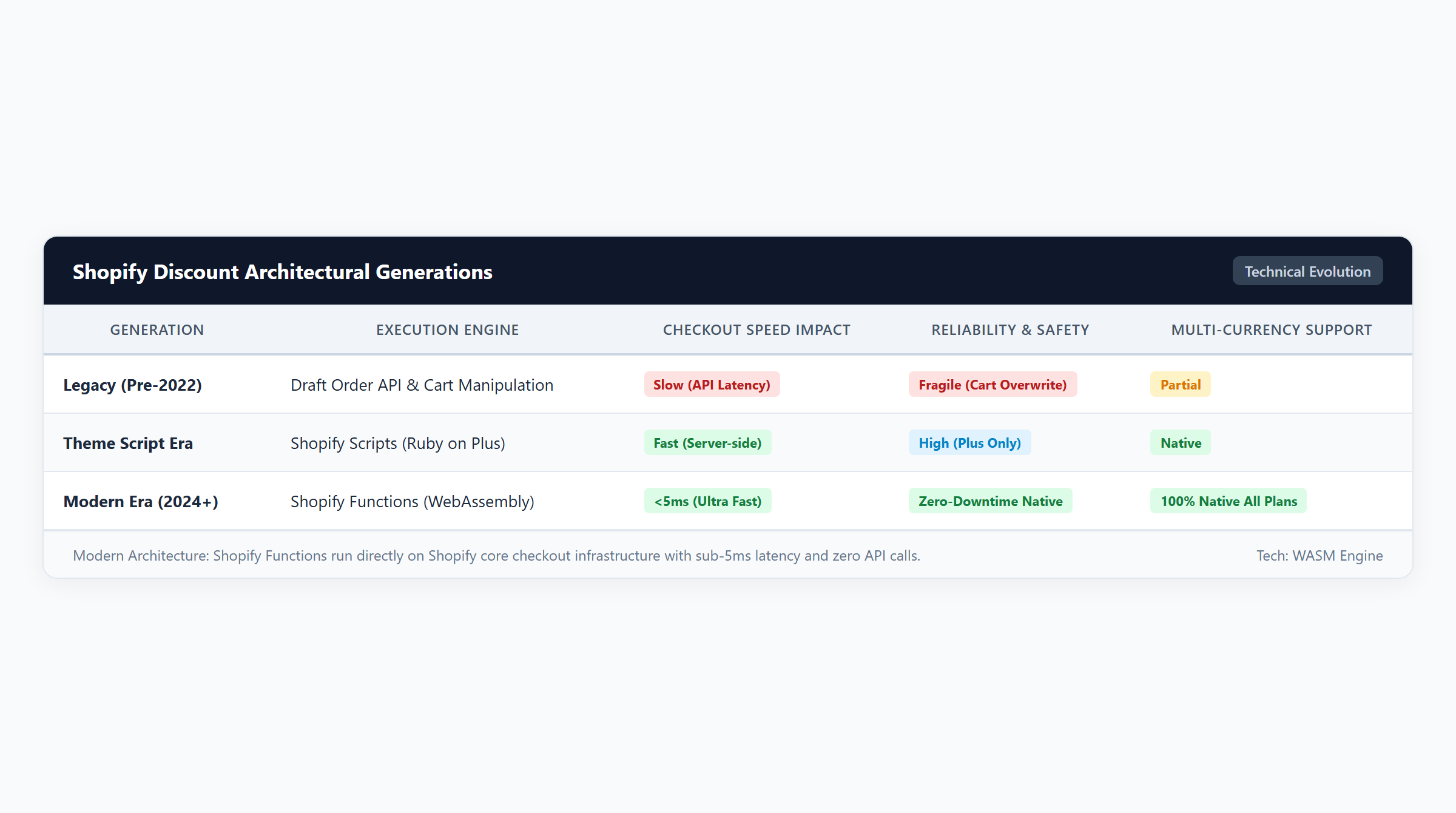
- Generation 1: Draft Order API Hijacking (Deprecated): Legacy apps intercepted the checkout button and generated a custom Draft Order via API. This broke accelerated wallets (Shop Pay, Apple Pay, Google Pay), stripped Google Analytics and ad attribution UTM parameters, bypassed automated sales tax calculations, and caused inventory reservation race conditions.
- Generation 2: Ruby Scripts via Script Editor (Sunset / Deprecated): Ruby Scripts ran only on enterprise Shopify Plus plans and required technical developer maintenance. Shopify has officially deprecated the Script Editor, requiring all merchants to transition custom discount logic to Shopify Functions.
- Generation 3: Shopify Functions (Modern Standard): Built on Shopify Extensibility, Functions compile custom business rules into WebAssembly (WASM). Functions execute server-side directly within Shopify’s checkout infrastructure under an enforced 5 millisecond execution budget. Functions maintain 100% compatibility with Shop Pay, introduce zero client-side JavaScript delay, and support clean discount allocations across line items.
4. The 10-Point Decision Scorecard: Native Discounts vs. Dedicated Apps
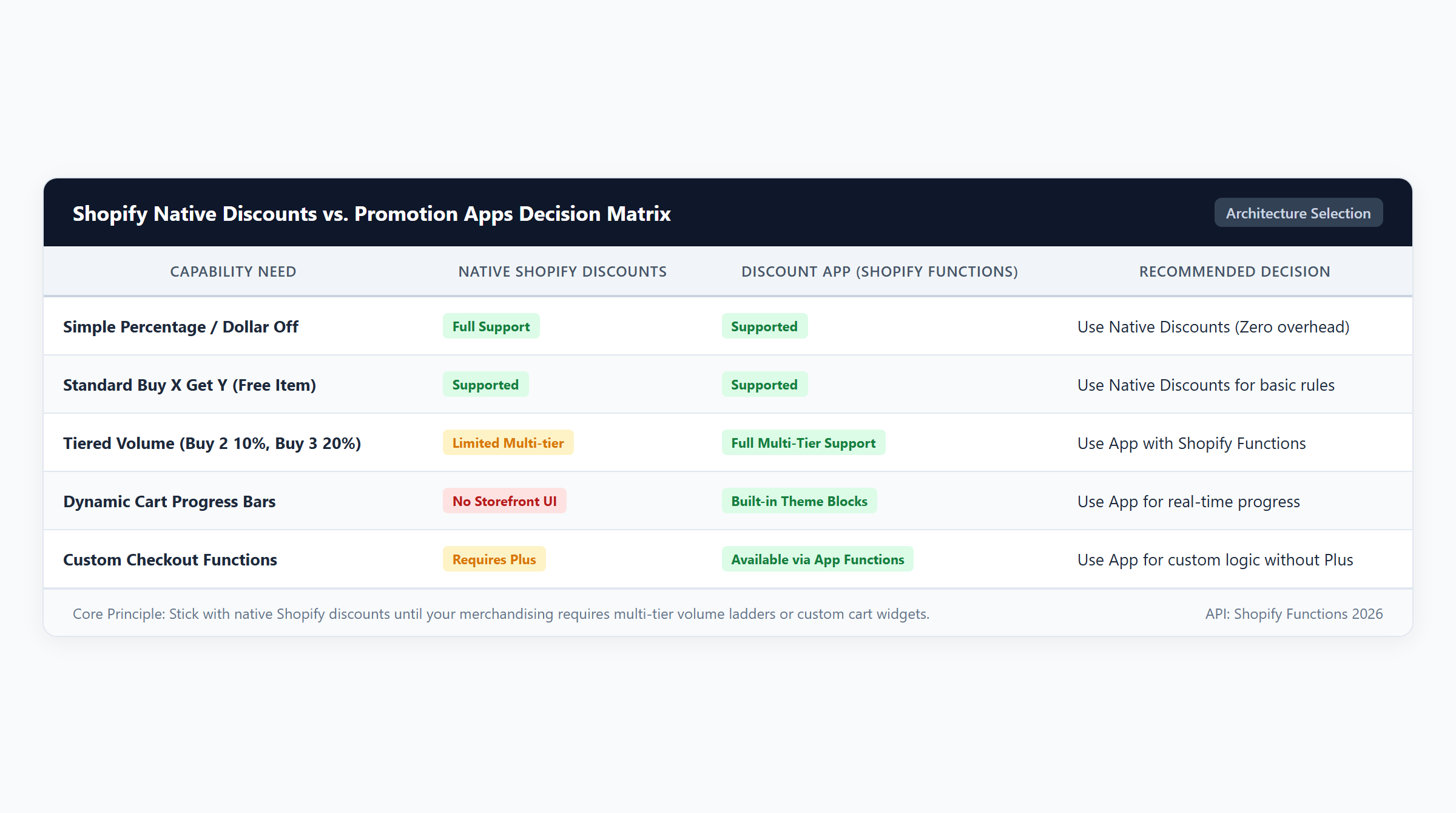
Use this structured 10-point evaluation matrix to assess whether your store’s merchandising requirements justify an app:
| Functional Criterion | Native Shopify Discounts | Modern Discount App (Easy Deals) | Strategic Recommendation |
|---|---|---|---|
| 1. Basic Promo Codes | Full Support | Full Support | Use Native |
| 2. Free Shipping Discounts | Full Support | Full Support | Use Native |
| 3. Free Gift Auto-Injection | Unsupported (Manual add only) | Full Automated Injection | Requires App |
| 4. Variant Selection Popups | Unsupported | Interactive Modal Support | Requires App |
| 5. Cart Drawer Progress Bars | Unsupported | Dynamic Milestone Steppers | Requires App |
| 6. Quantity Break Tables | Unsupported | Product Page Grids | Requires App |
| 7. Cheapest Item Targeting | Limited Matching | Dynamic Catalog Sorting | Requires App |
| 8. Multi-Tier Spend Goals | Complex Manual Stacking | Unified Tier Ladder | Requires App |
| 9. ALL vs. ANY Set Logic | ANY Only | ALL and ANY Supported | Requires App |
| 10. Monthly App Cost | $0.00 / mo | $15 – $49 / mo | Evaluate ROI |
5. Total Cost of Ownership (TCO) & Break-Even App ROI Modeling
Investing in a specialized discount app should never be viewed as an unrecoverable operational expense; it must be audited as a direct profit driver. The table below compares baseline native transactions against app-powered basket expansion across transparent unit economics:
| Campaign Scenario | Gross Retail | Discount ($) | Net Paid | Total COGS | Gross Profit ($) | Gross Margin (%) |
|---|---|---|---|---|---|---|
| 1. Native Baseline Order ($0 App Fee) 1x Baseline Item ($60 Retail, $20 COGS) | $60.00 | $0.00 | $60.00 | $20.00 | $40.00 | 66.7% |
| 2. App-Powered Tiered Goal (+AOV Lift) 1x Expanded Basket ($80 Retail, $25 COGS, 10% Off) | $80.00 | $8.00 | $72.00 | $25.00 | $47.00 | 65.3% |
| 3. Low-Ticket Order ($25 Order with $5 Off) 1x Entry Accessory ($25 Retail, $10 COGS) | $25.00 | $5.00 | $20.00 | $10.00 | $10.00 | 50.0% |
| 4. High-Volume Bundle ($120 Order, B2G1 Cheapest Free) $60 Denim + $40 Chino + $20 Bag ($36 total COGS) | $120.00 | $20.00 | $100.00 | $36.00 | $64.00 | 64.0% |
The App Subscription Break-Even ROI Formula
To determine whether an app subscription makes commercial sense for your store, calculate the exact number of incremental expanded orders required to cover the monthly software fee:
$$\text{Incremental Orders to Break Even} = \frac{\text{Monthly App Subscription Fee (\$/mo)}}{\text{Incremental Gross Margin Dollars per App-Influenced Order (\$/order)}}$$
Worked Merchant Example: Suppose you deploy Easy Deals on the Shopify App Store at a subscription fee of $19.00/month. In Scenario 2, an app-powered cart progress bar lifts AOV from $60.00 to $80.00, generating $47.00 in gross profit compared to the $40.00 baseline—an incremental profit of +$7.00 per influenced order.
$$\text{Incremental Orders to Break Even} = \frac{\$19.00}{\$7.00} \approx 2.71 \text{ orders}$$
Your store needs only 3 expanded orders per month to achieve complete break-even on the software fee! Every subsequent influenced order generates pure incremental profit contribution to your bottom line.
6. Operational Safeguards: Return Economics, Combinations & Stacking Limits
Whether utilizing native settings or third-party extensions, merchants must configure checkout combination guardrails to prevent accidental discount stacking.
Pro-Rated Line Item Discount Allocation on Returns
Under official Shopify return logic, order and bundle discounts are prorated across all qualifying line items. In Scenario 4 ($120 bundle with $20 discount, customer paying $100 total), the $20 discount is prorated across the items based on relative prices. If the customer returns one item, Shopify’s refund engine returns only the prorated net value, preventing the customer from returning full-price items while keeping discounted merchandise for free.
Two-Way Combinations and the 25 Automatic Discounts Limit
Every discount on Shopify belongs to one of three classes: Product, Order, or Shipping. Under Shopify platform rules:
- Two-Way Configuration: For a product discount to combine with an order-level discount or free shipping coupon, both discount rules must have combination checkboxes explicitly enabled in Shopify Admin. If either discount forbids combinations, Shopify checkout prioritizes the single discount offering the greatest monetary savings.
- The 25 Automatic Discounts Platform Ceiling: Shopify limits every store to a maximum of 25 active automatic discounts concurrently. Merchants running multiple tiered BOGO and volume rules must audit their active rule counts. Master combination strategy in our Shopify discount combinations guide.
Shopify Markets Multi-Currency and Tax Calculations
In international Shopify Markets, automatic price rounding rules can alter converted spend thresholds across foreign currencies. Additionally, sales taxes (such as US State Sales Tax or UK/EU VAT) are calculated on the net post-discount value per line item, ensuring statutory tax compliance.
7. Frequently Asked Questions (FAQ)
Do discount apps slow down Shopify storefronts and checkout?
Legacy apps that hijacked checkout buttons or injected bloated JavaScript did slow stores down. Modern discount apps built on Shopify Functions execute server-side in WebAssembly within Shopify’s global infrastructure under a strict 5ms runtime ceiling. They introduce zero checkout latency and maintain complete compatibility with Shop Pay.
Can I run Buy 2 Get 1 Free without paying for an app?
Yes, but with significant operational friction. Native Shopify Buy X Get Y discounts can enforce a B2G1 rule, but customers must manually find and add all 3 items to their cart. If you want the app to automatically discount the cheapest item, show cart progress bars, or auto-add gifts, a dedicated app is required.
Can native discounts combine with app-generated discounts?
Yes. Because modern apps use Shopify Functions, app discounts register as native Shopify discount rules. Provided both the native rule and the app rule have two-way combination permissions enabled in Shopify Admin, they combine seamlessly at checkout.
Are Shopify Functions discount apps restricted to Shopify Plus?
No. Unlike legacy Ruby Scripts (which were restricted exclusively to Shopify Plus), Shopify Functions discount applications are fully supported across all Shopify plans, including Basic, Shopify, Advanced, and Plus.
What happens if I uninstall a discount app?
When uninstalling an app built on Shopify Functions, always deactivate active discount campaigns and disable the App Embed in your Theme Editor before removing the app. This prevents orphan metafields from lingering in your theme. Follow our complete checklist: what to check before uninstalling a Shopify discount app.
Editorial Disclosure: Easy Deals is developed by EasyAppsLab. We evaluate all ecommerce promotion software using identical technical criteria, transparent Cost of Goods Sold accounting, and verified platform documentation. Merchants are encouraged to test all promotional rules in staging environments before public launch.