Shopify Buy X Get Y (BXGY) and Free Gift with Purchase (GWP) promotions allow merchants to reward shoppers with a complimentary or discounted item whenever cart contents satisfy predefined purchase criteria. While Shopify includes built-in discount settings for basic Buy X Get Y promotions, native discounts enforce a major operational constraint: customers must manually search your product catalog and add the free gift SKU into their cart before any discount evaluates at checkout. To eliminate this friction, scaling merchants deploy dedicated promotion apps built on modern Shopify Functions that automatically inject free gifts into AJAX cart drawers, offer interactive popups for variant selection (such as apparel sizing or cosmetic shades), and display real-time progress bars via sub-5ms WebAssembly execution without checkout latency.
However, launching a gifting campaign without evaluating unit-level economics can rapidly deplete operating profits. While giving away a “free” product feels less aggressive than slashing prices by 50%, every physical gift carries landed Cost of Goods Sold (COGS), warehouse picking fees, and added carrier shipping weight. This comprehensive merchant guide details the technical architecture of Shopify Buy X Get Y offers, examines the mathematical economics of gifting across four worked financial models, provides a minimum spend threshold formula, and delivers a 7-point quality assurance acceptance test matrix.

1. Architecture: Native Shopify BXGY vs. Legacy Workarounds vs. Shopify Functions
Understanding the exact boundaries between native Shopify admin settings, deprecated legacy workarounds, and modern Shopify Functions is critical for designing promotions that scale without checkout failure.
The Native Manual-Add Limitation
Under Shopify’s native discount engine, Buy X Get Y discounts operate strictly as post-selection pricing rules. According to official Shopify documentation, customers must manually locate and add all qualifying buy items and discounted reward items into their cart before the discount calculates at checkout. If a merchant advertises “Buy any winter coat, get a free cashmere scarf,” and a shopper adds the coat to their cart but fails to manually find and add the scarf, native Shopify checkout calculates the transaction without the gift.
This disconnect creates immediate friction: shoppers assume the promotion is broken, abandon their carts, or complete checkout and submit angry support tickets demanding the missing gift. Dedicated Shopify discount apps resolve this bottleneck through storefront theme integration and event-driven gift injection.
The Evolution: Legacy Draft Orders & Scripts vs. Shopify Functions
To automate gift insertion, historical discount apps relied on workarounds that compromised store security and checkout conversion:
- Draft Orders Workaround (Deprecated): Early apps hijacked the checkout flow by redirecting carts to a generated Draft Order. This broke accelerated wallet checkouts (Shop Pay, Apple Pay, Google Pay), stripped Google Analytics and ad attribution UTM parameters, bypassed automated sales tax calculations, and created inventory reservation race conditions.
- Shopify Scripts (Sunset / Deprecated): Ruby-based Scripts ran only on enterprise Shopify Plus plans and required technical developer maintenance. Shopify has officially deprecated the Script Editor, requiring all merchants to transition custom discount logic to modern Shopify Functions.
- Shopify Functions (Modern Standard): Built on Shopify Extensibility, Functions compile custom business rules into WebAssembly (WASM). Functions execute server-side directly within Shopify’s checkout infrastructure under an enforced 5 millisecond execution budget. Functions maintain 100% compatibility with Shop Pay, introduce zero client-side JavaScript delay, and support clean discount allocations across line items.
| Architectural Metric | Native Shopify BXGY | Legacy Draft Orders / Scripts | Modern Shopify Functions App |
|---|---|---|---|
| Free Gift Auto-Injection | No (Customer must manually add) | Yes (Via cart hijacking) | Yes (Storefront AJAX + Functions) |
| Execution Latency | Native Checkout Core | External API delay / Ruby script | Sub-5ms WebAssembly (WASM) |
| Shop Pay & Wallet Support | Fully Compatible | Broken / Disabled | 100% Accelerated Checkout Compatible |
| Plan Eligibility | All Shopify Plans | Shopify Plus only (Scripts) | All Shopify Plans |
| Active Limit | Up to 25 Auto-Discounts | Variable | Within Platform 25-Rule Pool |
For an architectural teardown of checkout engines, read our guide on Shopify native discounts vs. discount apps.
2. Promotional Mechanics: Quantity BXGY vs. Spend GWP & Behavioral Psychology
Merchants often confuse “Buy X Get Y” and “Gift with Purchase,” but they serve different merchandising objectives and rely on distinct psychological triggers.
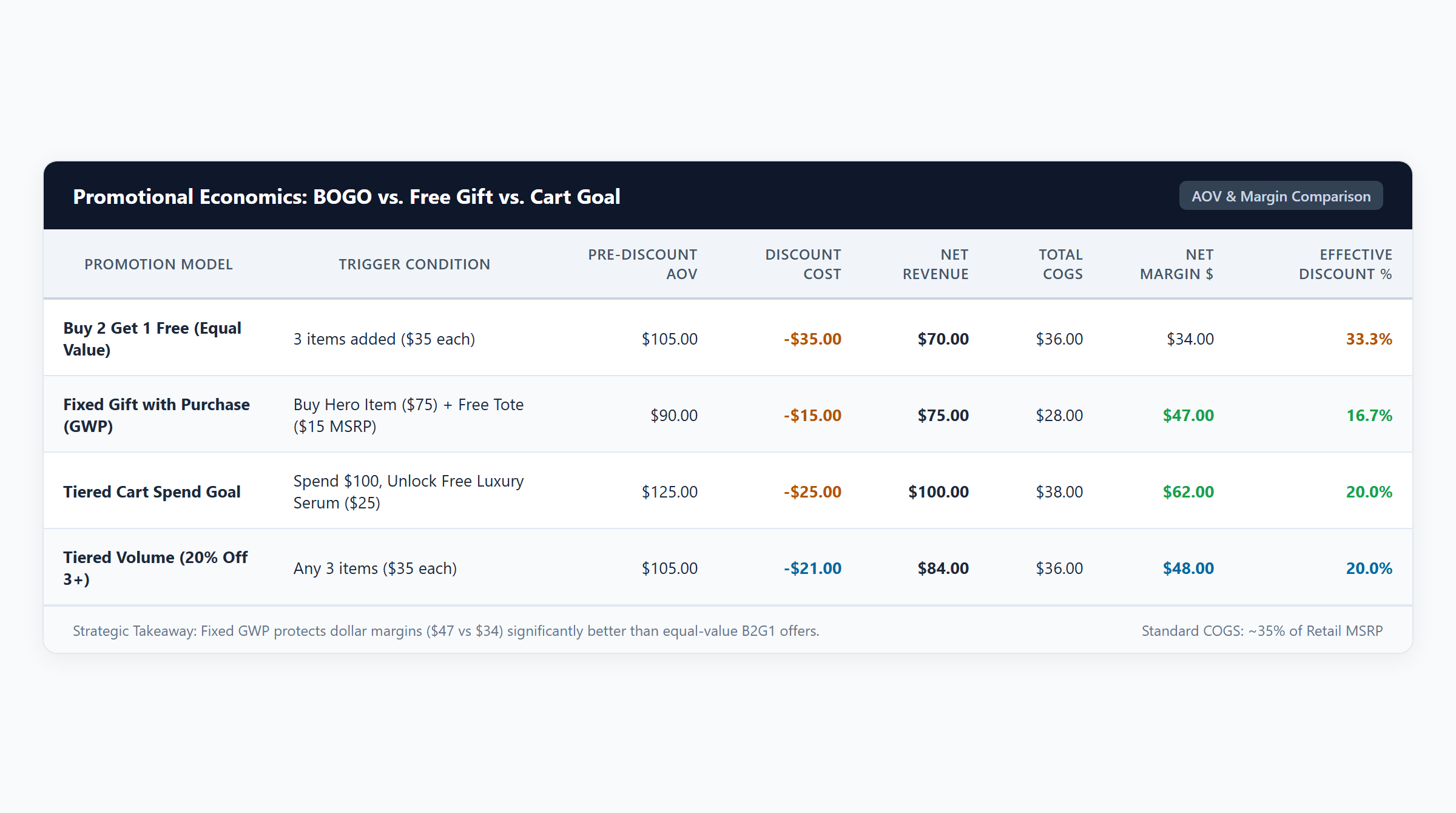
- Quantity-Triggered BXGY (Unit Bundles): Purchasing a specific number of items from a qualifying collection unlocks a free or discounted item (e.g., “Buy 2 Shirts, Get 1 Pouch Free”). This mechanic is engineered to increase multi-item basket depth and clear seasonal inventory. Review our Buy 2 Get 1 Free guide.
- Spend-Triggered GWP (Milestone Goals): Crossing a defined cart subtotal (e.g., “Spend $75, Unlock a Free Travel Glow Serum”) triggers the reward. This mechanic directly expands Average Order Value (AOV) by providing a compelling incentive to add an incremental product. Learn how to configure milestones in our cart goal tutorial.
- Tiered Escalating GWP: Multi-milestone progress bars (e.g., Spend $50 for Free Shipping, Spend $100 for a Deluxe Travel Kit, Spend $150 for a Canvas Duffel Bag). This structure captures both low-ticket and high-ticket customer segments without cannibalizing margins.
Behavioral Economics: Framing Deal Value
Why do shoppers often prefer a free gift over an equivalent cash discount? Three foundational behavioral economics principles explain this phenomenon:
- The Zero-Price Effect (Shampanier, Mazar & Ariely, 2007): Research published in Marketing Science demonstrates that items offered for exactly zero trigger an affective emotional response that significantly exceeds the linear utility of a price decrease. Consumers view free items not merely as discounted products, but as inherently risk-free bonuses, generating higher conversion rates than equal dollar discounts.
- Reference Price Preservation (Raghubir & Corfman, 1999): Repeated cash markdowns erode a product’s internal reference price, training consumers to delay purchases until the next promotional sale. Offering a branded accessory as a “Free Gift” protects the core product’s premium reference price while still delivering transaction satisfaction.
- The Goal Gradient Effect (Kivetz, Urminsky & Zheng, 2006): Empirical research in the Journal of Marketing Research proves that consumer purchase motivation accelerates as they perceive proximity to a goal. In an ecommerce cart drawer, an interactive milestone progress bar displaying “You are only $15 away from your Free Serum” creates urgency, encouraging shoppers to browse add-ons to unlock the reward.
3. Profitability Guardrails: Unit Economics & Landed COGS Analysis
A promotion that drives dramatic revenue expansion while depleting gross profit contribution damages brand health. Every gifting campaign must be evaluated based on Net Dollar Profit Contribution after accounting for physical unit manufacturing costs, packaging, and fulfillment labor.
| Campaign Scenario | Gross Retail | Discount ($) | Net Paid | Total COGS | Gross Profit ($) | Gross Margin (%) |
|---|---|---|---|---|---|---|
| 1. BXGY Bundle (Buy 2 Shirts Get Pouch) 2x $25 Shirts ($8 COGS) + $15 Pouch ($4 COGS) | $65.00 | $15.00 | $50.00 | $20.00 | $30.00 | 60.0% |
| 2. Spend Goal GWP ($75 Unlocks Serum) $35 Cleanser + $40 Cream + $20 Serum ($5 COGS) | $75.00 | $0.00 | $75.00 | $30.00 | $45.00 | 60.0% |
| 3. Margin Leakage: Low Spend with High COGS 2x $25 Tees ($12 COGS) + $25 Scarf ($9 COGS) | $50.00 | $0.00 | $50.00 | $33.00 | $17.00 | 34.0% |
| 4. Multi-Tier GWP ($120 Unlocks Leather Case) $60 Jacket + $60 Pants + $30 Case ($8 COGS) | $120.00 | $0.00 | $120.00 | $48.00 | $72.00 | 60.0% |
Key Financial Takeaways for Brand Operators
- Curated GWP (Scenario 2) captures the highest dollar gross profit ($45.00) while preserving a 60.0% margin. By selecting a sample gift with low manufacturing cost ($5 COGS) but high customer utility ($20 retail), the store captures $75 in cash revenue with minimal margin drag.
- BXGY Bundling (Scenario 1) successfully pairs two core garments with a low-cost accessory ($4 COGS). Discounting the accessory by 100% ($15 discount) maintains a 60.0% margin, producing $30.00 in contribution.
- The Margin Leakage Hazard (Scenario 3) highlights the danger of pairing low spending thresholds with expensive physical gifts. Unlocking a $25 scarf with a $9 COGS on a $50 order collapses gross margin to 34.0%, leaving only $17.00 in profit. After factoring in merchant processing fees and freight shipping, the store risks operating at a net loss.
- Multi-Tiered GWP (Scenario 4) demonstrates how higher milestone thresholds ($120) absorb premium gifts ($8 COGS) while expanding dollar gross profit to $72.00.
The GWP Minimum Spend Threshold Formula
To prevent margin erosion, calculate the minimum cart spend required to fund a promotional gift using this formula:
$$\text{Minimum Cart Spend Threshold} = \frac{\text{Landed Unit COGS of Free Gift}}{\text{Target Allowable Margin Reduction \%}}$$
Worked Example: If your free gift carries a unit landed COGS of $6.00 (manufacturing, packaging, and extra freight weight), and your financial model permits a maximum margin reduction of 6% to fund customer acquisition, your minimum threshold is:
$$\text{Minimum Spend Threshold} = \frac{\$6.00}{0.06} = \$100.00$$
Setting your cart spend milestone at or above $100.00 guarantees that gift fulfillment costs will not breach your financial guardrails. For additional volume pricing models, review our guide on volume discounts vs. price-based discounts.
4. Storefront UX: Automated Injection vs. Customer-Selected Modals
Merchants must select the storefront interaction model that aligns with their product catalog attributes:
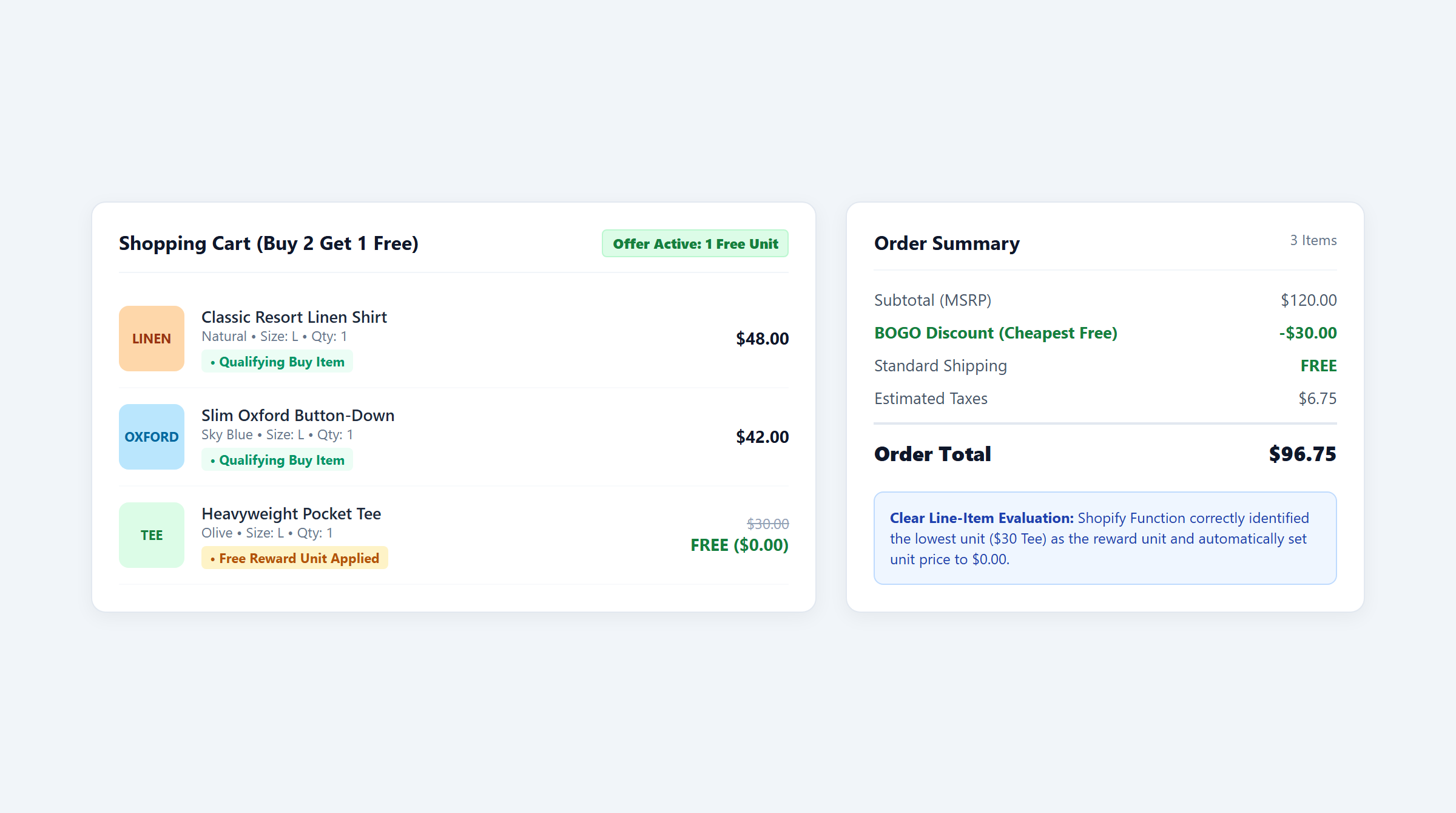
Model 1: Automated AJAX Cart Injection
Best suited for single-variant products, branded merchandise, or standardized samples (e.g., cosmetic trial bottles, canvas tote bags, or stickers). The moment the customer reaches the qualifying quantity or spend threshold, the promotion app injects the gift variant directly into the slide-out cart drawer with a clear “$0.00” price tag.
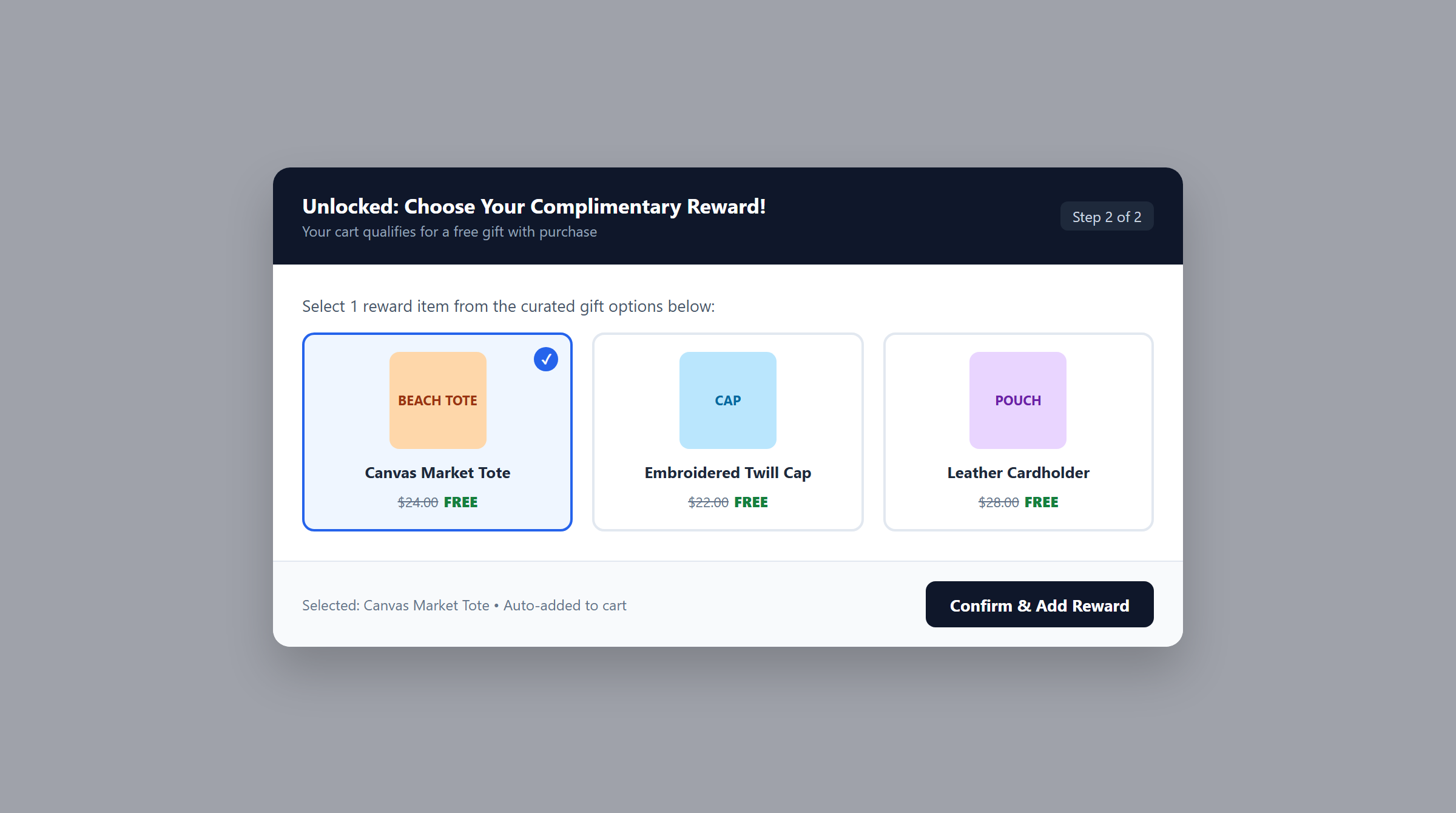
Model 2: Interactive Variant Selection Modals
Essential when the promotional reward includes product options, such as apparel sizing (Small to XXL), ring dimensions, or multiple colorways. Rather than guessing the customer’s size or forcing a default SKU, the app triggers an interactive modal allowing shoppers to select their exact preference. This eliminates fulfillment errors, reduces customer return rates, and enhances the gifting experience.
Preventing Threshold Hysteresis & Cart Gaming
A critical vulnerability in poorly configured gifting apps is cart gaming: a shopper adds qualifying items to reach a $100 threshold, receives the injected free gift, and then deletes the qualifying items to checkout with only the free gift. Modern Shopify Functions apps implement continuous cart monitoring: if qualifying items are removed and cart value drops below the threshold, the app automatically purges the reward SKU from the cart drawer, preventing unauthorized inventory leakage.
5. Operational Safeguards: Inventory, Combinations & Stacking Limits
Fulfillment logistics and checkout combination rules dictate whether high-volume promotional campaigns run smoothly during peak traffic.

Inventory Depletion and Stockout Fallback Logic
Promising a gift that is out of stock damages customer trust. Advanced promotion apps track real-time inventory levels. When promotional stock drops to zero, the app should automatically switch to a designated backup SKU or cleanly hide the promotion progress bar, preventing out-of-stock validation errors at checkout.
Pro-Rated Line Item Discount Allocation on Returns
How do returns work on orders containing free gifts? Under official Shopify return logic, discounts applied to an order are prorated across all qualifying line items. In a “Buy 2 Shirts ($50 total), Get $15 Pouch Free” order, the $15 discount is prorated across the items. If the customer returns one shirt, Shopify’s refund engine returns only the prorated net value, preventing the customer from returning full-price items while keeping the gift for free.
Two-Way Discount Combinations and the 25-Rule Limit
Every discount on Shopify belongs to one of three classes: Product, Order, or Shipping. Under Shopify platform rules:
- Two-Way Configuration: For a BXGY product discount to combine with a free shipping coupon, both discount rules must have combination checkboxes explicitly enabled in Shopify Admin. If either discount forbids combinations, Shopify checkout rejects the stack.
- The 25 Automatic Discounts Platform Ceiling: Shopify limits every store to a maximum of 25 active automatic discounts concurrently. Merchants running multiple tiered BOGO and GWP rules must audit their active rule counts. Master combination strategy in our Shopify discount combinations guide.
Shopify Markets Multi-Currency and Tax Calculations
In international Shopify Markets, automatic price rounding rules can alter converted spend thresholds across foreign currencies. Additionally, sales taxes (such as US State Sales Tax or UK/EU VAT) are calculated on the net post-discount value per line item, ensuring statutory tax compliance.
6. Step-by-Step Implementation & Storefront Acceptance Test Matrix
Configuring a Buy X Get Y or GWP campaign in Easy Deals on the Shopify App Store follows an intuitive 3-step sequence:
- Establish Promotion Mechanics: Inside the Easy Deals dashboard, click Create Campaign and select Buy X Get Y or Cart Goal GWP. Define the qualifying buy condition (item quantity or spend threshold), select your collection logic (ALL vs. ANY), and designate the reward product.
- Configure Storefront Interaction: Enable the App Embed block in your Shopify Theme Editor (Online Store 2.0). Choose between automatic AJAX injection or an interactive variant selection modal, and customize the cart drawer progress bar styling.
- Authorize Combination Settings: In Shopify Admin > Discounts, select the generated rule and ensure combination permissions are enabled for Shipping Discounts or Order Discounts as commercially intended.
7-Point Storefront Acceptance Test Matrix
Never launch a promotional campaign without running this comprehensive 7-point acceptance test matrix across desktop and mobile browsers:
| Test ID | Cart Scenario | Expected Cart Drawer Feedback | Expected Checkout Calculation |
|---|---|---|---|
| TC-01 | Cart subtotal below spend/quantity threshold. | Progress bar displays exact dollar amount needed; zero gifts present. | Full catalog price charged; zero discount applied. |
| TC-02 | Cart reaches qualifying threshold. | Gift auto-injects or variant modal opens; progress bar congratulates customer. | Reward item displays 100% discount ($0.00). |
| TC-03 | Customer removes qualifying item (drops below threshold). | Cart recalculates immediately; free gift is automatically purged. | No gift appears in checkout; full price charged for remaining items. |
| TC-04 | Customer adds item from excluded collection. | Excluded item does not increment promotion progress bar. | Full price charged for excluded line item. |
| TC-05 | Valid Free Shipping coupon code applied. | Free shipping rate and BXGY gift line coexist simultaneously. | Shipping rate zeroed out and gift remains $0.00 if combinations enabled. |
| TC-06 | Gift SKU reaches zero inventory stock. | App suppresses modal or displays designated secondary reward SKU. | Checkout proceeds smoothly without out-of-stock validation errors. |
| TC-07 | International currency switch (Shopify Markets). | Threshold converts dynamically and rounds per market settings. | Accurate converted currency charged at checkout. |
If a discount fails to apply during testing, follow our step-by-step diagnostic guide: Shopify discount not applying? Diagnostic troubleshooting checklist.
7. Frequently Asked Questions (FAQ)
Does Shopify automatically add a Buy X Get Y gift to the cart?
No. Under native Shopify automatic discounts, customers must manually search your store and add the free gift SKU into their cart before the discount evaluates. Dedicated apps like Easy Deals eliminate this barrier by automatically detecting qualification and injecting the gift into the cart drawer via Shopify Functions.
How do returns work when an order includes a free gift?
Shopify automatically prorates discounts across all qualifying items in an order based on relative price ratios. If a customer returns a paid item from a BXGY bundle, the refund engine issues a refund based on the prorated net value rather than the full undiscounted retail price, protecting the store from fraudulent gift claims.
Can customers choose their own free gift variant (size or color)?
Yes. With an advanced promotion app like Easy Deals, qualifying cart thresholds can trigger an interactive popup modal where shoppers select their preferred variant (such as ring size, apparel fit, or skincare shade) before the item is added to the cart drawer.
Can Buy X Get Y discounts combine with Free Shipping coupons?
Yes, provided that two-way combination permissions are configured. In Shopify Admin, both the Buy X Get Y discount and the Free Shipping discount must have combination checkboxes toggled on. If either rule disables combinations, Shopify checkout prioritizes the single discount offering the greatest monetary savings.
What happens when the promotional gift runs out of stock?
Modern gifting apps continuously monitor inventory levels. When stock reaches zero, the app can automatically route to a secondary reward SKU or suppress the progress bar, ensuring shoppers are not promised gifts that cannot be fulfilled.
Editorial Disclosure: Easy Deals is developed by EasyAppsLab. We evaluate all ecommerce promotion software using identical technical criteria, transparent Cost of Goods Sold accounting, and verified platform documentation. Merchants are encouraged to test all promotional rules in staging environments before public launch.