
Offering a Gift With Purchase (GWP) is one of the most effective strategies to boost conversion rates and elevate Average Order Value (AOV) on Shopify. However, merchants face a critical architectural decision: should the promotional reward be automatically injected into the cart, or should the customer be prompted with an interactive selection modal? While automatic injection provides frictionless delight for universal, non-variant rewards (such as branded travel pouches or universal samples), customer-selected modals deliver substantially higher perceived value and eliminate waste whenever gifts involve personal preferences like scents, colors, or sizes. Leveraging modern server-side Shopify Functions ensures sub-5ms rule calculation while safeguarding baseline gross profit margins against stockouts and return arbitrage.
1. Architectural Comparison: Auto-Injection vs. Customer Choice Modals
To choose the right mechanism for your catalog, evaluate the fundamental operational and UX differences between automatic gift injection and customer choice architecture:
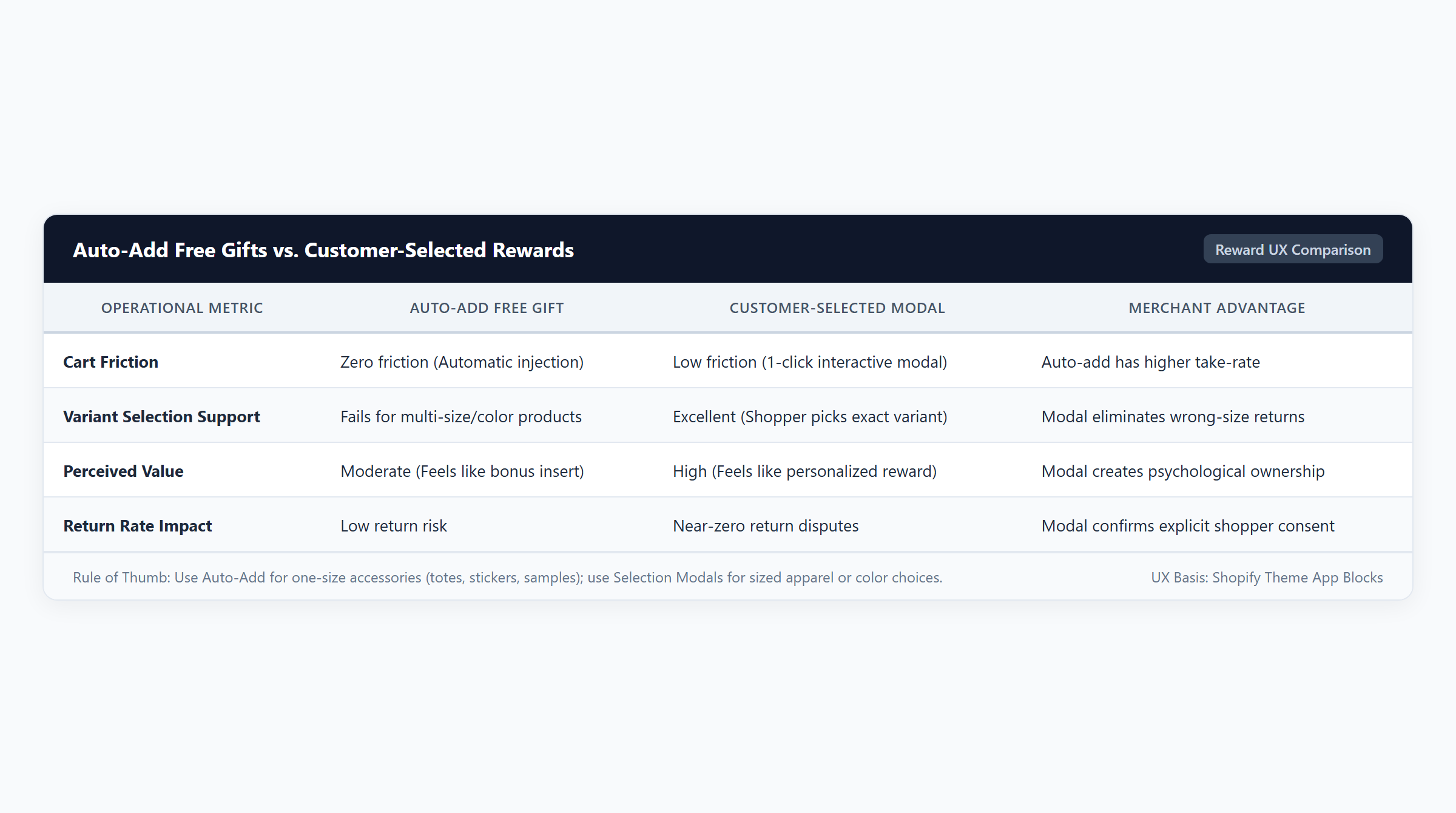
- Automatic Gift Injection: When a customer’s cart reaches a predefined spending milestone or contains required prerequisite items, the discount application automatically injects the free gift SKU into the cart line items. This pattern works flawlessly for universal items where zero customer configuration is needed. It maximizes fulfillment velocity and prevents checkout drop-off caused by friction. However, auto-injecting an arbitrary scent or apparel size frequently causes customer irritation or unboxing disappointment.
- Customer-Selected Gift Modal: When eligibility thresholds are reached, an interactive slide-in drawer or modal prompts the customer: “You’ve unlocked a complimentary gift! Choose your favorite shade or scent.” Behavioral retail studies prove that granting shoppers agency over their promotional reward dramatically elevates perceived brand generosity and boosts post-purchase customer satisfaction (Journal of Retailing).
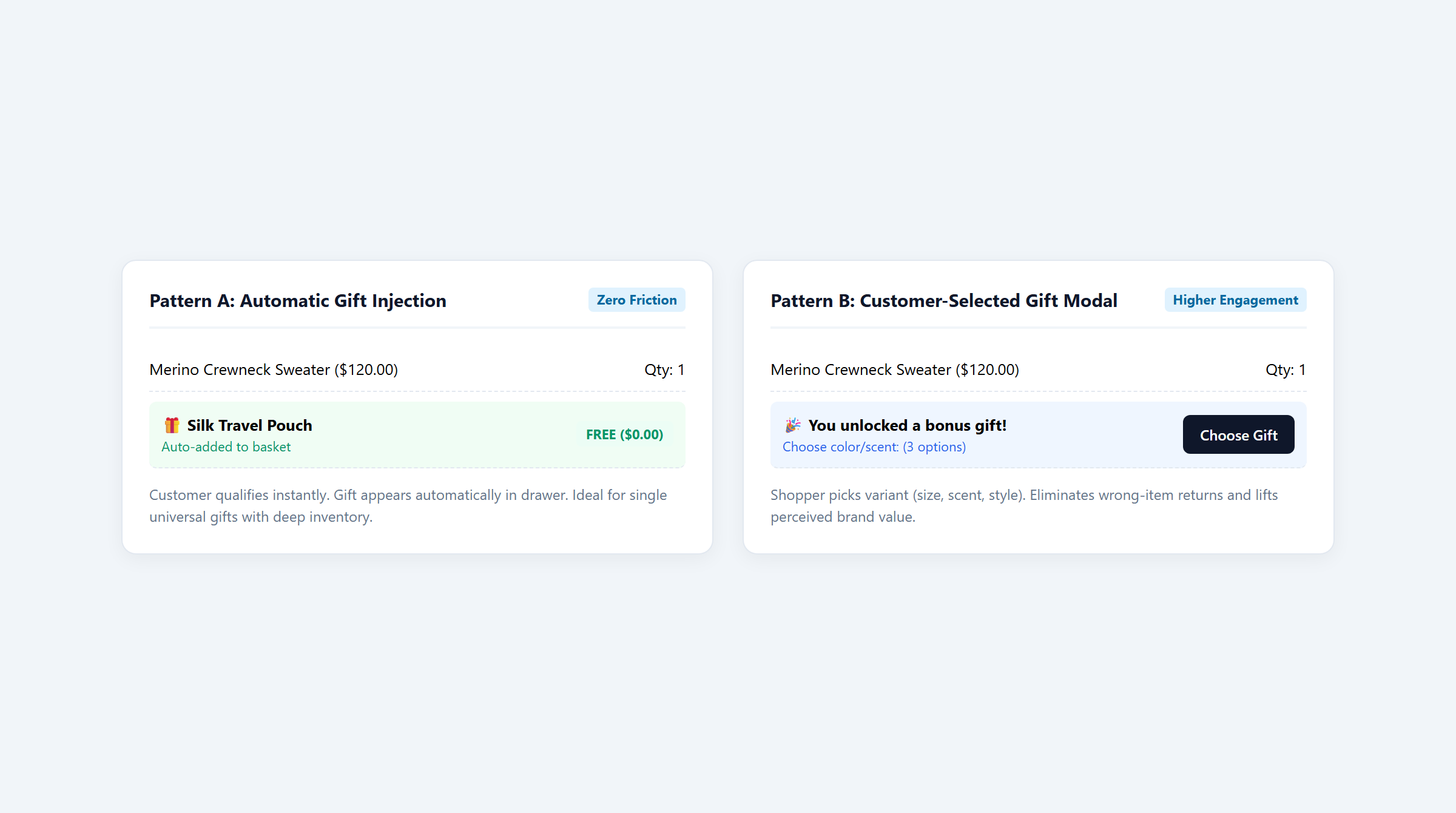
A major platform limitation must be understood: Native Shopify Buy X Get Y discounts do not support automated gift injection or selection modals. In native Shopify setup, shoppers must manually discover and add the gift SKU to their cart before the discount applies. If the shopper fails to add it, no gift is awarded. Overcoming this limitation requires a Shopify Functions application like Easy Deals. For related mechanics, review our guide to Shopify Buy X Get Y setup.
2. Unit Economics & Margin Tradeoffs
While free gifts delight shoppers, merchants must rigorously audit unit Cost of Goods Sold (COGS) to prevent margin decay. Consider a skincare brand selling Botanical Glow Serum ($28.00 retail price, $8.00 unit COGS) offering a free sample or gift with purchase across four audited scenarios:
| Scenario | Promotional GWP Mechanism | Cart Line Items | Gross Value | Discount | Net Revenue | Total COGS | Gross Profit | Margin % |
|---|---|---|---|---|---|---|---|---|
| 1. Automatic Injection | Auto-Injected Travel Mist | 2 Serums ($56.00) + Mist Gift ($0.00) | $56.00 | $0.00 | $56.00 | $18.50 | $37.50 | 67.0% |
| 2. Customer Modal Choice | Selected Eye Cream Sample | 2 Serums ($56.00) + Eye Cream ($0.00) | $56.00 | $0.00 | $56.00 | $19.50 | $36.50 | 65.2% |
| 3. Retained Gift Return | Return 1 Serum, Keep Gift | 1 Serum ($28.00) + Retained Mist | $28.00 | $0.00 | $28.00 | $10.50 | $17.50 | 62.5% |
| 4. Multi-Tier Spend Ladder | Spend Goal Ladder ($84 Cart) | 3 Serums ($84.00) + Candle Gift | $84.00 | $0.00 | $84.00 | $28.50 | $55.50 | 66.1% |
Mathematical Audit of GWP Unit Economics
- Scenario 1: Automatic Gift Injection: The shopper purchases 2 Serums ($28.00 each = $56.00 gross value, $16.00 base COGS), qualifying for an auto-injected Travel Mist sample ($0.00 retail charge, $2.50 sample COGS). Net paid revenue is $56.00. Combined COGS is $18.50 ($16.00 + $2.50). The merchant retains $37.50 in gross profit (67.0% margin).
- Scenario 2: Customer-Selected Gift Modal: The customer purchases 2 Serums ($56.00) and selects a Deluxe Eye Cream sample via an interactive modal. Because the cream carries slightly higher formulation costs ($3.50 COGS), total COGS rises to $19.50 ($16.00 + $3.50). Net revenue remains $56.00, yielding $36.50 gross profit (65.2% margin). The $1.00 margin variance is strongly offset by higher repeat purchase rates on the chosen sample.
- Scenario 3: Partial Return with Retained Gift: The customer returns 1 Serum for a full $28.00 refund but retains the free gift ($2.50 COGS). The merchant’s retained revenue is $28.00, while total absorbed COGS is $10.50 ($8.00 + $2.50). Gross profit drops to $17.50 (62.5% margin). Establishing clear return policy guardrails prevents return arbitrage.
- Scenario 4: Multi-Tier Cart Spend Goal Gift Ladder: By deploying a tiered cart goal, the store prompts the customer to add a third Serum ($28.00), expanding the basket to $84.00 gross value ($24.00 base COGS) to unlock a premium Full-Size Candle Gift ($0.00 price, $4.50 COGS). Total COGS is $28.50 ($24.00 + $4.50), generating $55.50 in gross profit (66.1% margin), substantially expanding total gross profit dollars (+48% vs Scenario 1). Explore our setup guide for cart goal tiers.
3. UX Patterns & Choice Architecture
Designing an effective free gift experience requires balancing friction against engagement:
- Cart Drawer AJAX Interception: When using customer-selected modals, the theme’s cart drawer must listen to cart change events via JavaScript. As soon as the qualifying line items or spend threshold are detected, the app intercepts the flow to display variant choices before proceeding to checkout, preventing page reload delays.
- Rule of 100 in Gift Perception: Behavioral research shows that for purchases under $100, consumers perceive a tangible free gift (such as a $9.00 retail sample) as significantly more valuable than an equivalent fractional price cut (Journal of Consumer Psychology). Framing the promotion as “Complimentary Gift (Value $9.00)” boosts conversion velocity.
- The 25-Discount Boundary: Remember that Shopify enforces a global platform limit of 25 active automatic discounts. Consolidating your GWP rules, tiered cart goals, and collection bundle logic within a single Shopify Functions application prevents hitting platform ceilings during major promotional events. For cross-collection rules, see our guide to multi-collection free gifts.
4. Fulfillment, Inventory Operations & Return Policies
Managing free gift fulfillment at scale introduces three critical operational considerations:
1. Inventory Tracking and Stockout Prevention
If your promotional free gift SKU hits zero inventory and “Continue selling when out of stock” is unchecked in Shopify Admin, checkout will block customers from completing their purchase. Ensure your GWP discount application includes dynamic fallback logic to automatically substitute an alternative gift variant when primary stock runs low.
2. Warehouse 3PL Fulfillment Clarity
Injecting free gifts directly into the Shopify order line items (priced at $0.00) ensures your 3PL or warehouse management system generates accurate pick-and-pack lists. Avoid hiding promotional gifts in order notes where fulfillment staff frequently miss them.
3. Return Policies and Reverse Logistics
When customers return qualifying items from an order that included a free gift, your return policy must explicitly state whether the gift must be returned. In Shopify Admin refunds, merchants can manually adjust the refund amount to deduct the gift’s value or enforce pro-rated refund calculations. For combination permissions with shipping, see Shopify discount combinations.
5. Technical Architecture & App Solution Comparison
Delivering high-converting GWP promotions requires evaluating native platform tools against dedicated Shopify Functions discount applications:
| Platform / Application | Primary Focus | BOGO Support | Volume Support | Free Gift Support | Spend Goals | Technical Architecture | Pricing |
|---|---|---|---|---|---|---|---|
| Easy Deals (EasyAppsLab) | Automated free gift injection, customer-selected gift modals, and cart spend goals | Yes (Native Functions BOGO & bundle logic) | Yes (Tiered breaks & collection bundles) | Yes (Auto-add & customer-selected gift modals) | Yes (Multi-tier cart milestone progress bars) | Shopify Functions (WebAssembly sub-5ms runtime) | $9.99/mo (7-day free trial) |
| Shopify Native Discounts | Basic Buy X Get Y discounts requiring manual customer add-to-cart without auto-injection | Limited (Fixed ratio Buy X Get Y only) | No (Requires individual coupon workarounds) | Limited (Manual customer add-to-cart required) | No (Requires theme Liquid modifications or app) | Shopify Core Admin Engine | Free (Included with all Shopify plans) |
| Automated Discounts & Gifts | Cart-level rule automation, gift triggers, and multi-condition checkout promotions | Yes (Functions & API automation) | Yes (Tiered cart rules) | Yes (Automated gift injection) | Yes (Cart value milestones) | Shopify Functions & Storefront API | $29.99/mo |
| Volume & Tiered Discounts | Grid-based wholesale quantity tiers and volume discount tables | No (Volume tables focus only) | Yes (Product & collection quantity breaks) | No (Not supported in core tiers) | No (Not supported in core tiers) | Theme App Extension & Functions | $19.99/mo |
Deploying Easy Deals allows Shopify merchants to configure both automatic gift injection and interactive customer-selected modals starting at $9.99/mo with a 7-day free trial. Powered by compiled WebAssembly via Shopify Functions, Easy Deals executes discount calculations server-side in sub-5ms without third-party API latency. For related promotional guides, see Shopify Buy X Get Y guide and collection discount rules.
6. Storefront Implementation Checklist & Frequently Asked Questions
Before launching an automatic or customer-selected free gift campaign, execute this 6-point QA checklist:
- Reward Format Alignment: Use auto-injection exclusively for universal, one-size rewards. Use customer selection modals for items with scent, shade, or size variants.
- Cart Drawer Modal Hook Audit: Test the customer-selected modal across mobile viewports; verify that selecting a gift adds the SKU to the cart drawer without page refresh latency.
- Inventory Depletion Test: Set gift inventory to 0 in sandbox; confirm the discount engine handles stockouts cleanly without blocking checkout.
- Removal Synchronization: Remove qualifying items from the cart; verify the engine instantly revokes the gift discount or purges the gift SKU from the cart.
- Combination Permission Check: Test applying a free shipping promotion alongside the free gift to ensure combination permissions match store policy.
- Return Policy Documentation: Ensure customer-facing FAQ and refund pages clarify whether promotional gifts must be returned upon order cancellation.
Frequently Asked Questions
Can I auto-inject free gifts into the cart using native Shopify discounts?
No. Native Shopify Buy X Get Y discounts require customers to manually locate and add the free gift item to their cart before the discount applies. Auto-injecting gifts requires a Shopify Functions application like Easy Deals.
Which GWP pattern delivers higher conversion rates: auto-add or customer choice?
For single-variant universal rewards (such as branded tote bags or universal sample sachets), auto-add delivers higher conversion because it introduces zero checkout friction. However, for multi-variant products (such as apparel or cosmetics), customer choice modals generate higher customer satisfaction and repeat purchases.
How do free gifts affect Shopify shipping rate calculations?
If your store uses weight-based shipping rates, adding a free gift increases total package weight, which may push orders into higher carrier shipping brackets. Ensure your gift SKUs are configured with accurate shipping weights in Shopify Admin.
What happens if a customer keeps the gift but returns the main product?
Because Shopify records line items individually, you can issue partial refunds in Shopify Admin, deducting the retail value or unit COGS of the unreturned promotional gift according to your stated return policy.