Maximizing e-commerce conversion rates requires presenting promotional incentives at the exact moment a shopper makes a purchasing decision. While a global announcement bar broadcasts storewide policies (such as free shipping thresholds or sitewide holiday cutoffs) across every page header, a contextual promotion spotlight delivers targeted bundles, tiered quantity breaks, or complimentary gifts directly on the Product Detail Page (PDP) adjacent to the “Add to Cart” button. Understanding the architectural and psychological distinctions between global header broadcast and point-of-decision spotlighting allows Shopify merchants to orchestrate high-converting promotional funnels while protecting Core Web Vitals and eliminating banner blindness.
1. Funnel Placement: Global Header Awareness vs. Point-of-Decision Context
In modern e-commerce storefront design, promotional components operate at distinct stages of the visitor journey:
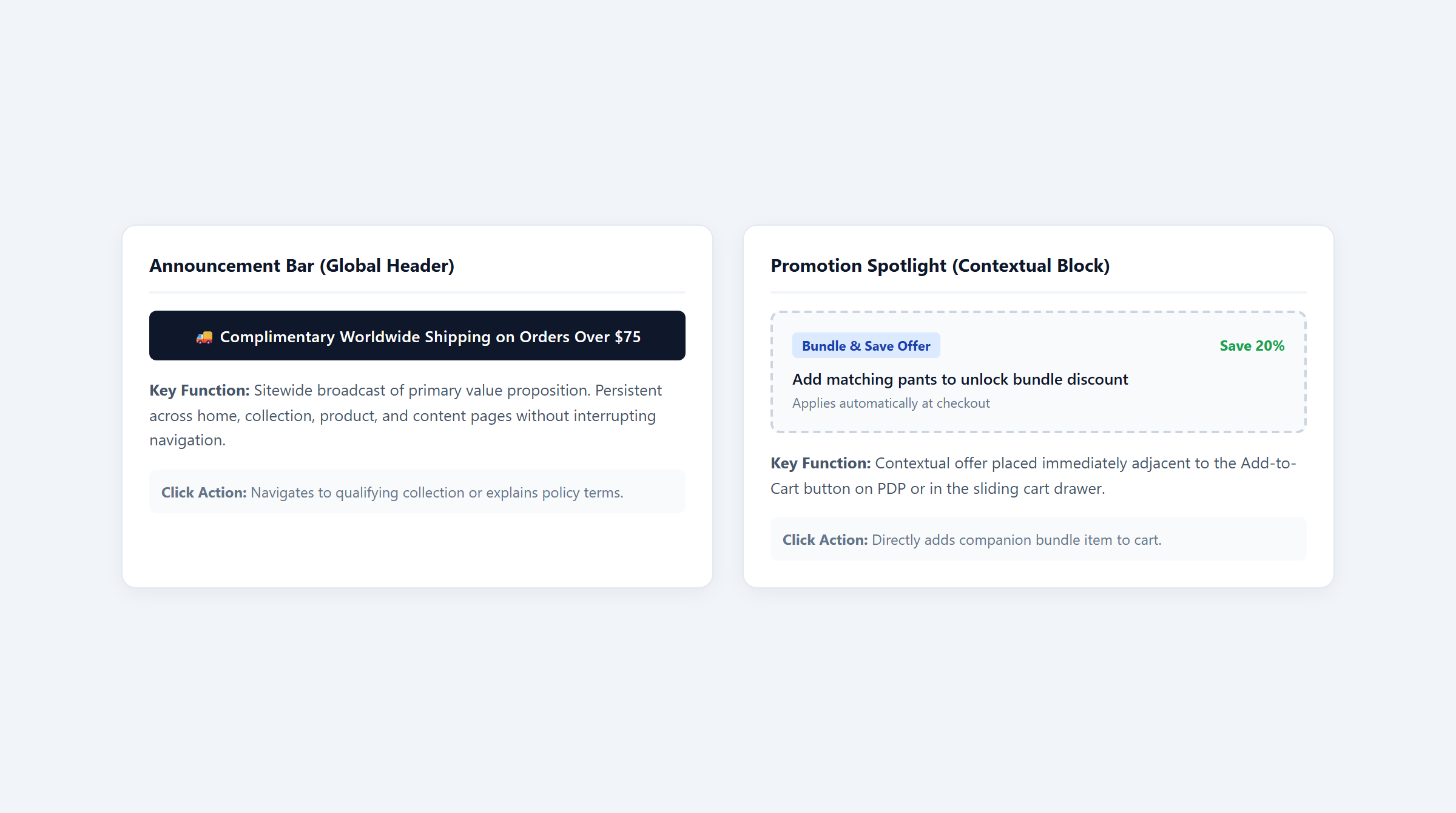
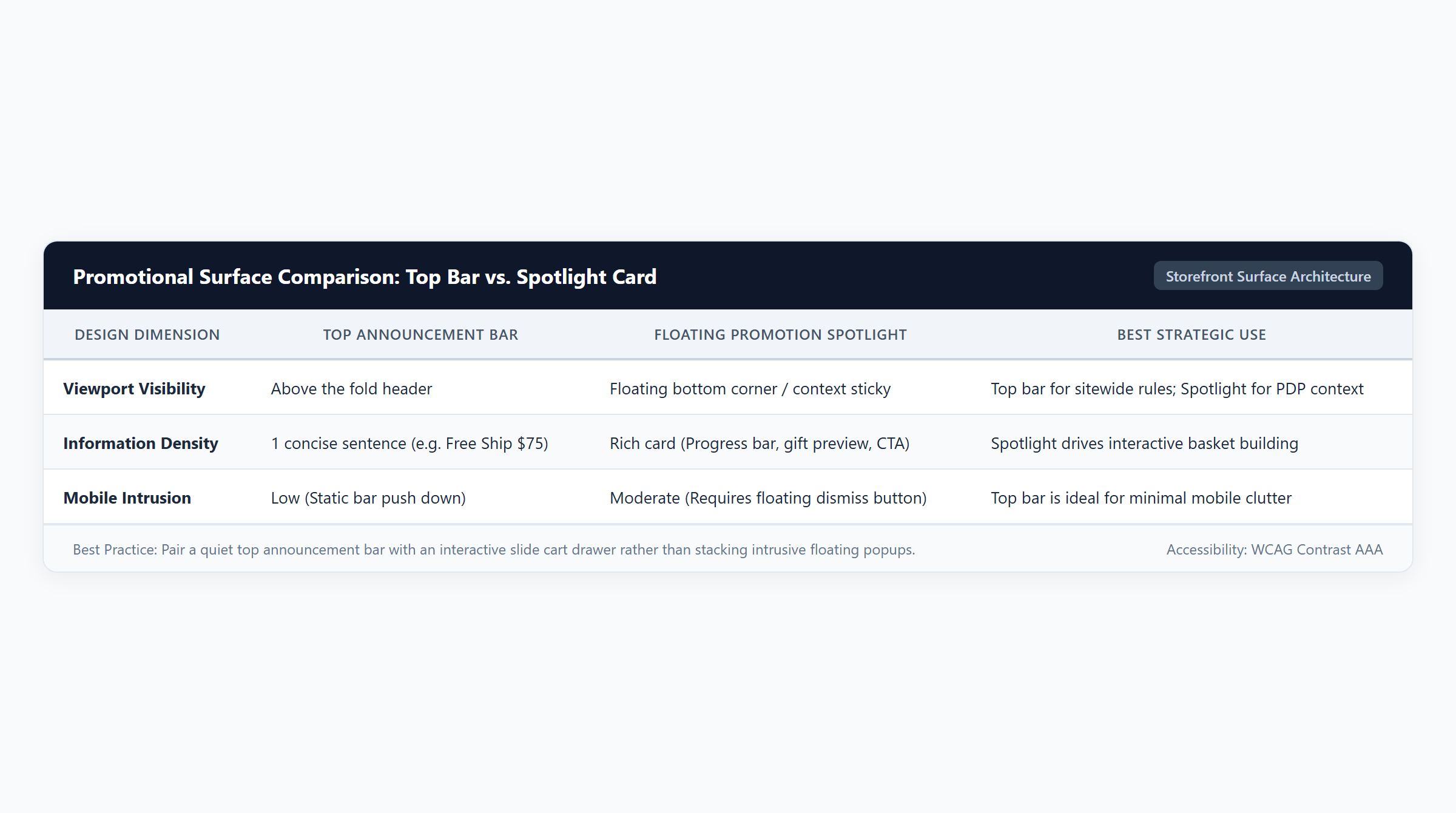
- Top Announcement Bar (Global Discovery Stage): Positioned at the very top of the storefront viewport, the announcement bar acts as a persistent broadcast mechanism. Its primary mission is setting broad expectations early: standard delivery terms, storewide sale dates, or free shipping thresholds. However, academic research reveals that persistent top bars suffer from severe banner blindness and visual habituation, with returning shoppers subconsciously filtering out static header text (Journal of Interactive Marketing). Furthermore, on mobile viewports, thick top bars consume valuable above-the-fold vertical screen height.
- Promotion Spotlight (Point-of-Decision Stage): Embedded directly within the PDP layout—typically between the product variant selector and the “Add to Cart” button—the promotion spotlight delivers contextual relevance. Rather than broadcasting generic slogans, it answers the shopper’s immediate question: “What incentive unlocks if I purchase this specific item or bundle?” Merchandising studies demonstrate that presenting complementary add-ons and volume ladders at the immediate point of purchase decision drives significantly higher add-to-cart velocity (Journal of Marketing Research).
2. Unit Economics & Margin Tradeoffs
Deploying storefront promotional components carries distinct financial and fulfillment implications. While announcement bars frequently promote free shipping (requiring the merchant to absorb out-of-pocket carrier freight), promotion spotlights drive higher basket sizes through product bundling or free sample gifts. Consider a beauty retailer analyzing four audited promotional scenarios:
| Scenario | Storefront Display Mechanism | Cart Line Items | Gross Value | Discount | Net Revenue | Total COGS | Gross Profit | Margin % |
|---|---|---|---|---|---|---|---|---|
| 1. Shipping Threshold Bar | Global Announcement Bar | 2 Facial Creams ($40.00 each) | $80.00 | $0.00 | $80.00 | $26.00 | $54.00 | 67.5% |
| 2. PDP Spotlight Bundle | PDP Promotion Spotlight | 1 Serum ($60.00) + 1 Balm ($20.00) | $80.00 | $16.00 (20%) | $64.00 | $21.00 | $43.00 | 67.2% |
| 3. Cart Goal Spotlight | Cart Drawer Milestone Bar | 1 Serum ($60.00) + 1 Cleanser ($25.00) + Mist Gift | $85.00 | $0.00 | $85.00 | $27.00 | $58.00 | 68.2% |
| 4. Full Funnel Stack | Header Bar + PDP Spotlight | 1 Serum ($60.00) + 1 Balm ($20.00) + 1 Cleanser ($25.00) | $105.00 | $12.00 (15%) | $93.00 | $34.00 | $59.00 | 63.4% |
Mathematical Analysis of Storefront Economics
- Scenario 1: Global Free Shipping Announcement Threshold Cart: The customer adds 2 Facial Creams ($40.00 each = $80.00 gross value), meeting the $80.00 free shipping qualification announced in the header bar. No item discount is applied ($0.00). The merchant receives $80.00 net customer payment. However, the store must absorb $6.00 in out-of-pocket carrier freight alongside $20.00 product COGS ($10.00 × 2), producing $26.00 total COGS. The transaction yields $54.00 gross profit (67.5% margin). For deep mathematical modeling on carrier subsidies, read our guide on how to choose a free shipping threshold.
- Scenario 2: PDP Promotion Spotlight Bundle: On the Restorative Botanical Serum page ($60.00 retail, $16.00 COGS), an inline promotion spotlight offers an add-on Lip Repair Balm ($20.00 retail, $5.00 COGS) at 20% bundle savings. Gross cart value is $80.00. The 20% discount deducts $16.00, leaving $64.00 net revenue. At $21.00 combined COGS, gross profit reaches $43.00 (67.2% margin). While gross profit dollars are lower than full-price cream, customer acquisition velocity increases without requiring logistics absorption.
- Scenario 3: Cart Goal Spotlight Free Sample: A dynamic cart drawer spotlight prompts the shopper to add a Gentle Foaming Cleanser ($25.00 retail, $7.00 COGS) to reach an $85.00 milestone, unlocking a Deluxe Travel Mist sample ($0.00 retail charge, $4.00 COGS). Gross and net revenue equal $85.00. Total COGS is $27.00 ($16.00 + $7.00 + $4.00), yielding $58.00 gross profit (68.2% margin). Explore our tutorial on Shopify cart goals.
- Scenario 4: Combined Global Announcement + Contextual PDP Spotlight Stack: The shopper encounters the global $80.00 shipping announcement and a 15% PDP bundle spotlight. The cart contains the Serum ($60.00), Balm ($20.00), and Cleanser ($25.00), reaching $105.00 gross value. The 15% spotlight discount on the serum and balm deducts $12.00, producing $93.00 net revenue. Accounting for $28.00 inventory COGS ($16.00 + $5.00 + $7.00) plus $6.00 carrier shipping subsidy results in $34.00 total COGS, securing $59.00 in gross profit (63.4% margin), maximizing total cash contribution.
3. Message Orchestration: Coordinating Sitewide Terms with PDP Offers
Conflicting storefront messaging creates checkout abandonment. When an announcement bar declares “Get 20% Off Everything with Code SAVE20” while a PDP spotlight highlights “Buy 2 Get 1 Free”, shoppers will attempt to apply both at checkout. If Shopify combinations prevent the coupon from stacking, the customer feels deceived.
To avoid promotional conflict, structure your messaging hierarchy according to three proven rules:
- Reserve the Announcement Bar for Non-Conflicting Global Policies: Dedicate header real estate to universal terms that do not clash with line-item discounts, such as free shipping thresholds, extended holiday return windows, or international duty prepaid guarantees.
- Restrict Product-Level Discounting to PDP Spotlights: Keep volume ladders, Buy X Get Y deals, and collection bundles directly on product pages where line items and variants are selected. Review our guide to Shopify collection discount rules.
- Explicit Combination Permissions: In the Shopify Admin discount configuration, ensure product-level discounts are designated to combine with shipping discounts, allowing shoppers to claim both the spotlight bundle and the free shipping announced in the header bar without checkout friction. For complete combination guidelines, see Shopify discount combinations.
4. Performance & Core Web Vitals: Preserving Cumulative Layout Shift (CLS)
Storefront promotional components must never compromise page rendering performance. Above-the-fold layout instability severely degrades Google Core Web Vitals metrics, specifically Cumulative Layout Shift (CLS) and Largest Contentful Paint (LCP):
- Eliminate Layout Jumping via Reserved CSS Min-Height: When third-party app widgets load asynchronously via JavaScript, they often inject header bars or PDP spotlight boxes after the initial DOM renders, violently pushing down the product title, image gallery, and buy buttons. To comply with Google Web Vitals standards (web.dev), developers must reserve container dimensions in theme CSS using
min-heightor CSS aspect-ratio placeholders so the browser allocates layout space before the widget hydrates. - Use Native Shopify Theme App Extensions: Modern Shopify themes utilize Theme App Extensions (App Blocks) rendered server-side via Liquid during initial page construction. Unlike legacy script tag injections that modify the global window object and trigger race conditions, Theme App Blocks render synchronously alongside theme HTML without delaying DOMContentLoaded.
- Server-Side Shopify Functions Execution: The underlying pricing logic behind your spotlight promotions must run inside Shopify Functions compiled to WebAssembly. Executing in sub-5ms within Shopify’s checkout pipeline, Functions eliminate external webhook latency and maintain instant cart drawer refreshes.
5. Technical Architecture & App Solution Comparison
Evaluating the optimal storefront promotional stack requires understanding the functional differences between native theme blocks and dedicated discount applications:
| Platform / Application | Primary Focus | BOGO Support | Volume Support | Free Gift Support | Spend Goals | Technical Architecture | Pricing |
|---|---|---|---|---|---|---|---|
| Easy Deals (EasyAppsLab) | Contextual PDP promotion spotlights, cart milestone bars, and server-side Functions logic | Yes (Native Functions BOGO & bundle logic) | Yes (Tiered breaks & collection bundles) | Yes (Auto-add & customer-selected gift modals) | Yes (Multi-tier cart milestone progress bars) | Theme App Extensions & Shopify Functions (Wasm sub-5ms) | $9.99/mo (7-day free trial) |
| Shopify Native Theme Bar | Static site-wide announcement text at the top header without dynamic cart triggers | Limited (Fixed ratio Buy X Get Y only) | No (Requires individual coupon workarounds) | No (No dynamic gift injection or modal) | No (Requires theme Liquid modifications or app) | Shopify Theme Section Liquid | Free (Included with Shopify theme) |
| Automated Discounts & Gifts | Cart-level rule automation, gift triggers, and multi-condition checkout promotions | Yes (Functions & API automation) | Yes (Tiered cart rules) | Yes (Automated gift injection) | Yes (Cart value milestones) | Shopify Functions & Storefront API | $29.99/mo |
| Volume & Tiered Discounts | Grid-based wholesale quantity tiers and volume discount tables | No (Volume tables focus only) | Yes (Product & collection quantity breaks) | No (Not supported in core tiers) | No (Not supported in core tiers) | Theme App Extension & Functions | $19.99/mo |
With Easy Deals, merchants seamlessly configure PDP promotion spotlights, cart milestone bars, and volume ladders at an accessible entry price of $9.99/mo with a 7-day free trial. Built with Theme App Extensions and Shopify Functions, Easy Deals ensures zero Cumulative Layout Shift and executes checkout calculations in sub-5ms. For automated gift mechanics, see our analysis of automatic vs customer-selected gifts.
6. Storefront Implementation Checklist & Frequently Asked Questions
Before launching a combined announcement bar and promotion spotlight campaign, execute this 6-point QA checklist:
- Viewport Ergonomics Audit: Open your storefront on mobile devices (iOS Safari and Android Chrome). Confirm the header announcement bar does not push the main product image or primary headline below the initial viewport fold.
- CLS Layout Reservation Check: Use Chrome DevTools Performance panel to record page load. Verify that the PDP spotlight block reserves space with a CSS min-height container, scoring 0.00 CLS.
- Messaging Hierarchy Alignment: Ensure the top header bar announces universal terms (e.g., free shipping at $80.00) while PDP spotlights promote specific product incentives without contradictory coupon codes.
- Discount Combination Permission: Test applying a PDP spotlight bundle alongside the header-announced shipping discount. Confirm checkout honors both promotions without rejection errors.
- Cart Drawer Real-Time Sync: Add a spotlight item to your basket; verify the cart drawer updates immediately without requiring a manual page refresh.
- Mobile Tap Targets: Verify that interactive spotlight radio buttons, quantity steppers, and add-on checkboxes meet the minimum 48×48 pixel touch target standard for mobile usability.
Frequently Asked Questions
Should I put my promotional discount codes in the top announcement bar?
Generally, no. Putting discount codes in the top bar frequently encourages shoppers who were prepared to pay full price to take the code and reduce your margin without increasing their basket size. Announcement bars are most effective when broadcasting threshold-based incentives (such as free shipping) that require customers to stretch their order value.
Can I display different promotion spotlights on different product pages?
Yes. Using modern Shopify Theme App Extensions, you can target specific promotional spotlight blocks to specific collections or product tags, ensuring customers viewing serums see skincare add-ons while customers browsing cleansers see complementary moisturizers.
Do promotion spotlight widgets slow down Shopify page speed?
When built as Theme App Blocks, promotion spotlights render directly via theme Liquid without loading external third-party JavaScript libraries before DOM readiness. Combined with server-side Shopify Functions for checkout calculation, modern spotlights introduce virtually zero page speed degradation.
How do announcement bars interact with Shopify’s 25 automatic discount limit?
A top announcement bar is simply a theme display component and does not consume a Shopify discount slot unless it connects to an active automatic discount. If your store runs an automatic free shipping rule at $80.00 alongside multiple PDP spotlight bundles, consolidate promotional rules into a single Shopify Function app to remain well beneath the platform’s 25 active discount limit.