
Black Friday Cyber Monday (BFCM) represents the highest-traffic and highest-stakes sales period of the year for Shopify merchants. However, rushing promotional campaigns into production without rigorous Quality Assurance (QA) regularly leads to catastrophic margin leakage, compounding discounts, and broken checkouts during peak traffic surges. Following a comprehensive BFCM promotion QA checklist—spanning from T-14 day staging and worst-case combination stress tests to a strict T-3 day theme code freeze—ensures your promotional logic executes flawlessly. Leveraging server-side Shopify Functions guarantees sub-5ms discount calculations under massive concurrency while keeping your gross margins firmly protected.
1. Operational Timeline: From T-14 Staging to T-0 Hour Midnight Launch
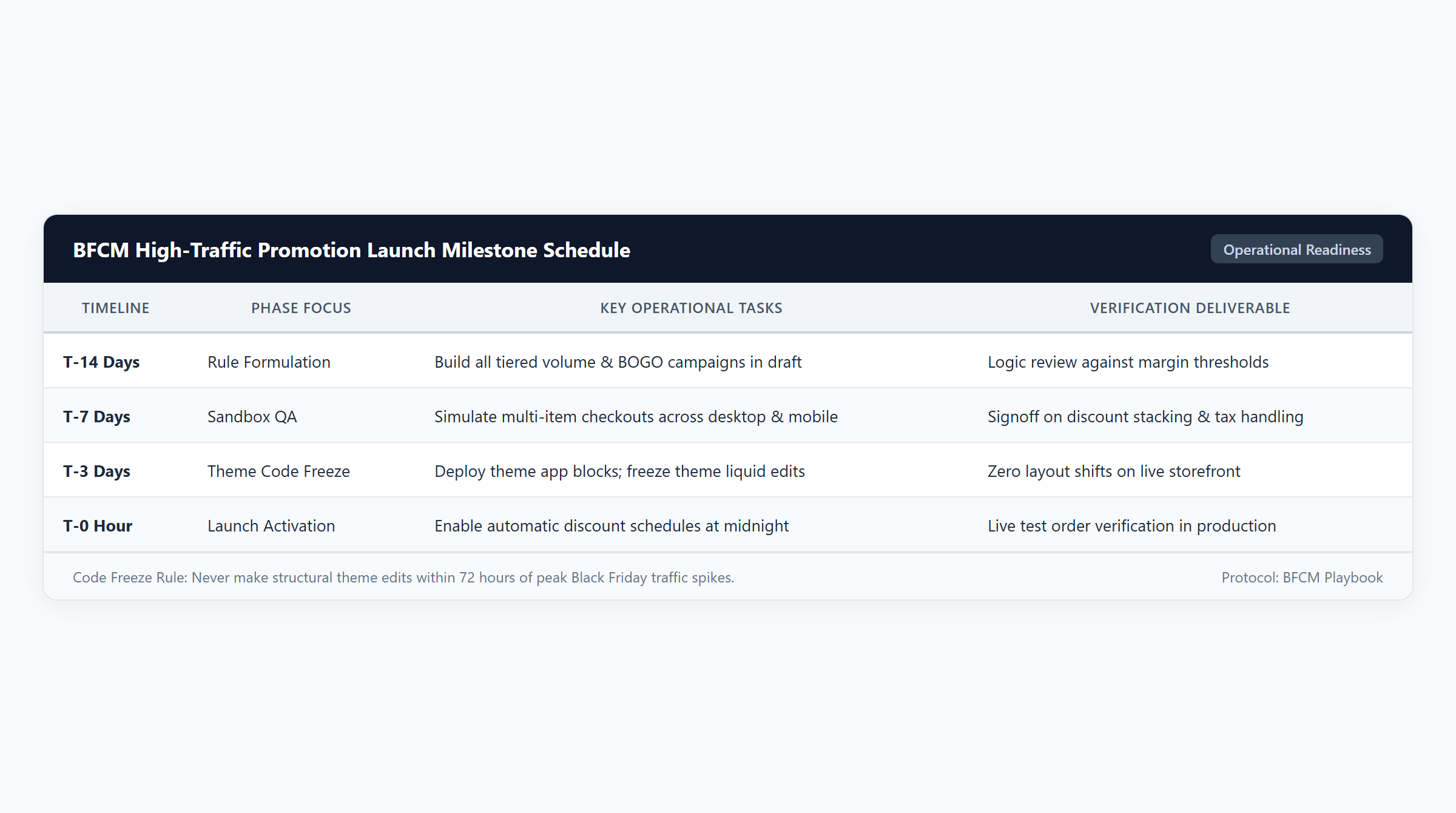
Launching a high-converting BFCM promotional schedule requires a disciplined multi-week staging roadmap rather than last-minute admin tinkering:
- T-14 Days (Promotional Rule Formulation & Audit): Finalize all headline campaign mechanics (e.g., 30% sitewide flash sale, tiered spend breaks at $100 and $200, and free gift milestones). Calculate explicit Cost of Goods Sold (COGS) across every promotional tier to identify break-even thresholds.
- T-7 Days (Development Sandbox & Edge Case Testing): Build promotional campaigns inside a duplicate development store or unpublished theme preview. Test boundary conditions (such as $49.98 subtotal vs $50.00 milestone requirements) and multi-currency exchange rates across Shopify Markets.
- T-3 Days (Strict Theme Code & App Freeze): Implement an absolute freeze on liquid template edits, JavaScript script modifications, and newly installed apps. High-traffic flash sales expose unminified theme scripts to severe race conditions. All promotional UI blocks must run via sandboxed Theme App Extensions.
- T-0 Hour (Synchronized Launch & Real-Time Verification): Automatic discounts schedule start times based on your store’s primary time zone configured under Settings → General in Shopify Admin. Place live test orders in incognito windows across mobile devices 5 minutes post-launch to confirm discounts trigger without coupon friction.
Framing promotional incentives effectively during peak traffic demands cognitive alignment. Psychological research into promotional perception indicates that for basket amounts below $100, shoppers respond more aggressively to percentage-off discounts, whereas for baskets exceeding $100, flat dollar-off reductions drive superior conversion velocity (Journal of Consumer Psychology). Match your BFCM promotional copy to these behavioral principles.
2. Stress-Testing Combinations: Simulating Worst-Case Stacking Carts
The single greatest cause of financial loss during BFCM is unintended discount compounding. When a merchant enables a 30% sitewide automatic discount, while an affiliate or VIP customer enters a $10 coupon, while a free gift ($6.00 COGS) automatically injects into the cart, product contribution margins collapse rapidly.
| Scenario | Promotional Mechanics Tested | Gross Value | Applied Discount | Net Customer Paid | Total COGS | Gross Profit | Gross Margin |
|---|---|---|---|---|---|---|---|
| 1. Unchecked Stacking Stress | 30% Sitewide + $10 Coupon | $150.00 | $55.00 | $95.00 | $44.00 | $51.00 | 53.7% |
| 2. Cart Goal Free Gift (GWP) | $125 Milestone + Beanie Gift | $125.00 | $0.00 | $125.00 | $42.00 | $83.00 | 66.4% |
| 3. Cent Boundary Test ($0.02 Short) | 2 Socks ($24.99) vs $50 Threshold | $49.98 | $0.00 | $49.98 | $12.00 | $37.98 | 76.0% |
| 4. Tiered Spend Ladder ($200) | 15% Tiered Break + Gift | $200.00 | $30.00 | $170.00 | $64.00 | $106.00 | 62.4% |
Mathematical Audit of BFCM Stress Models
- Scenario 1: Flash Sale Stacking Stress Test: The customer adds 2 Merino Wool Sweaters ($75.00 each = $150.00 gross value, $44.00 total COGS). An automatic 30% flash sale deducts $45.00. The customer also enters an active VIP $10 coupon. If combination permissions permit product and order stacking, the total discount reaches $55.00, reducing net payment to $95.00. At $44.00 COGS, gross profit plummets to $51.00 (53.7% margin). Unchecked compounding destroyed $10.00 of pure margin dollars without expanding basket size. Learn how to prevent this in our architectural review of Shopify discount combinations.
- Scenario 2: Tiered Cart Goal GWP: The shopper adds a Sweater ($75.00) and an Oxford Shirt ($50.00), reaching an $125.00 cart value. A free Holiday Cashmere Beanie ($0.00 price, $6.00 COGS) injects into the cart. Net revenue remains $125.00. Accounting for $36.00 product COGS ($22.00 + $14.00) plus $6.00 gift COGS yields $42.00 total COGS, securing $83.00 in gross profit (66.4% margin). Check out our setup tutorial for cart spend goal tiers.
- Scenario 3: Boundary Cent Failure: A customer purchases 2 Wool Blend Socks 3-Packs at $24.99 each, totaling $49.98. The promotion requires a $50.00 threshold for free shipping. Because the cart falls $0.02 short, the discount evaluates to $0.00. Net paid is $49.98, COGS is $12.00, and profit is $37.98. While mathematically sound, this friction triggers cart abandonment unless dynamic progress messaging prompts the shopper to add a minor upsell item.
- Scenario 4: BFCM Tiered Spend Milestone Ladder: A shopper adds 2 Sweaters ($150.00), 1 Shirt ($50.00), and unlocks the Cashmere Beanie gift, reaching $200.00 gross value. Reaching the $200 threshold triggers a 15% tiered volume break ($30.00 discount). Net payment is $170.00. Total COGS is $64.00 ($44.00 + $14.00 + $6.00), delivering $106.00 in gross profit (62.4% margin), proving that structured tiered incentives maximize total gross margin dollars.
3. Edge Case Validation: Cent Rounding, Low Stock Gifts & Currencies
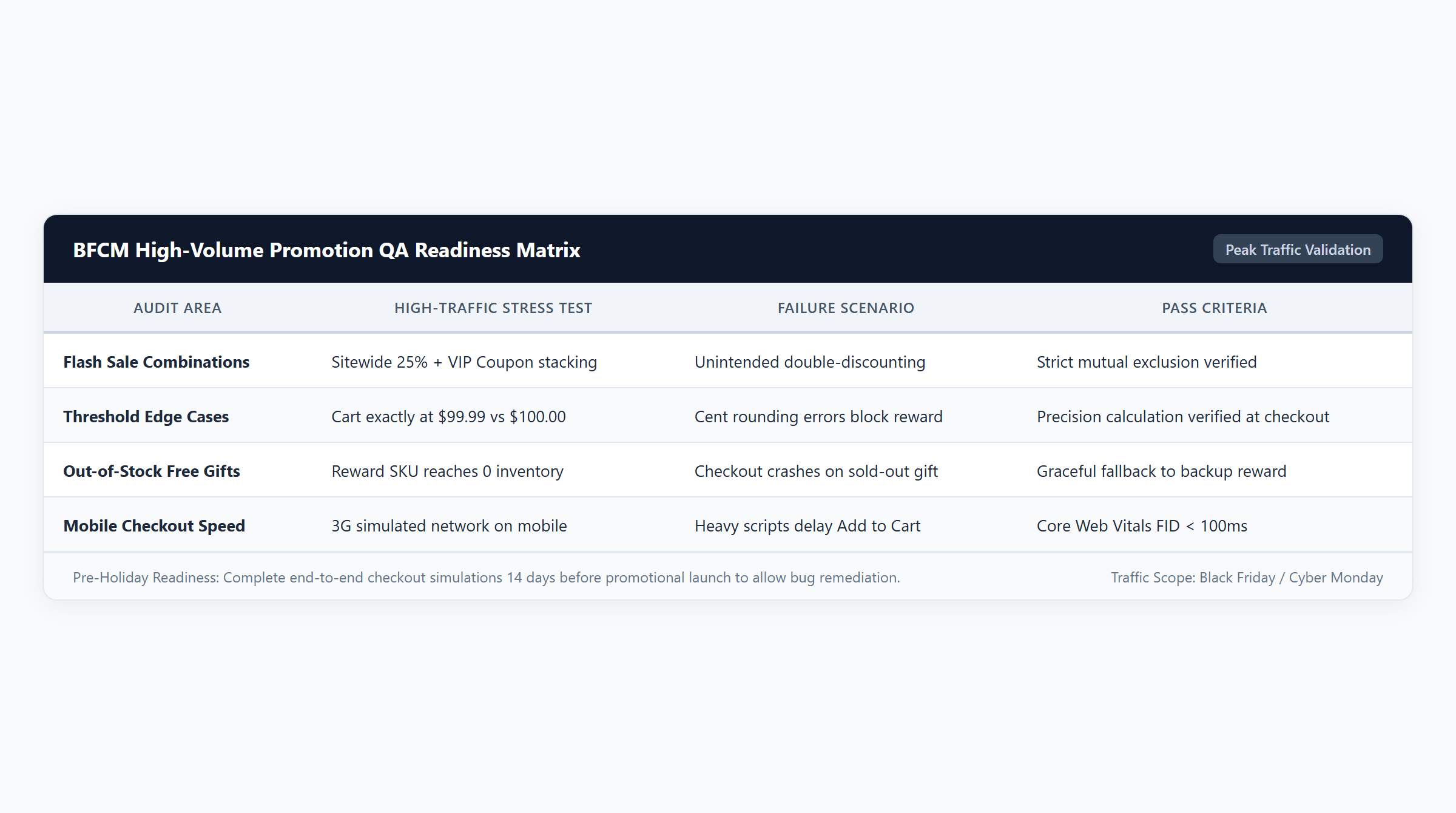
Peak BFCM traffic exposes subtle architectural edge cases that remain hidden during standard trading weeks:
- Cent Boundary Conditions on .99 Price Endings: If your catalog features prices ending in .99 (e.g., $49.99), setting promotional thresholds at round increments ($50.00 or $100) forces single-item shoppers to be 1 cent short of qualification. Always configure your threshold matching rules to evaluate
>= 49.00or deploy $1.00-$5.00 cart drawer impulse add-ons. - Out-of-Stock Fallbacks for Free Gift SKUs: When a promotional gift SKU hits 0 inventory, native Shopify discounts fail to allocate savings or display checkout blocking errors unless “Continue selling when out of stock” is checked in product inventory settings. Modern discount applications must be configured with secondary fallback gifts to ensure promotions continue seamlessly when primary gifts sell out.
- Shopify Markets Dynamic Currency Fluctuations: When selling internationally, automatic discounts evaluate currency thresholds dynamically based on live exchange rates. An $80.00 threshold may translate to €74.20 or £63.15. Test promotional cart rules across your primary international markets to confirm threshold messages display in local currency formatting.
- Debugging Missing Discounts: If a discount fails to trigger as expected during staging, systematically trace your rule prerequisites using our diagnostic guide on why Shopify discounts fail to apply.
4. Mobile Checkout Experience & High-Concurrency Performance
Over 75% of peak BFCM traffic originates on mobile devices. Ensuring flawless mobile execution requires rigorous technical validation:
- Shopify Functions Concurrency: Legacy discount apps built on external API webhooks or Draft Orders collapse under high-concurrency traffic surges, causing checkout timeouts and lost sales. Modern Shopify Functions compile to WebAssembly (Wasm) and execute directly within Shopify’s global edge infrastructure within an 11M instruction / sub-5ms runtime limit, ensuring instantaneous price calculation during flash sales.
- The 25-Discount Boundary: Shopify enforces an absolute platform ceiling of 25 active automatic discounts across your entire store. If your marketing team schedules distinct automatic promotions for VIP tiers, collection sales, and cart goals, you will breach this limit. Consolidate your BFCM promotional logic into a single Functions app capable of executing multi-tier rules within a single active discount instance.
- Mobile Viewport Ergonomics: Confirm that promotional banner overlays, cart drawer countdown timers, and free gift selection modals do not obstruct primary mobile checkout buttons. Ensure touch targets measure at least 48×48 pixels for effortless thumb navigation.
5. Technical Architecture & App Solution Comparison
Selecting the right technical infrastructure determines whether your storefront survives peak holiday concurrency:
| Platform / Application | Primary Focus | BOGO Support | Volume Support | Free Gift Support | Spend Goals | Technical Architecture | Pricing |
|---|---|---|---|---|---|---|---|
| Easy Deals (EasyAppsLab) | High-concurrency BFCM promotional consolidation, multi-tier cart goals, and sub-5ms Wasm logic | Yes (Native Functions BOGO & bundle logic) | Yes (Tiered breaks & collection bundles) | Yes (Auto-add & customer-selected gift modals) | Yes (Multi-tier cart milestone progress bars) | Shopify Functions (WebAssembly sub-5ms runtime) | $9.99/mo (7-day free trial) |
| Shopify Native Discounts | Basic coupon codes and single-tier automatic discounts without tiered quantity breaks | Limited (Fixed ratio Buy X Get Y only) | No (Requires individual coupon workarounds) | Limited (Manual customer add-to-cart required) | No (Requires theme Liquid modifications or app) | Shopify Core Admin Engine | Free (Included with all Shopify plans) |
| Automated Discounts & Gifts | Cart-level rule automation, gift triggers, and multi-condition checkout promotions | Yes (Functions & API automation) | Yes (Tiered cart rules) | Yes (Automated gift injection) | Yes (Cart value milestones) | Shopify Functions & Storefront API | $29.99/mo |
| Volume & Tiered Discounts | Grid-based wholesale quantity tiers and volume discount tables | No (Volume tables focus only) | Yes (Product & collection quantity breaks) | No (Not supported in core tiers) | No (Not supported in core tiers) | Theme App Extension & Functions | $19.99/mo |
Deploying Easy Deals equips your Shopify store with high-concurrency BFCM promotion rules, tiered cart spend bars, and automated gift triggers for an accessible $9.99/mo with a 7-day free trial. Executing server-side in compiled WebAssembly via Shopify Functions, Easy Deals consolidates complex multi-tier campaigns into a single active discount instance, completely avoiding the 25-discount platform limit. For additional setup guidance, review our guides on free shipping thresholds and collection discount rules.
6. 10-Point BFCM QA Acceptance Checklist & Merchant FAQ
Before releasing marketing emails or launching paid advertising campaigns, run your store through this 10-point BFCM QA verification audit:
- Timezone Synchronization Audit: Confirm discount activation and expiration times match your store’s primary time zone in Shopify Admin settings.
- Worst-Case Stacking Simulation: Add maximum discount cart combinations (flash sale + coupon + gift); verify gross profit remains above your target margin threshold.
- Combination Precedence Check: Verify checkboxes under “Combines with” in discount settings to ensure promotions combine only with intended shipping or order discounts.
- Cent Boundary & Rounding Test: Add combinations totaling $49.98 or $99.98 to confirm progress bars and threshold prompts guide shoppers smoothly over milestone targets.
- Gift Inventory Depletion Test: Temporarily set promotional gift inventory to 0 in sandbox; confirm fallback gift logic or out-of-stock messages trigger cleanly.
- Partial Return Accounting Audit: Process a test return on a multi-item bundle order to ensure pro-rated refund calculations match net paid amounts.
- Shopify Markets Currency Test: Switch storefront currency to EUR, GBP, or CAD; confirm automatic currency conversion applies cleanly to discount thresholds.
- Mobile Checkout Usability: Complete full test checkout flows on both iOS Safari and Android Chrome devices; ensure zero UI overlaps or checkout freezes.
- The 25-Discount Boundary Audit: Count all active automatic discounts in your admin; verify total active rules do not exceed platform limits.
- Theme Code Freeze Enforcement: Ensure zero direct modifications to theme liquid files within 72 hours of launch; deploy promotional widgets strictly via Theme App Extensions.
Frequently Asked Questions
When should I implement a theme code freeze before Black Friday?
We strongly recommend implementing a strict theme code freeze at least 72 hours (T-3 days) before your promotional launch. Modifying liquid templates or JavaScript files close to launch risks introducing unminified script errors, broken cart drawers, or cache invalidation delays right as peak traffic arrives.
How can I prevent customers from stacking multiple discount codes during BFCM?
In the Shopify Admin discount editor, navigate to the “Combines with” section on each discount. Uncheck Product discounts and Order discounts if you want the discount to apply exclusively. Only check Shipping discounts if you wish to allow customers to claim free shipping alongside their promotional pricing.
What is the biggest risk with running automatic discounts during peak traffic?
The biggest risk with legacy discount apps is API rate-limiting and webhook delays, which cause checkouts to lag or crash. With modern Shopify Functions, this risk is eliminated because the discount code compiles to WebAssembly and executes directly on Shopify’s global edge infrastructure in sub-5ms.
What happens if my promotional free gift runs out of stock on Black Friday?
If a free gift SKU hits zero inventory and your inventory policy does not allow backorders, Shopify checkout will block the customer from completing their purchase. Always maintain sufficient buffer inventory on promotional gift SKUs or utilize a discount application that supports dynamic fallback gifts.