Promote a campaign with an Announcement Bar in ED: Buy X Get Y & Free Gifts. The bar communicates the offer; the campaign still controls reward eligibility and discount application.
1. Select campaigns and message order
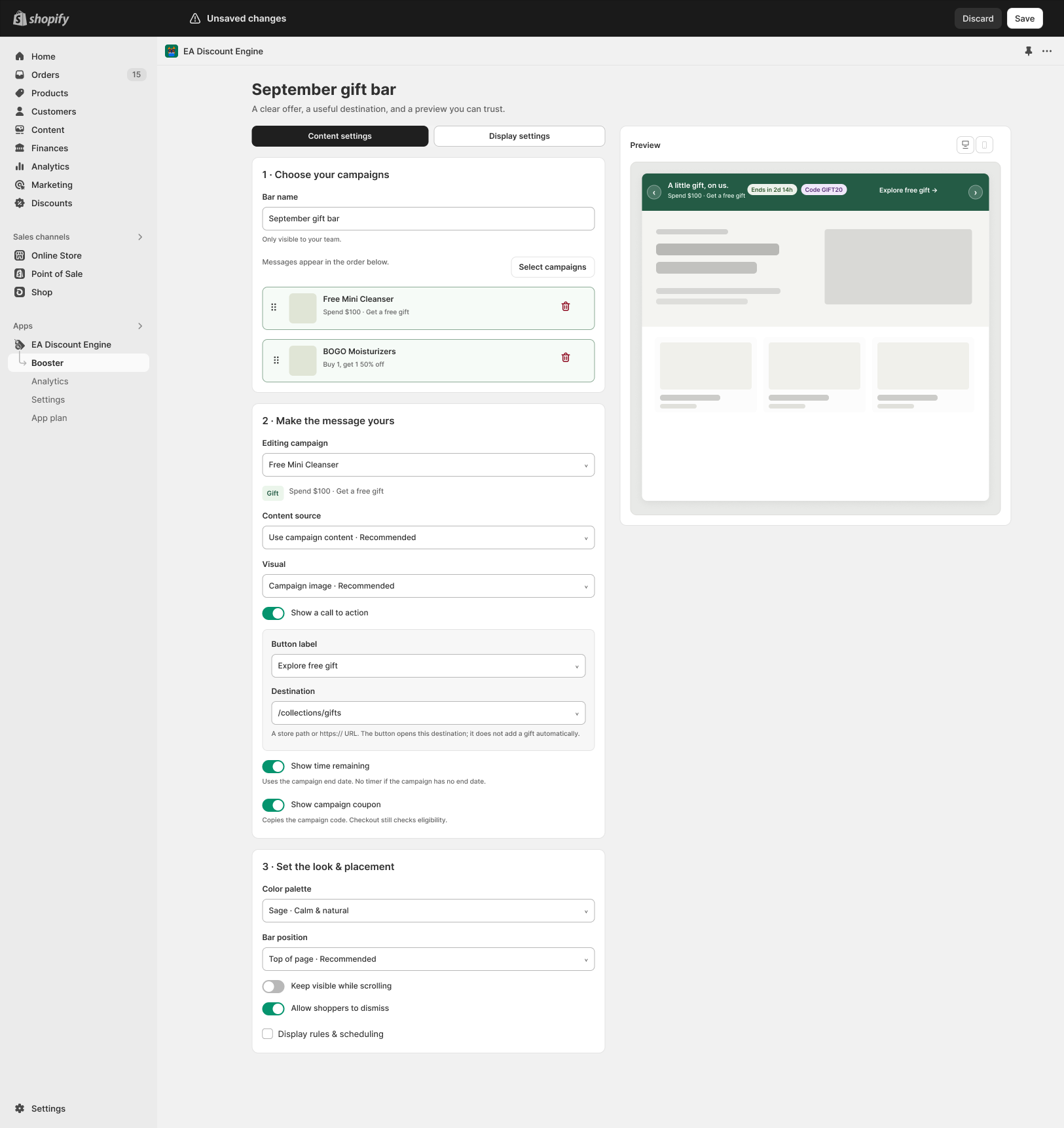
- Open Booster, find Announcement Bar and choose Manage bars. Open or create the bar you want to configure.
- Enter a Bar name for your team.
- Choose Select campaigns and add the campaigns to promote. Check that their status and schedules support the intended offer.
- Reorder the campaign messages using the drag handles. The design states that messages appear in that order.
2. Customize each message
- Under Make the message yours, choose the Editing campaign.
- Select Content source. Use campaign content when you want the bar to reflect the configured offer; review any custom text for accuracy.
- Choose the Visual, such as Campaign image.
- Enable Show a call to action if required. Set Button label and Destination to a valid store path or HTTPS URL. The button opens that destination; it does not automatically add a gift.
- Enable Show time remaining only for a campaign with an end date.
- Enable Show campaign coupon where appropriate. Copying a code does not bypass checkout eligibility.
3. Choose appearance and placement
- Set the Color palette and Bar position.
- Review Keep visible while scrolling and Allow shoppers to dismiss.
- Open Display rules & scheduling when you need to restrict where or when the bar is shown. Review any targeting rules exposed in your version.
- Switch the preview between desktop and mobile. Check contrast, message length and button destination.
- Save the bar and use the available publishing or activation control when ready. Check its status in Booster.
4. Verify the theme and customer flow
- Top/bottom bars use the app embed shown in the design. Below-header placement also needs the appropriate announcement app block. Save the real Shopify theme connection.
- Check that an existing theme announcement bar does not overlap this one.
- Open the storefront, test message order, dismissal and sticky behavior, and follow the call-to-action link.
- Complete a qualifying cart and verify the real discount at checkout. Test an ineligible cart and an expired campaign too.
If the bar is missing
Review the connection for its placement, campaign schedule, display rules and dismissal behavior. In Booster, compare Storefront health with promotion coverage: a connected bar may still have no eligible campaign to display.
Illustrations are taken from the app design. Some screens use the legacy label “EA Discount Engine”; the app name is ED: Buy X Get Y & Free Gifts. Available controls can vary with the released version.
Related resources
Related guides: Connect the booster using Theme App Embeds and discover Shipping & Order Goals.