Use ED: Buy X Get Y & Free Gifts to reward a spending goal or reduce eligible shipping costs. A shipping threshold campaign and an order-goal campaign have separate reward and display settings.
1. Create a shipping threshold campaign
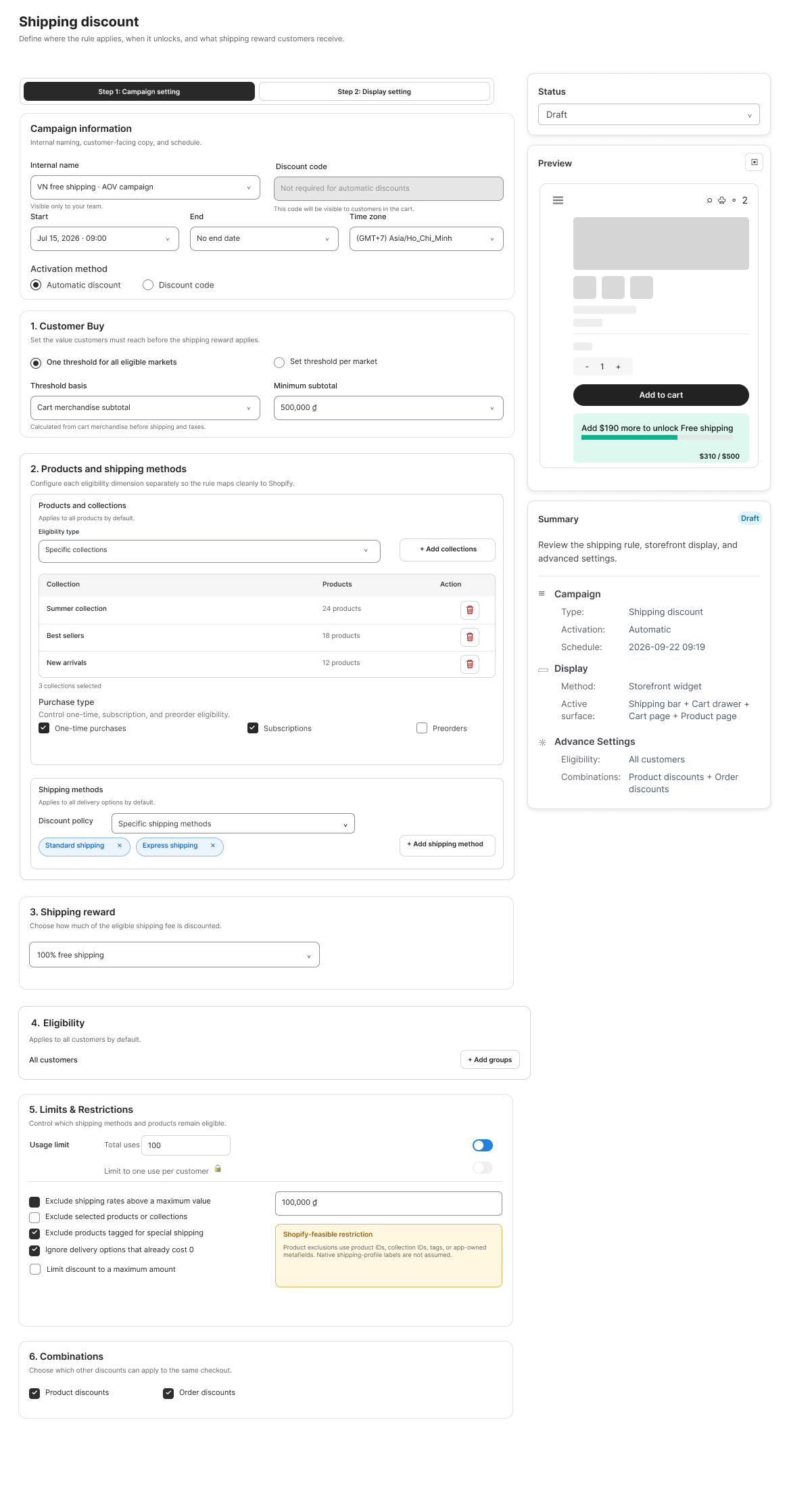
- Open the Shipping Discount flow. Enter the Campaign information and choose Activation method: Automatic discount or Discount code. Enter a code only for the code-based method.
- Set Start/End times and review the Time zone.
- Under Customer Buy, choose One threshold for all eligible markets or Set threshold per market. Enter the minimum subtotal for each applicable market.
- Review Threshold basis. In the illustrated design it is Cart merchandise subtotal before shipping and taxes; do not count shipping toward that threshold.
- Under Products and shipping methods, select eligible products/collections, purchase types and the shipping methods that may receive the discount.
- Choose the Shipping reward. The example uses 100% free shipping; other reward designs include percentage or fixed reductions.
2. Review restrictions and activation
- Add customer or market eligibility groups if needed.
- Review usage limits, maximum eligible shipping rates, excluded products/collections or tags, zero-cost delivery options and maximum discount amount where available.
- Select Product and Order combinations to match your intended offer.
- Review the progress preview and Summary. Save as draft, then activate after testing the eligible destination and shipping method.
3. Configure an order goal instead
- Open Order Goal when the offer should use a cart-spend milestone with a Discount or Free gifts reward.
- Choose One goal or Multiple goals. Define the minimum spend and reward for each goal. Add additional milestones with Add goal when available.
- Select eligible or excluded products. Use Override threshold by market only when the campaign needs distinct market thresholds, and review each currency.
- In Display setting, choose automatic or customer-choice gift handling. Choose the available product-page, cart-drawer or cart-page milestone placement.
- Open Edit widget to customize progress and completion messages and goal labels. Preview desktop/mobile and save.
Boundary test
For a $100 goal, test eligible merchandise at $99, $100 and above $100. For shipping, also test an excluded method, another destination, a disallowed purchase type and the same cart with a code where required. For multiple order goals, cross each milestone and remove items again. Confirm the checkout result and the displayed progress use the intended basis and currency.
Illustrations are taken from the app design. Some screens use the legacy label “EA Discount Engine”; the app name is ED: Buy X Get Y & Free Gifts. Available controls can vary with the released version.
Related resources
Related guides: Announce your shipping goals using the Cart Announcement Booster and configure the Cart Drawer Widget.