Use increasing purchase thresholds to offer larger rewards in ED: Buy X Get Y & Free Gifts. The BOGO design includes an explicit multi-tier option. This guide follows that option; configure percentage volume pricing only if those controls exist in your released campaign type.
1. Prepare the tiers
Write down the qualifying items, threshold and reward at each level. A BOGO example from the design is buy 2 → get 1, buy 4 → get 2, buy 6 → get 3. Decide the intended maximum reward per order before configuring it.
2. Enable multi-tier BOGO
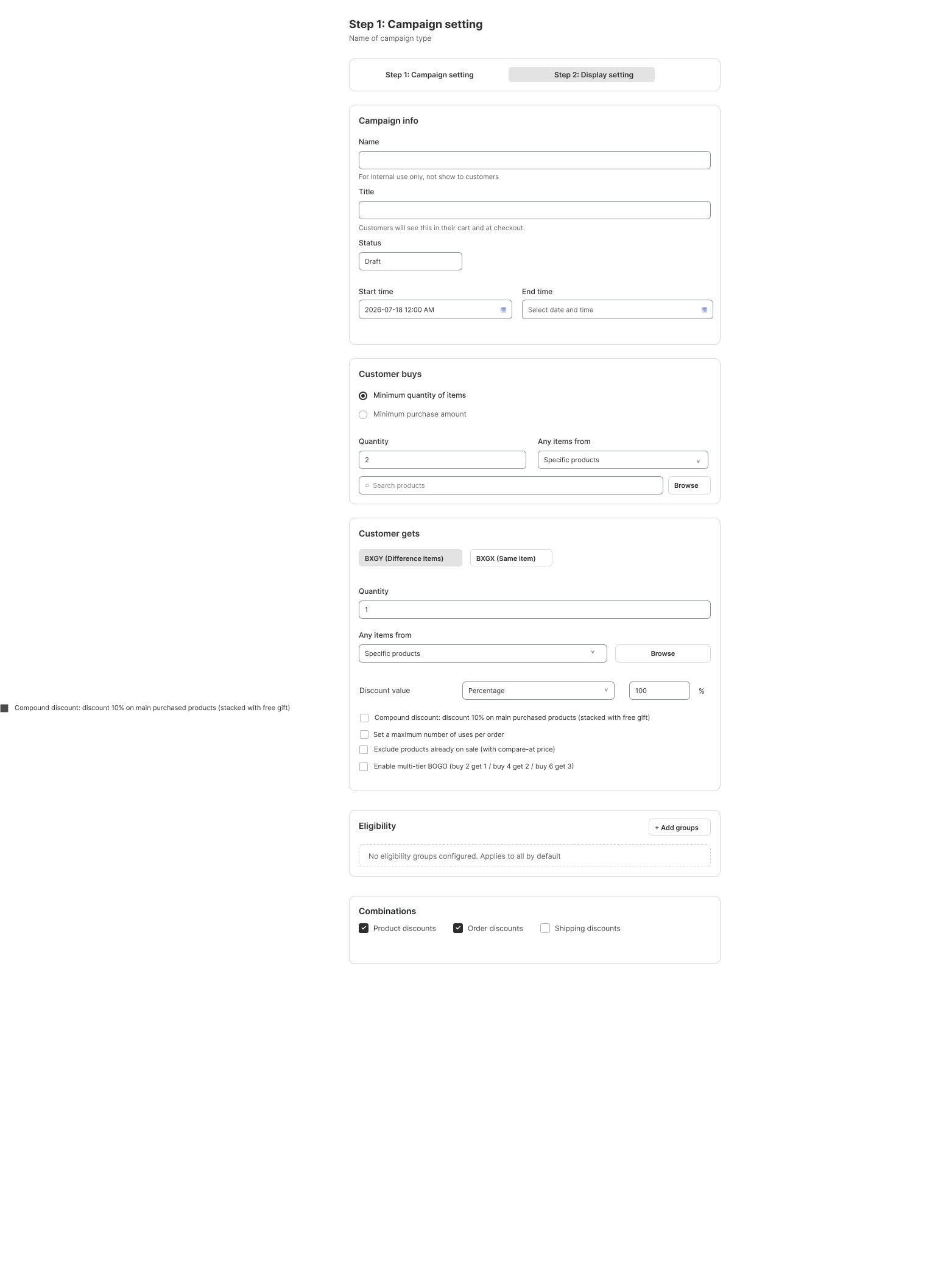
- Open a BOGO campaign and enter the internal Name, customer Title and schedule. Keep it Draft.
- Under Customer buys, choose the quantity requirement and select the eligible products or variants.
- Under Customer gets, select BXGY for separate gift items or BXGX for the same items. Choose the reward products and discount value.
- Enable Enable multi-tier BOGO in Options. The design identifies the 2/1, 4/2 and 6/3 progression. Review any tier controls exposed by your version.
- Check Set max number uses per order and sale-product exclusions. Do not assume multiple tiers or repeated qualifying sets bypass these limits.
- Configure eligibility and Combinations, then select gift delivery in Display setting. Save and review the summary before activating.
3. Explain the reward clearly
- State the qualifying products and each quantity threshold in the campaign message.
- For customer-choice gifts, make the permitted gift quantity clear in the modal or cart widget.
- Preview on mobile so the threshold and reward can be understood without clipped text.
- Do not advertise percentage savings unless the configured reward actually uses that percentage.
4. Test every boundary
| Eligible quantity | Example reward to verify |
|---|---|
| 1 | No tier reached |
| 2 and 3 | First tier: 1 gift |
| 4 and 5 | Second tier: 2 gifts |
| 6 | Third tier: 3 gifts |
This table states the intended example, not a guarantee of every version’s tier calculation. Compare it with the campaign summary and actual checkout. Test mixed eligible/ineligible products, quantities above the highest tier, per-order caps and removal of items. Confirm tiers replace or accumulate exactly as your configured campaign specifies before launch.
Illustrations are taken from the app design. Some screens use the legacy label “EA Discount Engine”; the app name is ED: Buy X Get Y & Free Gifts. Available controls can vary with the released version.
Related resources
Related guides: See standard Buy X Get Y (BOGO) and learn how to manage Discount Combination Rules.