Build collection-based offers in ED: Buy X Get Y & Free Gifts. Collection requirements determine when a cart qualifies; reward modes determine which items receive the benefit.
1. Configure campaign information
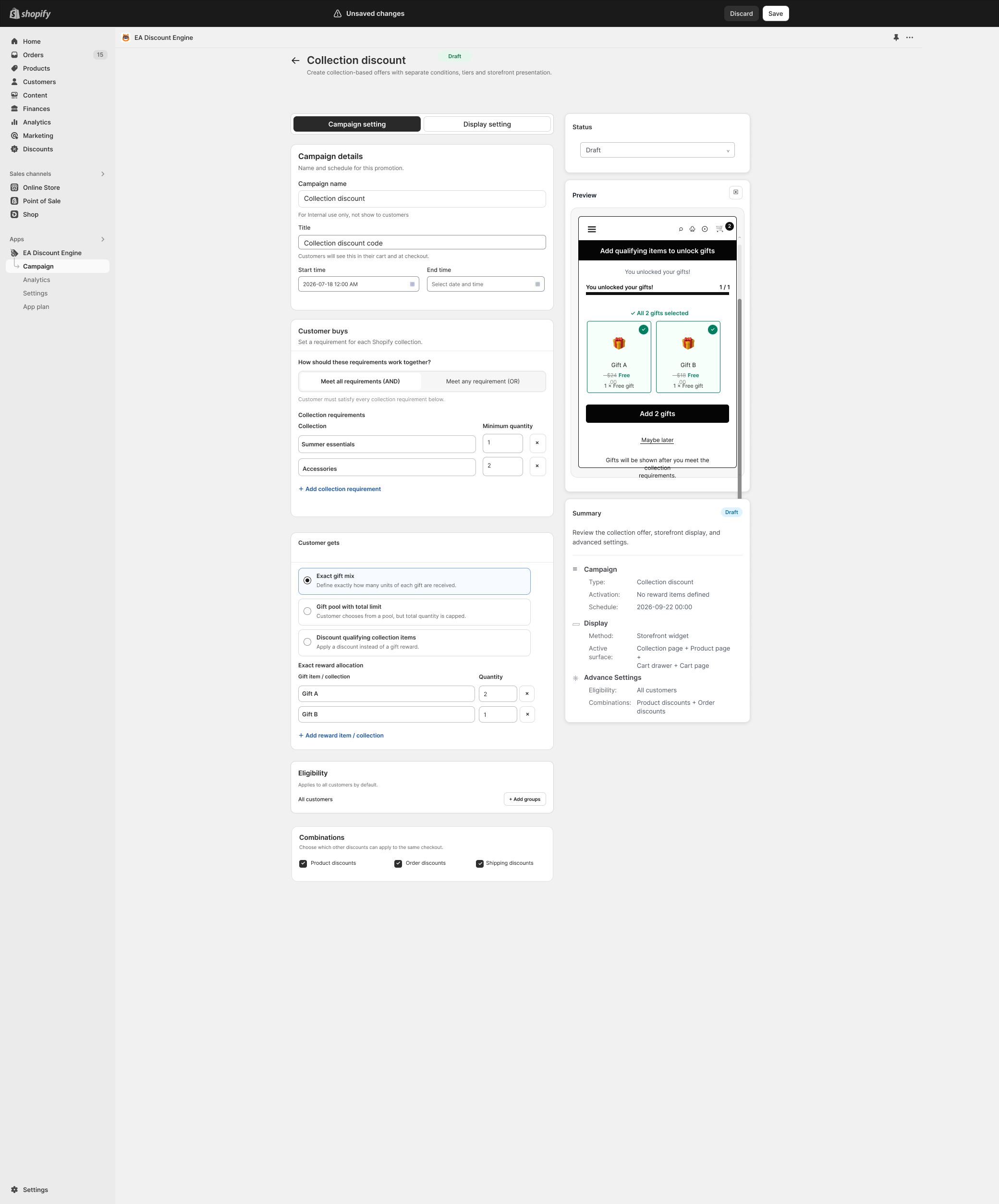
- Open Collection Discount and start with Campaign setting.
- Enter the internal Campaign name, customer-facing Title, and Start/End times. Keep the campaign Draft while setting it up.
2. Add collection requirements
- Under Customer buys, choose how requirements work together: Meet all requirements (AND) or Meet any requirement (OR).
- Use Add collection requirement to add each collection and its Minimum quantity.
- For example, require one item from Summer essentials and two from Accessories. With AND, both requirements must be met; with OR, either is sufficient.
- Review products that appear in more than one selected collection and test them explicitly. Do not assume how overlapping quantities will be allocated.
3. Choose the reward mode
- Choose Exact gift mix to define a specific reward allocation. Add the gift item or collection and its Quantity with Add reward item/collection.
- Choose Gift pool with total limit when shoppers can receive rewards from a pool within a total cap. Check the pool selection and cap shown in your version.
- Choose Discount qualifying collection items when the benefit should apply to the qualifying collection items instead of separate gifts. Configure its displayed discount fields.
- Use one clear reward mode for the offer and review the Summary so it matches your advertised message.
4. Set eligibility, combinations and display
- Use Add groups to restrict eligibility where needed. Review Product, Order and Shipping combinations.
- Continue to Display setting and configure the available storefront surfaces. The design’s summary includes collection page, product page, cart drawer and cart page.
- Preview messaging and gift selection on desktop and mobile. Check the theme connection for the chosen surfaces.
- Save, review the final summary and activate when ready.
Test the complete offer
- For AND, test each requirement alone, then both together. For OR, test each qualifying path.
- Test quantities just below and exactly at each collection minimum.
- Try a product that belongs to multiple collections and one outside all selected collections.
- Check reward allocation, total gift limits and variant availability.
- Verify checkout discounts and remove a qualifying item to test recalculation.
Illustrations are taken from the app design. Some screens use the legacy label “EA Discount Engine”; the app name is ED: Buy X Get Y & Free Gifts. Available controls can vary with the released version.
Related resources
Related guides: Explore single-product Buy X Get Y (BOGO) and review Discount Combination Rules.