Control how discounts work together in ED: Buy X Get Y & Free Gifts. The design distinguishes multiple benefits inside one Stacking discount campaign from discounts outside that campaign.
1. Build the internal stack
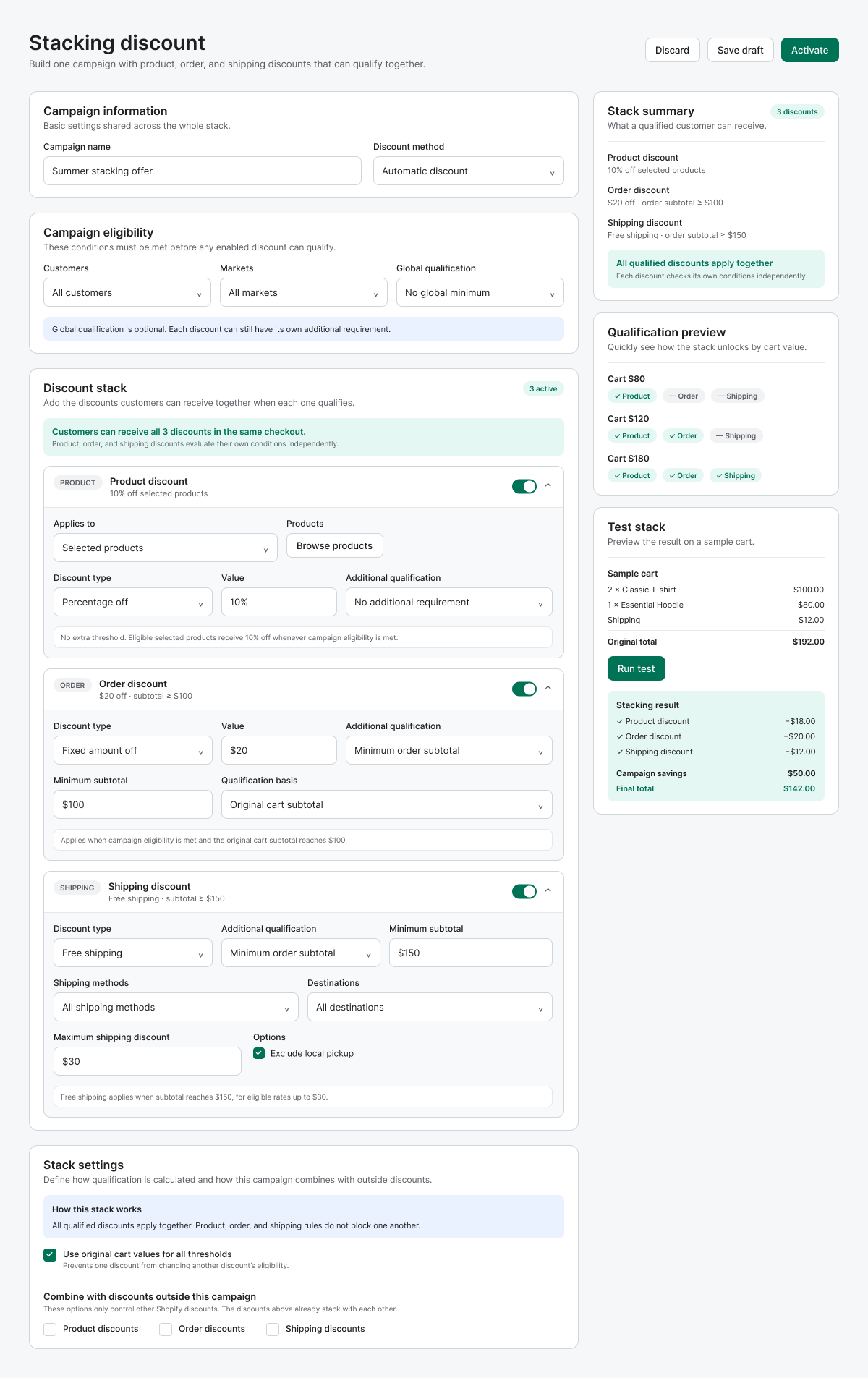
- Open Stacking discount and enter Campaign information. The illustrated method is Automatic.
- Review Campaign eligibility: Customers, Markets and any Global qualification. Global qualification is separate from conditions on individual discount cards.
- Enable the Product discount card, choose its products, Discount type, Value and any Additional qualification.
- Enable Order discount and set its type/value and minimum subtotal if needed. Review Qualification basis.
- Enable Shipping discount and configure its reward, minimum subtotal, shipping methods, destinations, maximum discount and local-pickup exclusion where available.
2. Choose threshold and combination behavior
- Under Stack settings, review Use original cart values for all thresholds. With this model, compare qualifications using the original cart rather than assuming earlier discounts reduce the next threshold.
- Review Combine with discounts outside this campaign. Select Product, Order and Shipping only when external discounts should be allowed.
- For a standard BOGO or collection campaign, review its Combinations section instead. These settings express your intended permission; verify the resulting combination at checkout.
- Read the Stack summary and Qualification preview. Use Run test in the design’s Test stack panel where the released version exposes it.
- Save draft, test the combinations you intend to advertise, then activate.
Worked example from the design
The sample stack uses 10% off selected products, $20 off orders at $100, and free shipping at $150, with original cart values for thresholds. Two $50 T-shirts plus an $80 hoodie give $180 merchandise, with $12 shipping. If all items and the delivery qualify, product savings are $18, order savings $20 and shipping savings $12: total savings $50, final total $142 from $192 before tax. This is a design example, not a live order.
Test a combination matrix
- Below each card’s minimum: verify only eligible benefits apply.
- At $100 and $150: verify the order and shipping boundary independently.
- Try an external product, order and shipping code separately, then together if supported.
- Try an ineligible product, destination or delivery method.
- Confirm discount lines and the final total at checkout; record whether blocked external combinations behave as intended.
If totals differ
Recheck selected items, subtotal basis, global versus card-level qualification, caps and outside-campaign combinations. A correct widget message is not a substitute for checking the checkout result.
Illustrations are taken from the app design. Some screens use the legacy label “EA Discount Engine”; the app name is ED: Buy X Get Y & Free Gifts. Available controls can vary with the released version.
Related resources
Related guides: If a stacked discount fails to trigger, review Discounts not applying and our BOGO Campaign guide.